

The essential website security practices are: enforce strong authentication, keep all software patched, use TLS everywhere, lock DNS and registrar settings, deploy a WAF at the edge, harden your hosting environment, and monitor continuously. Here is the priority checklist with a one-line next step for each.
- Strong authentication and 2FA — enable two-factor authentication on every admin account today, using an authenticator app rather than SMS.
- Patch CMS, plugins, themes and server software — run a full update audit this week; apply all critical patches before the weekend.
- HTTPS and TLS everywhere — force HTTPS site-wide, enable HSTS, and automate certificate renewals so expiry never catches you out.
- DNS and registrar security — enable registrar lock, activate DNSSEC where your registrar supports it, and publish SPF, DKIM and DMARC records.
- WAF and edge protection — put a web application firewall in front of every client site; configure rate limiting and bot mitigation rules.
- Secure hosting and server hardening — set correct file permissions, disable directory indexing, restrict SSH access, and limit database user privileges.
- Monitoring, logging and backups — set up centralised log alerting, schedule daily off-site backups, and test a restore at least once a quarter.
- Third-party and supply-chain control — audit every plugin, theme and external script; remove anything unmaintained or unvetted.
Urgency check: 1 in 2 small businesses in the UK suffer a cyber incident every year. If your agency manages WordPress sites for clients, the risk is not theoretical.
Table of Contents
- Why website security matters: threats, costs and the UK context
- How do you secure admin accounts and control access?
- Keeping platform and server software up to date
- Does your site use HTTPS and a properly configured TLS certificate?
- How do you protect your domain and DNS from hijacking?
- Managing third-party scripts, plugins and supply-chain risks
- WAF, DDoS protection and bot management at the edge
- Secure hosting and server hardening for WordPress sites
- Logging, monitoring and what to do when something goes wrong
- Vulnerability testing, OWASP Top 10 and when to bring in a specialist
- UK-specific guidance: NCSC, Cyber Essentials and compliance checkpoints
- A practical 30–60–90 day plan with ballpark costs
- Key takeaways
- Security is continuous, not a one-off project
- Wpcto takes the security burden off your agency
- Useful sources and further reading
Why website security matters: threats, costs and the UK context
Good security prevents the incidents that cost agencies and their clients the most: emergency recovery hours, reputational damage, regulatory exposure, and lost client trust. That is the practical case, before you even consider compliance.
The threat landscape for UK websites in 2026 centres on a handful of repeating attack types:
- Malware and ransomware injected through outdated plugins or compromised themes.
- Credential stuffing using leaked username and password combinations against admin login pages.
- Cross-site scripting (XSS) and SQL injection (SQLi) exploiting unvalidated input fields.
- Supply-chain attacks via compromised website builders, templates or third-party scripts.
- DDoS and bot traffic overwhelming origin servers and degrading availability.
“Cyber security is everyone’s business. Don’t leave the responsibility with a single person — every member of the team should realise that.”
— NCSC, Small Organisations Guide to Cyber Security
The GDPR dimension is worth a single clear sentence: if a breach exposes personal data belonging to UK residents, you have a 72-hour window to notify the ICO, and failure to demonstrate adequate technical measures can result in enforcement action. Cyber Essentials alignment is the practical baseline the NCSC recommends for demonstrating those measures. Success looks like fewer incidents, faster recovery when something does go wrong, and a documented security posture you can show clients.
How do you secure admin accounts and control access?
Enforce unique credentials, 2FA on every privileged account, and least-privilege access for all users. Those three rules prevent the majority of account-based compromises.
Step-by-step account security checklist
- Use a password manager (Bitwarden, 1Password, or similar) for every account. No shared spreadsheets, no reused passwords.
- Set a minimum password length of 16 characters or require three-random-word passphrases, as the NCSC recommends.
- Rename or disable the generic ‘admin’ username in WordPress. Attackers target it by default.
- Enable 2FA on all admin accounts using an authenticator app (Google Authenticator, Authy, or a hardware key). SMS-based 2FA is better than nothing but is vulnerable to SIM-swap attacks.
- Evaluate passkeys for business-critical accounts where the platform supports them. Passkeys resist phishing because there is nothing to hand over.
- Apply role-based access control (RBAC): audit every user account, remove anyone who no longer needs access, and reduce the number of full administrators to the minimum required.
- Use temporary elevation for contractors. Grant elevated access for the duration of a project, then revoke it immediately on completion.
- Review access quarterly. Staff leave, roles change, and dormant accounts with outdated passwords are a persistent risk.
Pro Tip: For agencies managing multiple client sites, consider a centralised identity and access management (IAM) or single sign-on (SSO) provider. It gives you one place to audit, revoke, and rotate credentials across your entire client portfolio, which is far more reliable than per-site password lists.

Keeping platform and server software up to date
Regular, tested updates are the single highest-return security activity available to most agencies. The majority of successful WordPress compromises exploit known vulnerabilities in outdated plugins or themes, not zero-day attacks.
A practical update workflow looks like this:
- Check for updates weekly. Use WP-CLI (
wp plugin update --all --dry-run) to audit what is pending without applying changes immediately. - Test in staging first. Never push major plugin or core updates directly to production. A staging environment catches compatibility breaks before clients notice them.
- Back up before every update. A full-site backup (files and database) takes minutes and gives you a clean rollback point.
- Deploy during a low-traffic window. Schedule maintenance windows for evenings or weekends and communicate them to clients in advance.
- Verify after deployment. Run a quick smoke test: check the homepage, key forms, checkout (if applicable), and the admin dashboard.
- Keep a changelog. Log every update with a timestamp, the version numbers before and after, and who applied it. This is invaluable during incident investigations.
- Enable automatic minor updates for WordPress core. Minor releases are security patches; the risk of not applying them outweighs the risk of breakage.
- Remove unused plugins and themes entirely. Deactivated plugins still present an attack surface if their files remain on the server.
For agencies handling multiple client sites, a managed WordPress security update service removes the manual overhead and keeps every site in the portfolio current without pulling your team away from billable work.
Does your site use HTTPS and a properly configured TLS certificate?
Use TLS for all traffic, automate certificate renewals, and configure your server to reject legacy protocols. A lapsed certificate or a misconfigured cipher suite can expose your clients’ data and trigger browser warnings that destroy visitor trust overnight.
Practical TLS checklist:
- Force HTTPS site-wide via server configuration or
.htaccess. Redirect all HTTP requests to HTTPS with a 301. - Enable HTTP Strict Transport Security (HSTS) with a
max-ageof at least 31,536,000 seconds (one year). This tells browsers to refuse non-HTTPS connections entirely. - Use TLS 1.2 or TLS 1.3 only. Disable SSLv3, TLS 1.0, and TLS 1.1, which are deprecated and exploitable.
- Disable weak cipher suites (RC4, DES, 3DES). Prefer ECDHE key exchange and AES-GCM ciphers.
- Automate certificate renewals. Let’s Encrypt issues free 90-day certificates and supports automated renewal via Certbot or ACME clients built into most control panels. Set expiry alerts at 30 days and 7 days as a safety net.
- Check your TLS configuration periodically using a tool such as SSL Labs’ server test to catch configuration drift.
Pro Tip: Cloudflare’s edge proxy terminates TLS at the CDN layer and handles certificate issuance automatically, which means even origin servers with manual certificate management get a reliable HTTPS layer in front of them. It is not a substitute for securing the origin, but it removes one common failure point.

How do you protect your domain and DNS from hijacking?
Secure your registrar account and DNS settings to prevent domain theft and DNS manipulation. A hijacked domain can redirect all your client’s traffic to a malicious site within minutes, and recovery can take days.
DNS and registrar security checklist:
- Enable registrar lock (also called domain lock or transfer lock) on every domain. This prevents unauthorised transfers without an explicit unlock step.
- Secure your registrar account with a strong password and 2FA. The registrar account is the master key; treat it accordingly.
- Enable DNSSEC where your registrar and DNS provider support it. DNSSEC cryptographically signs DNS records, making it far harder to poison DNS responses.
- Publish SPF, DKIM and DMARC records for every domain that sends email. These records prevent spoofing and phishing using your client’s domain name.
- Enable encrypted DNS (DNS over TLS or DNS over HTTPS) for administrative connections. This prevents DNS queries from being intercepted on untrusted networks.
- Audit DNS records quarterly for unexpected changes, particularly A records, MX records, and CNAME entries that could indicate a compromise.
Pro Tip: Hide your origin server’s IP address behind a CDN or reverse proxy such as Cloudflare. If attackers cannot resolve your origin IP, they cannot target it directly with DDoS or brute-force attacks, even if your domain is temporarily manipulated.
Managing third-party scripts, plugins and supply-chain risks
Treat all third-party code as an attack surface. Every plugin, theme, and external script you install is a potential entry point, and the risk compounds across a portfolio of client sites.
The NCSC has documented supply-chain attacks via website builders and templates, where a single compromised component can affect many legitimate sites simultaneously. Agencies are particularly exposed because they often replicate starter templates across multiple client builds.
Plugin and theme vetting checklist:
- Check the plugin’s active installation count, last update date, and support response rate in the WordPress repository before installing.
- Prefer plugins with a track record of prompt security patch releases.
- Keep the total plugin count as low as possible. Every additional plugin is an additional attack surface.
- Review the permissions and external connections a plugin requests. A contact form plugin that calls external APIs it has no reason to contact is a warning sign.
- Use Content Security Policy (CSP) headers to restrict which external domains can load scripts on your pages. A basic CSP header looks like this:
Content-Security-Policy: default-src 'self'; script-src 'self' https://trusted-cdn.example.com;
- Apply Subresource Integrity (SRI) attributes to externally loaded scripts and stylesheets. SRI ensures the browser rejects a file if its hash does not match what you specified:
<script src="https://cdn.example.com/library.js"
        integrity="sha384-[hash]"
        crossorigin="anonymous"></script>
- Scan your codebase and repositories for exposed secrets (API keys, database credentials, private keys). Tools such as git-secrets or truffleHog can automate this. Revoke and rotate any exposed credentials immediately.
- Schedule a quarterly plugin audit: remove anything unused, replace anything unmaintained, and document the rationale for every plugin that remains.
For WooCommerce sites specifically, vetting security-focused plugins carefully is worth the extra time. A useful reference for WooCommerce security plugins covers the options worth considering in 2026.
WAF, DDoS protection and bot management at the edge
Edge defences — a web application firewall combined with rate limiting and bot mitigation — stop the majority of automated attacks before they reach your origin server. This matters especially during incidents, when a WAF can absorb attack traffic while you investigate and respond.
What to put at the edge:
- WAF rules that block common attack patterns: SQLi, XSS, remote file inclusion, and known exploit signatures.
- Managed bot mitigation to distinguish legitimate crawlers from credential-stuffing bots and scrapers.
- IP reputation filtering that blocks traffic from known malicious IP ranges automatically.
- Rate limiting on login pages, API endpoints, and form submissions to prevent brute-force and enumeration attacks.
- Geo-blocking as a last resort for origins generating sustained malicious traffic, applied carefully to avoid blocking legitimate users.
Cloudflare is a practical example of an edge platform that combines all of these features. Its free tier covers basic WAF rules and DDoS mitigation; paid tiers add managed rulesets, bot scores, and advanced rate limiting. The key point is not which provider you use, but that you have something at the edge rather than relying solely on server-level defences.
Pro Tip: Always stage WAF rule changes before pushing them to production. Enable a new rule in “log only” mode first, review the traffic it would have blocked, confirm there are no false positives affecting legitimate users, then switch to blocking mode. Skipping this step is how agencies accidentally lock their clients out of their own sites.
Secure hosting and server hardening for WordPress sites
Harden the host and platform, set correct file permissions, restrict database access, and require tested backups. These are the controls that determine how much damage an attacker can do if they get past the edge.
Server hardening checklist
- Set WordPress file permissions: directories at
755, files at644, andwp-config.phpat440or400. - Disable directory indexing in your web server configuration to prevent attackers from browsing your file structure.
- Restrict SSH access to specific IP addresses and disable password-based SSH login in favour of key-based authentication.
- Use least-privilege database accounts: the WordPress database user should have only the permissions it needs (SELECT, INSERT, UPDATE, DELETE) and nothing more.
- Disable unnecessary services and close unused ports. A web server has no reason to expose FTP or Telnet to the public internet.
- Keep PHP updated and disable dangerous functions (
exec,shell_exec,system) inphp.iniunless explicitly required. - Disable XML-RPC in WordPress if you are not using it. It is a common brute-force target.
For a deeper technical walkthrough, Wpcto’s guide on server hardening for WordPress covers configuration specifics in detail.
Backup policy template
| Dimension | Recommended standard |
|---|---|
| Frequency | Daily automated backups (database + files) |
| Retention | 30 days minimum; 90 days for higher-risk or e-commerce sites |
| Off-site storage | Separate cloud storage account (not the same server) |
| Restore testing | Full restore test at least once per quarter |
| Backup verification | Automated integrity check after each backup run |
The NCSC small business guide is clear that tested restores matter as much as the backups themselves. A backup you have never restored is a backup you cannot rely on.
Hosting checklist for agencies evaluating providers
- Does the host offer a managed staging environment?
- Are automated daily backups included, with off-site storage?
- Does the host apply server-level security patches automatically?
- What is the incident response SLA and out-of-hours contact process?
- Is server-level malware scanning included?
Logging, monitoring and what to do when something goes wrong
Continuous monitoring and a tested incident runbook minimise the impact of a breach and reduce recovery time. Without logs, you cannot tell when an attack happened, what was accessed, or how the attacker got in.
Logging checklist
- Enable and retain server access logs (Apache/Nginx) for at least 90 days.
- Capture WordPress application logs including failed logins, user role changes, and plugin activations.
- Retain WAF logs and set up alerts for spikes in blocked requests.
- Use centralised log storage separate from the web server. If an attacker compromises the server, you want logs they cannot tamper with.
- Set up automated alerts for: repeated failed logins, unexpected admin account creation, file changes in core WordPress directories, and certificate expiry.
Incident response runbook
- Detect: alert fires or client reports an issue. Confirm the scope — is it one site or multiple?
- Isolate: take the affected site offline or into maintenance mode. Prevent further damage and data exfiltration.
- Preserve evidence: capture logs, database snapshots, and file system state before cleaning anything. This is critical for post-incident analysis and any ICO notification.
- Recover: restore from the last known-clean backup. Verify integrity before bringing the site back online.
- Communicate: notify the client immediately. If personal data was exposed, the client has 72 hours to notify the ICO under UK GDPR. Document the timeline.
- Review: conduct a post-incident review within 48 hours. Identify the entry point, close it, and update your checklist.
For agencies managing WordPress monitoring at scale, Wpcto’s WordPress security monitoring guide covers tooling and alert configuration in detail.
Vulnerability testing, OWASP Top 10 and when to bring in a specialist
Regular automated scanning combined with periodic human-led audits finds what monitoring alone misses. Automated tools catch known vulnerabilities quickly; a skilled tester finds logic flaws and misconfigurations that scanners overlook.
Recommended testing cadence:
- Weekly: automated scans for open ports, outdated software versions, and certificate expiry.
- Quarterly: full vulnerability scan covering OWASP Top 10 categories, security headers, DNS record drift, and exposed admin interfaces.
- Annually (or after major changes): penetration test for higher-risk sites — e-commerce, healthcare, legal, or any site handling sensitive personal data.
OWASP Top 10 quick-reference mapping
| OWASP category | Checklist mitigations |
|---|---|
| Broken access control | RBAC, least privilege, remove unused accounts |
| Cryptographic failures | TLS everywhere, HSTS, encrypt sensitive data at rest |
| Injection (SQLi, XSS) | Parameterised queries, input validation, CSP headers |
| Insecure design | Threat modelling, code review, secure development practices |
| Security misconfiguration | Server hardening checklist, disable defaults, WAF rules |
| Vulnerable components | Patching workflow, plugin audit, dependency scanning |
| Authentication failures | 2FA, passkeys, account lockout, password manager |
| Software integrity failures | SRI for external scripts, signed deployments, supply-chain audit |
| Logging failures | Centralised logging, alerting, log retention policy |
| SSRF | Restrict outbound server requests, validate URLs in user input |
For SAST (static analysis) tooling, WPScan covers WordPress-specific vulnerabilities. For DAST (dynamic analysis), tools such as OWASP ZAP can scan a staging environment for runtime issues. When a site handles payment data or sensitive personal information, outsourcing the annual pentest to a CREST-accredited specialist is worth the investment. Wpcto’s guide on why you should audit website security explains what a proper audit covers and how to brief a tester.
UK-specific guidance: NCSC, Cyber Essentials and compliance checkpoints
Follow NCSC principles and aim for Cyber Essentials alignment as your practical baseline. For UK agencies, this is not just a compliance exercise — it is a client-facing trust signal and a prerequisite for some government contracts.
Key NCSC resources for agencies and small businesses:
- The NCSC Small Organisations Guide covers backups, account security, device protection, and spotting scams. Many of its recommendations take under five minutes to implement.
- The GOV.UK cyber security guidance for business consolidates links to Cyber Essentials, the Cyber Action Toolkit, and the Response and Recovery Guide.
- The NCSC’s small and medium organisations advice hub includes the free Check Your Cyber Security tool and guidance on choosing managed service providers.
Cyber Essentials: what it covers and how it maps to this checklist:
- Firewalls and internet gateways — maps to WAF, edge protection, and server firewall configuration.
- Secure configuration — maps to server hardening, disabling defaults, and removing unused services.
- User access control — maps to RBAC, least privilege, 2FA, and account audit cadence.
- Malware protection — maps to patching, plugin vetting, and server-level scanning.
- Patch management — maps directly to the update workflow in this guide.
“Organisations with a Cyber Essentials certificate are 92% less likely to make a claim on their cyber insurance.”
— GOV.UK, Cyber Security Guidance for Business
Cyber Essentials certification costs vary by organisation size and certifying body, but for most small agencies the investment is modest relative to the insurance and procurement benefits. Cyber Essentials Plus adds an independent technical verification step and carries more weight with enterprise clients.
The NCSC’s shared responsibility guidance makes the point that security cannot sit with one person. For agencies, that is both a challenge and an opportunity: packaging security as a managed service you deliver on behalf of clients is a natural extension of what you already do.
A practical 30–60–90 day plan with ballpark costs
A prioritised plan focused on highest-risk, fastest wins first. The goal in the first 30 days is to close the most exploited gaps; the next 60 days build the monitoring and edge layer; the final 30 days formalise processes and address supply-chain risk.
30-day priorities (close critical gaps)
- Enable 2FA on all admin accounts across every client site.
- Run a full plugin and core update audit; apply all critical patches.
- Verify HTTPS is enforced site-wide and check certificate expiry dates.
- Confirm daily automated backups are running and test one restore.
- Rename or disable generic ‘admin’ usernames; audit and remove unused accounts.
60-day priorities (build the defensive layer)
- Deploy a WAF and configure rate limiting on login pages and API endpoints.
- Enable DNSSEC and registrar lock on all managed domains.
- Publish SPF, DKIM and DMARC records for every domain.
- Set up centralised logging and configure alerts for failed logins and file changes.
- Apply server hardening checklist to all managed hosting environments.
90-day priorities (formalise and audit)
- Conduct a full supply-chain audit: review every plugin, theme, and external script.
- Commission a vulnerability scan or penetration test for higher-risk client sites.
- Document and test the incident response runbook with your team.
- Formally implement RBAC across all client sites with a documented access review cadence.
- Assess Cyber Essentials readiness and begin the certification process if not already started.
Ballpark cost bands:
- DIY (agency technician time): 30-day sprint typically requires 8–16 hours of focused work per site. Multiply by your internal hourly rate.
- Managed security service: monthly retainer for a managed WordPress security and maintenance service typically ranges from £50–£150 per site per month depending on scope, with one-off hardening audits ranging from £300–£800 per site.
- Penetration testing: CREST-accredited pentest for a typical WordPress site starts at around £1,500–£3,000 for a scoped engagement.
If you are not sure how much uncaptured security revenue is sitting in your existing client base, the Wpcto WordPress Profit Calculator shows you in under 90 seconds. It is free, takes no sign-up, and most agencies are surprised by the number.
Key takeaways
Effective website security practices require layered controls: strong authentication, continuous patching, TLS enforcement, edge protection, hardened hosting, and active monitoring, all aligned to NCSC and Cyber Essentials standards.
| Point | Details |
|---|---|
| Authentication is the fastest win | Enable 2FA on all admin accounts immediately; it prevents the majority of credential-based compromises. |
| Patching beats every other control | Most WordPress compromises exploit known, patchable vulnerabilities — a weekly update cadence closes the gap. |
| NCSC and Cyber Essentials alignment | Cyber Essentials maps directly to this checklist and organisations holding the certificate are 92% less likely to claim on cyber insurance. |
| Monitoring and backups are non-negotiable | Daily off-site backups with quarterly restore tests, combined with centralised log alerting, determine how quickly you recover. |
| Wpcto handles this for agencies | Wpcto delivers managed security audits, hardening, monitoring, and incident response so agencies keep the client relationship without absorbing the support overhead. |
Security is continuous, not a one-off project
The conventional wisdom in agency circles is that security is a setup task: install a plugin, tick the box, move on. That framing is wrong, and it is the reason so many client sites get compromised months after a “secure” launch.
The honest picture is that security is a lifecycle. Threats evolve, plugins introduce new vulnerabilities, configurations drift, and staff change. A site that was well-hardened 18 months ago may have three outdated plugins, a lapsed certificate, and a former contractor’s admin account still active. None of that shows up on a dashboard unless you are actively looking.
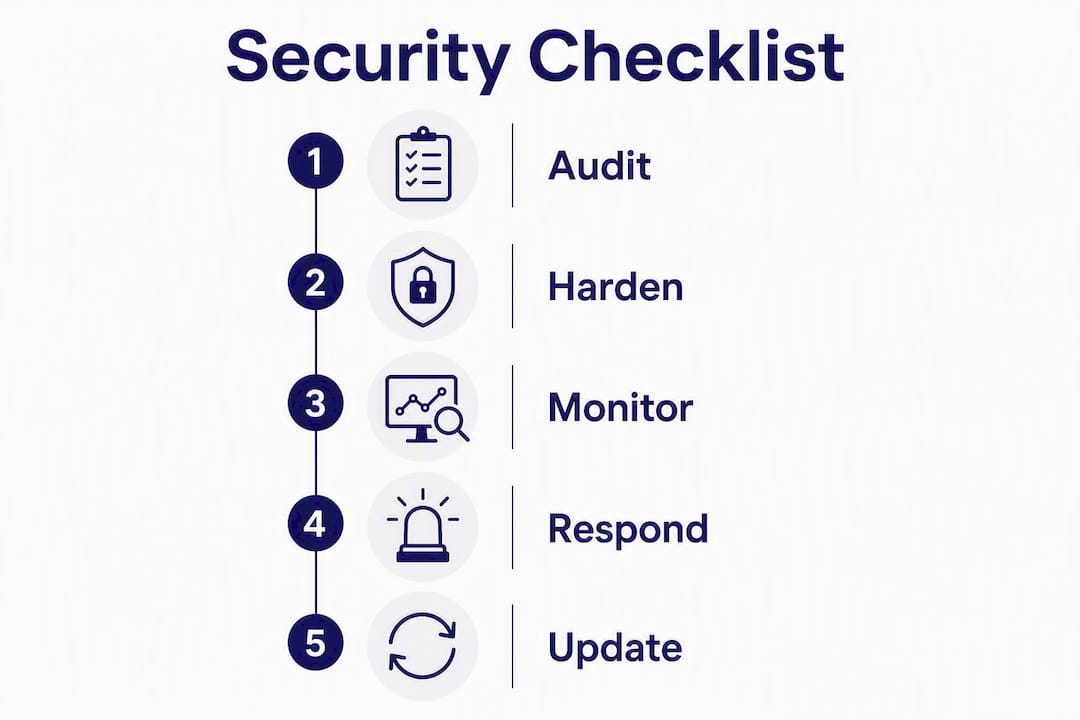
What actually works is the audit → harden → monitor cycle, applied continuously. The audit finds the current state. Hardening closes the gaps. Monitoring catches drift before it becomes a breach. Bolt-on plugins can contribute to that cycle, but they cannot replace it. A plugin that flags vulnerabilities is useful; a plugin that substitutes for a proper access control review or a server hardening checklist is false confidence.
For agencies, the practical challenge is that this cycle takes time your team does not have. Security work is absorbed into project budgets, done reactively after an incident, or quietly dropped when a sprint gets busy. The agencies that handle this well are the ones that have either dedicated the internal resource or found a specialist partner to carry it. There is no third option that works reliably.
The cost argument is straightforward too. Recovery from a compromised site costs far more in emergency hours, client management, and reputational damage than a monthly managed security service. The question is not whether you can afford to do this properly. It is whether you can afford not to.
Wpcto takes the security burden off your agency
Agencies that manage WordPress sites for clients already know the pattern: a client site gets flagged for malware, or a plugin update breaks something at 9pm on a Thursday, and suddenly your team is firefighting instead of doing the work they were hired for. Security incidents are expensive, disruptive, and entirely preventable with the right support in place.
Wpcto is built specifically for UK design, brand and digital agencies that want to deliver reliable, secure WordPress sites without absorbing the maintenance overhead internally. We handle security audits, server hardening, plugin and core updates, continuous monitoring, and incident response, all under your agency’s brand if you prefer a white-label arrangement.

Our agency security and maintenance service gives your clients a documented security posture, regular reporting, and hands-on recovery if something goes wrong. You keep the client relationship and the recurring revenue. We handle everything behind the scenes.
If you want to see exactly how much uncaptured security revenue is sitting in your existing WordPress client base, use the Wpcto WordPress Profit Calculator. It takes under 90 seconds and most agency owners find the result worth acting on. Or if you would prefer to talk through your current setup first, get in touch for a free discovery call.
Useful sources and further reading
- NCSC Small Organisations Guide to Cyber Security — the NCSC’s practical guide covering backups, account security, device protection and scam awareness. Most recommendations take under five minutes to implement and the guide includes a free personalised Cyber Action Plan.
- GOV.UK Cyber Security Guidance for Business — consolidates Cyber Essentials, the Cyber Action Toolkit, Response and Recovery guidance, and links to free training. The starting point for any UK business building a compliance case.
- NCSC Small and Medium Organisations Advice Hub — includes the free Check Your Cyber Security tool, guidance on choosing managed service providers, and the Cyber Essentials overview.
- NCSC Secure Your Important Online Accounts — step-by-step instructions for enabling 2FA and passkeys across common business platforms, with direct links to each service’s settings page.
- Cloudflare — How to Secure a Website — practical operational guidance on WAF configuration, TLS, bot management and layered defence. Useful for technical teams configuring edge protection.
- NCSC Small Business Guide (NBCC PDF) — a concise printable guide covering backups, restore testing, and ransomware response. Good for briefing non-technical clients.
- Olimpio — Website Security Checklist for UK Small Businesses — a 15-point practical checklist covering SSL expiry, DNS records, open ports, security headers, backups and 2FA. Useful as a quick audit reference.
- NCSC Supply Chain Security — Website Builders — NCSC case examples of supply-chain attacks via website builders and templates. Required reading for any agency that uses starter templates across client builds.
- Wpcto — Why Website Security Matters — the business case for agency-led security services, including how security protects client revenue and agency reputation.
- Wpcto — Enhanced Security Case Study — a detailed case study showing Wpcto’s security work on a sensitive data website, covering the audit, hardening, and monitoring phases.