

TL;DR:
- WordPress plugin vulnerabilities account for 91% of security issues, making plugin management critical.
- Layered security, including updates, backups, and monitoring, is essential beyond just WAFs.
- Regular proactive audits improve security, client trust, and generate ongoing revenue for agencies.
WordPress vulnerabilities are rising fast, and if you manage client sites, the risk lands squarely on your agency’s reputation. Vulnerabilities surged 42% year on year, with WordPress powering 43% of all websites globally. That scale makes it a prime target. For UK agencies, the pressure is real: one compromised client site can unravel months of trust-building, trigger GDPR investigations, and cost far more to fix than it would have to prevent. This guide gives you a clear, sequential process to assess risk, harden environments, execute security improvements, and maintain ongoing compliance across your entire client portfolio.
Table of Contents
- Understand the risks: where WordPress is most vulnerable
- Preparation: essential tools and environment hardening for agencies
- Execution: step-by-step WordPress security process
- Verification and maintenance: auditing, reporting, and ongoing compliance
- Why agencies must prioritise proactive over reactive WordPress security
- Enhance your agency’s WordPress security with expert support
- Frequently asked questions
Key Takeaways
| Point | Details |
|---|---|
| Plugins are the biggest risk | Most WordPress attacks target outdated or vulnerable plugins, not the core system. |
| Proactive security saves money | Hardening WordPress sites before attacks is more cost-effective than clean-up. |
| Agency-scale tools are essential | Centralised audits and automation help agencies protect multiple client sites efficiently. |
| Compliance matters for UK agencies | GDPR and data privacy must be part of all agency security processes. |
| Verification is an ongoing process | Regular audits and monitoring ensure your security measures remain effective over time. |
Understand the risks: where WordPress is most vulnerable
Before you can protect client sites effectively, you need to know exactly where attackers focus their efforts. The threat landscape is not evenly spread across WordPress. 91% of vulnerabilities in 2025 were found in plugins, while WordPress core recorded only six low-level issues. That is a striking imbalance, and it tells you where to concentrate your attention.
Plugins are the weak link because the ecosystem is vast, quality varies enormously, and many are maintained by solo developers who may abandon them without notice. These so-called zombie plugins, ones that have not received updates in over a year, remain installed on thousands of sites and represent open doors for attackers. The gap between a vulnerability being discovered and it being actively exploited is shrinking. Many common WordPress security threats are now weaponised within hours of public disclosure.
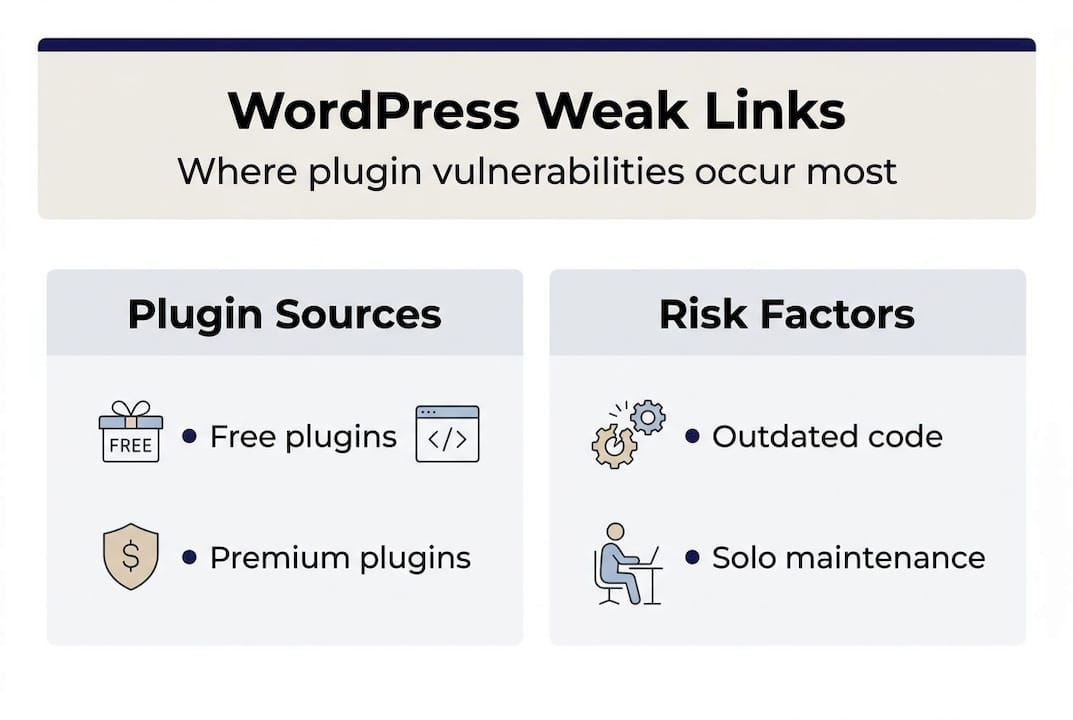
Premium plugins carry their own distinct risk. They are three times as likely to carry zero-day vulnerabilities, partly because they are higher-value targets and partly because their closed-source nature means community scrutiny is limited. Agencies that assume a paid plugin is safer than a free one are operating on a false assumption.
Here is a breakdown of where WordPress vulnerabilities originate:
| Component | Share of vulnerabilities | Risk level |
|---|---|---|
| Plugins | 91% | High |
| Themes | ~3% | Medium |
| WordPress core | ~6% (low-level) | Low |
| Premium plugins | Disproportionate zero-days | Very high |
Key threat vectors your agency should be aware of:
- Unpatched plugins with known CVEs (Common Vulnerabilities and Exposures)
- Abandoned or zombie plugins no longer receiving security patches
- Weak authentication on admin accounts and hosting panels
- Misconfigured file permissions that allow unauthorised writes
- Shared hosting environments where one compromised site affects neighbours
“Hosting-level firewalls alone are not a sufficient defence. Agencies need layered security that goes beyond what any single provider offers.”
Understanding the business impact of attacks is equally important. A breach is not just a technical problem. It is a client relationship problem, a commercial problem, and increasingly a legal one.
Preparation: essential tools and environment hardening for agencies
With risk areas clear, let us focus on the security essentials and tools your agency needs in place before executing any changes. Getting the foundation right means fewer surprises later.
A secure WordPress environment starts at the server level. Managed hosting with WAF and DDoS protection, HTTPS with TLS 1.3, properly configured security headers, and .htaccess controls form the first defensive line. If your clients are on cheap shared hosting without these features, that is your first conversation to have. Refer to server-level security strategies for a fuller picture of what to look for in a hosting environment.

Here is a comparison of agency-grade security requirements:
| Requirement | Basic hosting | Managed hosting | Agency-grade setup |
|---|---|---|---|
| WAF included | Rarely | Often | Always |
| TLS 1.3 support | Sometimes | Yes | Yes |
| Offsite backups | No | Sometimes | Yes, automated |
| Security headers | Manual | Partial | Configured by default |
| PHP version control | Limited | Yes | Yes |
Beyond hosting, your agency needs a consistent toolkit. Essential items include:
- A vulnerability scanner (such as Patchstack or Wordfence) to flag known issues
- An offsite backup solution that runs daily and stores copies independently of the host
- A staging environment for every client site, so updates can be tested safely
- Security header configuration using tools like SecurityHeaders.com to verify implementation
- Two-factor authentication enforced across all admin accounts
GDPR compliance is not optional. Any security process for UK agencies must ensure that personal data stored in WordPress is handled lawfully. Review GDPR-compliant practices and make sure your security foundation aligns with data minimisation and breach notification requirements. This is also something clients increasingly ask about, so having a clear answer builds confidence. See compliance-ready configurations for practical guidance.
Pro Tip: Always test updates in a staging environment before applying them to live sites. It takes minutes to set up and can save hours of emergency recovery work.
Execution: step-by-step WordPress security process
With preparations complete, follow these steps to roll out security enhancements confidently across your client sites. This is where the work becomes systematic.
- Back up everything first. Before touching a single plugin or theme, ensure a verified, offsite backup exists. This is non-negotiable.
- Update WordPress core. Core updates are generally safe and should be applied promptly. Use your staging environment to confirm compatibility.
- Audit and update all plugins. Cross-reference installed plugins against known vulnerability databases. Remove anything unused. For safe theme updates, follow the same staged approach.
- Remove zombie plugins. If a plugin has not been updated in over 12 months, find an alternative or remove it entirely. Inactivity is a liability.
- Run a full security scan. Use your chosen scanner to identify malware, suspicious file changes, and known vulnerabilities. Document findings.
- Enable edge-level WAF and rate limiting. Edge WAF and CDN rate-limiting provides better protection than app-level controls alone. Configure rules to limit login attempts and block known malicious IP ranges.
- Set up file integrity monitoring. Any unexpected change to core files should trigger an alert. This catches compromises early.
- Implement login hardening. Change default admin usernames, enforce strong passwords, and activate two-factor authentication.
- Automate audit reporting. Use a centralised dashboard to audit client sites effectively across your portfolio without logging into each site individually.
Reactive clean-ups cost significantly more than proactive hardening, and half of high-impact vulnerabilities are exploited within the first 24 hours of disclosure. Speed and consistency matter.
“The agencies that handle security best are not the ones with the most complex tools. They are the ones with the most consistent processes.”
Pro Tip: Avoid country-based IP blocking as a security measure. It blocks legitimate users, creates support overhead, and provides minimal actual protection against determined attackers who use proxies.
For a broader view of how security fits into agency project workflows, it helps to treat security hardening as a standard deliverable, not an afterthought. The agencies improving client results through regular audits treat security as a built-in service, not a bolt-on.
Verification and maintenance: auditing, reporting, and ongoing compliance
After execution, it is vital to ensure changes are effective and your security standards remain high. Verification is not a one-off task. It is a continuous process.
Start with scheduled audits. Monthly is the minimum recommended cadence, with weekly monitoring for file changes, failed login attempts, and newly disclosed vulnerabilities. Scalable tools and centralised audits are critical for agencies managing multiple client sites. Manual site-by-site checks do not scale.
Here is a recommended audit checklist structure:
| Audit area | Frequency | Tool/method |
|---|---|---|
| Plugin vulnerability scan | Weekly | Patchstack, Wordfence |
| File integrity check | Weekly | Security plugin alerts |
| Backup verification | Weekly | Manual restore test monthly |
| GDPR compliance review | Monthly | Internal checklist |
| Full security report | Monthly | Centralised dashboard |
For client reporting, keep it simple and visual. A one-page summary showing update status, scan results, and any resolved issues is far more useful to a client than a technical log. It also reinforces the value of your ongoing service.
GDPR must be woven into your audit process, not treated separately. GDPR compliance must be integrated into all WordPress security and data handling practices for UK agencies. Check data retention settings, cookie consent tools, and contact form data handling at every review. For a practical overview, see GDPR for WordPress.
One statistic worth keeping front of mind: hosting WAFs alone block only 12 to 26% of attacks. That means even clients on well-managed hosting are exposed without additional layers. Comprehensive auditing closes that gap.
Automate wherever possible. Workflow automation tools can trigger alerts, schedule reports, and flag anomalies without manual input. The WordPress Profit Calculator is also worth running at this stage. It shows agencies in under 90 seconds how much recurring revenue is sitting uncaptured in their existing client base, including from security and maintenance services.
Why agencies must prioritise proactive over reactive WordPress security
Most agencies we speak to only start thinking seriously about security after something goes wrong. A client site gets defaced, a data breach triggers a complaint, or a plugin vulnerability takes down a key page. By that point, the cost is already high: emergency recovery time, client anxiety, potential GDPR exposure, and the quiet erosion of trust that is hard to rebuild.
The business case for proactive security is straightforward. Proactive hardening is cheaper and far more effective than waiting for a compromise. But beyond cost, there is a real commercial opportunity here. Agencies that build security into their offering as a named, recurring service differentiate themselves clearly. They retain clients longer, generate predictable monthly income, and position themselves as trusted partners rather than project vendors.
Three lessons we have seen from agencies that made the shift:
- Lesson one: Agencies that run regular audits catch vulnerabilities before clients ever notice them. That invisibility is the point. Clients feel safe without knowing the detail.
- Lesson two: Packaging security as a care plan, rather than billing ad hoc for fixes, removes awkward conversations and creates reliable revenue.
- Lesson three: Agencies that document their security processes win more pitches. Clients increasingly ask about site security during procurement, and a clear answer is a genuine differentiator.
The gains from regular audits go well beyond security. They surface performance issues, outdated content, and technical debt that clients are often happy to pay to resolve.
Enhance your agency’s WordPress security with expert support
If the process above feels like a significant undertaking on top of everything else your agency is already managing, that is completely understandable. Security done properly takes time, expertise, and consistent attention.
At WPCTO, we work as a specialist partner behind agencies like yours, handling WordPress security updates, monitoring, and maintenance so your team never has to. Our maintenance and support services are built for agencies that want to offer clients reliable, ongoing WordPress care without absorbing the overhead internally. We operate white-label, so your client relationship stays entirely yours. See how we have delivered real results in our security case study and get in touch to explore how we can support your portfolio.
Frequently asked questions
What is the most common cause of WordPress breaches?
Unpatched or vulnerable plugins are responsible for most serious WordPress breaches. 91% of vulnerabilities in 2025 were plugin-related, making plugin management the single most important security task.
How can agencies scale security across many client sites?
Agencies should use centralised tools and automated audit and reporting systems to manage multiple client sites efficiently. Scalable monitoring frameworks are essential once a portfolio grows beyond a handful of sites.
Does using a firewall or WAF fully protect WordPress sites?
No. WAFs block only 12 to 26% of attacks, which means full security requires regular updates, monitoring, and layered controls beyond the firewall alone.
How often should agencies audit client WordPress sites?
Monthly full audits are recommended as a minimum, supported by weekly monitoring for file changes and newly disclosed vulnerabilities. Scalable audit frameworks make this achievable even across large portfolios.
What is one compliance requirement UK agencies must remember?
GDPR compliance must be integrated into all WordPress security and data handling practices. Prioritising GDPR in hardening procedures protects both your clients and your agency from regulatory risk.
Recommended
- How to Secure WordPress Site: Complete Protection Guide – WPCTO
- Why website security matters: protect clients and grow revenue
- Secure WordPress Site Guide: Expert Strategies for 2025 – WPCTO
- WordPress theme update steps: Safe guide for agencies
- Essential WordPress hosting tips for speed, security, savings
- Protect your website with daily automated backups – inSave Hosting