

An effective posture for preventing WordPress malware infections includes minimizing the attack surface, enforcing two-factor authentication, and maintaining tested backups. Everything else is secondary.
Plugins cause the overwhelming majority of WordPress compromises, and attackers now move from disclosure to exploitation in hours rather than weeks. Weekly update reviews are already too slow for the fastest-moving vulnerabilities. That reality changes what “prevention” should mean for an agency managing dozens of client sites: fewer moving parts, harder logins, and a recovery plan that works under pressure.
Two things to do in the next 30 minutes, before reading further:
- Confirm every site you manage forces HTTPS across all pages, not just the checkout or login screen.
- Turn on two-factor authentication for every account with publish, edit, or administrator access, and retire any shared logins.
Key Takeaways
Preventing WordPress malware infections depends on shrinking the plugin attack surface, enforcing two-factor authentication, and maintaining backups that have been tested through an actual restore.
| Point | Details |
|---|---|
| Plugins drive most breaches | Over 90% of disclosed vulnerabilities sit in plugins, with exploitation often beginning within hours of disclosure. |
| Harden authentication first | Enforce TOTP two-factor authentication and rate-limit logins to stop the most common compromise route. |
| Delete, don’t deactivate | Remove abandoned plugins and themes outright rather than leaving dormant code reachable on the server. |
| Test restores, not just backups | Run a scheduled restore drill so recovery time is known in advance, not discovered during an incident. |
| Outsource the operational cadence | Wpcto runs plugin audits, updates, monitoring, and restore drills for agencies that would rather not own this workload. |
Table of Contents
- Why WordPress is targeted: common attack vectors and 2026 threat trends
- Authentication and login hardening that actually stops attacks
- Updates and plugin hygiene: build an inventory before you build a policy
- Edge protections that stop automated attacks before they arrive
- Backups, file integrity and a recovery plan you have actually tested
- Monitoring and audit cadence: what to check and when
- A short action plan you can hand to your team
- Why agencies trust Wpcto with this work
- What signs suggest a WordPress site is already infected
- Secure hosting and server configuration fundamentals
- Implementing SSL/TLS certificates and enforcing HTTPS
- Reviewing user roles and permissions regularly
- Security headers and protection against common exploits
- What agencies get wrong about WordPress security
- Let Wpcto carry the security workload for your agency
- Sources
Why WordPress is targeted: common attack vectors and 2026 threat trends
WordPress runs a huge share of the web, which makes it a volume target rather than a bespoke one. Attackers write automated scanners once and point them at millions of sites simultaneously, so the question is never “will my site be scanned” but “will it be worth exploiting once found.”
Patchstack and Monarx analysis found that Most 2025 vulnerability disclosures were concentrated in plugins, not WordPress core, and the median time from disclosure to first exploitation attempt was very short, often within hours. Many of those flaws were still unpatched at the moment attackers found them. That single figure should reshape how agencies think about update cadence: a Friday afternoon plugin update queued for “next week” is often already too late.
The mechanics behind most infections fall into a short list:
- Vulnerable or abandoned plugins and themes with unpatched flaws, often installed years ago and forgotten.
- Weak or reused passwords exploited through credential stuffing against
wp-login.php. - XML-RPC and REST API abuse, used both to brute-force logins and to trigger pingback-based amplification attacks.
- Malicious file uploads, where a vulnerable form or plugin lets an attacker drop a web shell that survives even after the original hole is patched.
- Supply-chain risk from a legitimate plugin whose developer account or repository gets compromised, pushing malicious code to sites that trust the auto-update.
Synmek’s 2026 annual analysis reaches the same conclusion from a different angle: reducing the number of plugins in play is an effective defence available to anyone managing many sites at once, because it cuts the number of things that can go wrong before you’ve written a single security rule.
Authentication and login hardening that actually stops attacks
Many WordPress compromises start at the login form, which makes this the highest-leverage fix on the list.
- Turn on TOTP-based two-factor authentication for every account with publish, edit, or admin rights. An authenticator app, not SMS, is the sensible default.
- Retire shared credentials. If three team members log in as “admin,” you have no way to know who did what after an incident. Issue named accounts and use a password manager rather than a shared spreadsheet.
- Enforce strong, unique passwords at the policy level, not just in a welcome email nobody reads.
- Add server-side rate limiting, locking an IP or account out after five failed attempts within 15 minutes. This alone removes most brute-force noise.
- Restrict or disable
xmlrpc.phpif the site does not use the Jetpack mobile app or a legacy remote-publishing tool, and consider renaming or protectingwp-login.phpat the server level where your hosting setup allows it safely.
Operational hardening guides for 2026 consistently point to XML-RPC restriction and enforced 2FA as two of the highest-return, lowest-effort changes available, because both target the exact channels automated attackers probe first.
Pro Tip: Audit who still has administrator access every quarter, not just when someone joins the team. Ex-freelancers and old developer accounts are one of the quietest ways a site gets compromised months after the relationship ended.
Updates and plugin hygiene: build an inventory before you build a policy
You cannot secure what you have not counted. Before touching a single update setting, list every plugin and theme active across your client sites, then flag anything that has not been updated in over 12 months against its own WordPress.
That inventory usually surfaces the same pattern: a handful of plugins doing real work, and a long tail installed for a single feature years ago and forgotten. Patchstack’s research treats this long tail as the primary attack surface for most sites, since abandoned code stops receiving security patches while remaining fully installed and reachable.
Once the inventory exists, the workflow is straightforward: start by understanding your site’s weaknesses through a vulnerability assessment to identify technical safeguards needed.
- Delete inactive plugins and themes rather than merely deactivating them. Dormant code sitting in the file system is still a target during a file-based scan.
- Enable automatic updates for core and for trusted, widely used plugins, provided you have a staging environment and a fast rollback backup in place first. WordPress.org’s own release notes are the place to check compatibility before a major version jump.
- Test major core upgrades on staging first. Historical version notes show breaking changes have happened before, and they will again.
- Justify every remaining plugin. If you cannot say why it is installed, what it does, and how actively it is maintained, that is your answer.
A smaller, better-maintained plugin list is more protective than another single-purpose security tool stacked on top of a bloated build, and it is a theme worth returning to throughout this guide.
Edge protections that stop automated attacks before they arrive
A web application firewall (WAF) and content delivery network (CDN) sit in front of your site, filtering traffic before it ever reaches WordPress. For an agency managing many client sites, this is often the single most efficient control, because one configuration protects every site behind it.
- A cloud WAF/CDN handles rate-limiting and bot mitigation at scale, absorbing the bulk of automated scanning traffic that would otherwise hit your login form and REST endpoints directly.
- Behavioural rate-limiting beats blunt IP blocking in most cases. Attackers rotate IPs constantly, while geo-blocking can quietly cut off legitimate visitors or a client working from abroad, so use it sparingly and only where the business case is clear.
- Server rules restricting
xmlrpc.phpand hardening REST API endpoints close off two of the most commonly abused entry points without touching plugin code. - Choose your WAF layer deliberately. A plugin-level firewall is easy to deploy but adds PHP overhead per site; a host-level or cloud WAF protects before WordPress even loads, which scales far better across a portfolio of client sites.
LionScripts’ 2026 hardening guidance notes that edge-level blocking removes the majority of opportunistic, automated attack traffic, leaving your team to focus on the smaller number of genuinely targeted attempts.
Backups, file integrity and a recovery plan you have actually tested
A backup you have never restored is a hope, not a plan. The gap between “we have backups” and “we can recover in under an hour” is where most agencies get caught out during a real incident.
- Keep off-site, versioned backups separate from the hosting account itself, so a compromised server cannot also destroy your recovery point.
- Run a restore test on a schedule, not just when something breaks. Quarterly is a sensible minimum for most agency client portfolios.
- Monitor file integrity continuously, checking core, plugin, and theme files against known-good checksums to catch injected code or web shells before they are noticed some other way.
- Set a retention policy that keeps enough history to roll back to a point before an infection took hold, since some malware sits dormant for weeks before activating.
- Isolate accounts on shared hosting. One compromised site on a shared server should never be able to reach its neighbours.
Monitoring and audit cadence: what to check and when
Prevention fails quietly when nobody is watching for the signals that matter. A workable cadence does not need to be elaborate, it just needs to run on a schedule your team actually follows.
- Daily: uptime monitoring, a basic malware scan, and a trusted-file check against known checksums.
- Weekly: review pending plugin and theme updates, and confirm the last backup completed and is restorable.
- Monthly: review access logs, check security headers, audit the PHP version in use, and run a vulnerability scan across the plugin inventory.
- Quarterly: perform a full restore test, a broader security audit, and rotate any shared or long-standing credentials.
Pro Tip: Automate the daily and weekly checks with alerting rather than a manual login. If a human has to remember to check, eventually they will not, usually on the exact week it mattered.
A structured cadence like this is what separates agencies that catch a problem in hours from those that find out from a client’s angry email three weeks later, by which point Google may already have flagged the site for spam.
A short action plan you can hand to your team
For sites already under your management, this sequence takes a week to complete properly and turns into a repeatable checklist afterwards.
- Day 1 (30 minutes per site): confirm HTTPS, enable 2FA on all elevated accounts, and disable
xmlrpc.phpif unused. - Day 2 to 3: complete the plugin and theme inventory, flag anything unmaintained for over 12 months.
- Day 4 to 5: delete abandoned plugins, enable auto-updates for trusted core plugins, and confirm staging environments exist.
- Week 1: run a full backup restore test and document the result.
Assign clear ownership: a developer owns plugin decisions, the account lead owns client communication if something breaks, and the host owns server-level rules like rate limiting. Write the incident-response steps down once, then test them, rather than improvising during an actual outage.
- If you manage more than a handful of WordPress sites, this is also the moment to work out what that maintenance workload is actually worth. The WordPress Profit Calculator shows how much recurring revenue is sitting unclaimed in your existing client base in under 90 seconds.
Why agencies trust Wpcto with this work
Marcel leads Wpcto’s approach to agency-focused WordPress support, built specifically around the problem this guide describes: too many plugins, too little time to audit them properly, and backups nobody has tested since the site launched.
Wpcto’s service catalogue covers the exact operational cadence this article recommends:
- Ongoing maintenance and care plans, including plugin inventory and auto-update management.
- Security monitoring and enhanced security updates for client sites at scale.
- Emergency support when a site is already compromised, plus fractional CTO input on hardening decisions.
- Restore drills run on a schedule, not left until an incident forces the question.
Agencies use Wpcto to reduce their own plugin count, hand off the update workload, and keep restore testing on a calendar rather than a wish list.
What signs suggest a WordPress site is already infected
Malware rarely announces itself. Most infections are found by a client noticing something odd, not by the agency spotting an alert.
Unexpected redirects are the most common tell: a visitor lands on the homepage and gets bounced to a pharmaceutical, gambling, or counterfeit-goods site, often only on mobile or only for visitors arriving from search, which is precisely what makes it hard to spot from your own desk.
SEO spam shows up as strange page titles or content appearing in Google’s index that you never wrote, cloaked so it is invisible to a normal site visit but fully visible to a search crawler. Check Google Search Console for pages you do not recognise.
Unknown administrator users are a red flag on their own. If a user list has grown since you last checked, or an account you cannot account for has publish or admin rights, treat it as an active compromise until proven otherwise.
Modified core, plugin, or theme files that do not match the official version are the clearest technical signal, usually surfaced through a file-integrity check against known checksums rather than by eye. A sudden spike in outbound email, unexplained CPU usage, or a hosting provider’s abuse notice are all secondary indicators worth acting on immediately rather than waiting to confirm through other channels.
Secure hosting and server configuration fundamentals
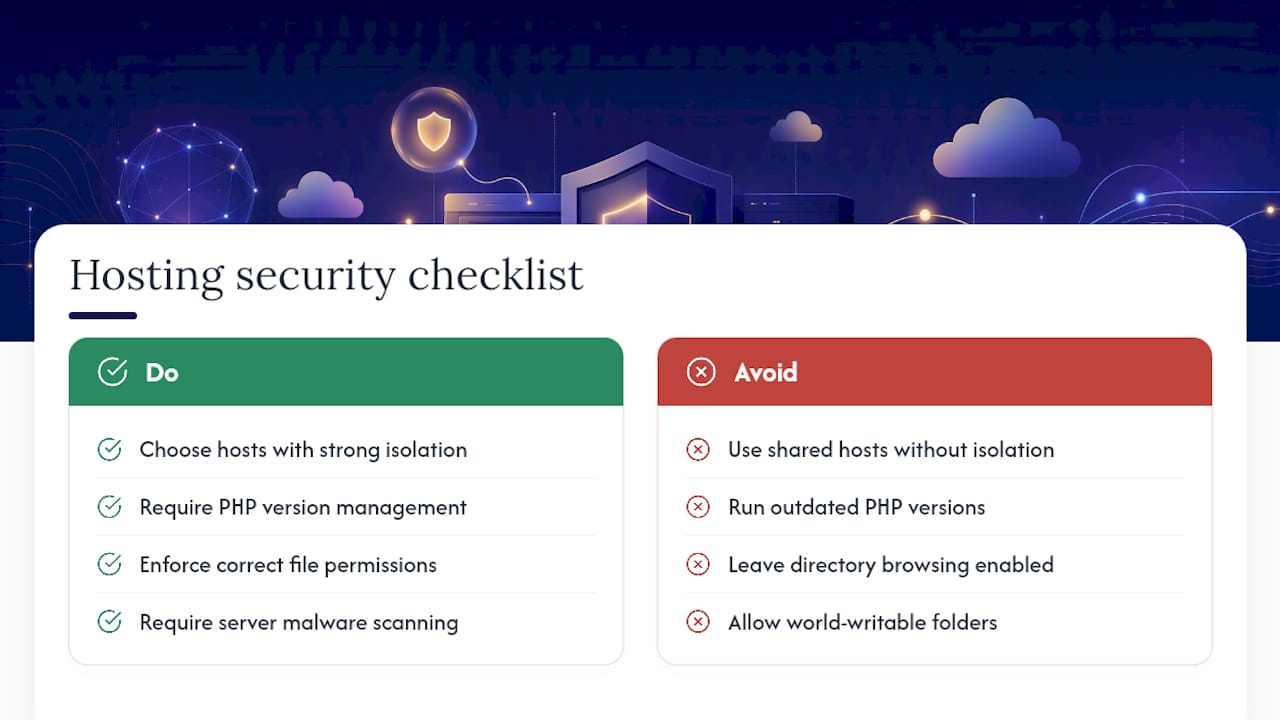
The hosting layer sits underneath every plugin decision you make, and a weak one undermines all of them. Shared hosting with poor account isolation means a single compromised neighbour site can, in some configurations, expose others on the same server.
Look for hosts that support PHP version management, since running an outdated PHP version leaves known vulnerabilities exposed regardless of how well WordPress itself is patched. Security Technical Implementation Guide style hardening principles, originally built for broader web applications, apply cleanly here: correct file permissions (directories at 755, files at 644, and wp-config.php locked down further), disabled directory browsing, and no world-writable folders outside what WordPress genuinely needs for uploads.
Server-level malware scanning, isolated database credentials per site, and a host that patches its own server software promptly all matter as much as anything happening inside the WordPress admin panel. An agency managing many client sites should treat the hosting provider’s own security posture as a vetting question, not an afterthought, because a weak host quietly undoes careful work done everywhere else.
Implementing SSL/TLS certificates and enforcing HTTPS
HTTPS is no longer optional infrastructure, it is baseline trust signalling that also protects login credentials from interception on the wire. Every WordPress site should run a valid TLS certificate, with HTTPS enforced across every page, not just the checkout or login screen.
Most hosts now provision free certificates automatically through Let’s Encrypt, so there is rarely a cost barrier left. The remaining work is configuration: force HTTPS redirects at the server level rather than relying solely on a WordPress plugin, update the site URL settings in WordPress itself to the HTTPS version, and check for mixed-content warnings where old images or scripts still load over plain HTTP.
Certificate renewal is usually automatic, but it is worth confirming that on a schedule rather than discovering a lapsed certificate the way most people do, through a client’s phone call after their browser started showing a warning page.
Reviewing user roles and permissions regularly
Every WordPress account carries a role, and every role carries capabilities that go well beyond what most users actually need. An editor account with plugin-installation rights is a mistake waiting to compound, because it turns one phished password into full site control.
Run a role audit on the same quarterly schedule as your credential rotation. Check for accounts with administrator access that only ever need editor or author permissions, remove anyone who has left the client’s team or your own, and confirm client-side users cannot install plugins or edit theme files unless that is genuinely part of their job.
The principle of least privilege, giving each account only the access its job requires, is not a compliance nicety here. It is what limits the damage when, not if, one set of credentials eventually gets compromised.
Security headers and protection against common exploits
Security headers cost nothing to add and close off entire categories of attack, yet a site survey found that roughly 87% of WordPress sites were missing a Content Security Policy and 78% lacked HSTS header entirely.
A Content Security Policy (CSP) restricts which scripts and resources a browser will execute on your pages, which blunts cross-site scripting attacks even when a vulnerability exists elsewhere in the stack. The X-Frame-Options header prevents your site being loaded inside a hidden iframe on someone else’s page, a technique called clickjacking. HTTP Strict Transport Security (HSTS) tells browsers to only ever connect over HTTPS, closing the small window where a downgrade attack could intercept traffic.
None of these require a plugin. Most can be set at the server or CDN level in a single configuration file, and they apply to every request without adding load time. For an agency managing many client sites, this is one of the few genuinely set-and-forget improvements available, worth adding to the standard build checklist for every new site rather than treated as an optional extra bolted on later.
What agencies get wrong about WordPress security
Most WordPress security advice reads like a checklist because checklists are easy to publish. The uncomfortable reality, backed by how quickly plugin vulnerabilities get exploited, is that a long checklist followed loosely protects a site less than a short list of controls enforced consistently across every site in a portfolio.
The conventional advice oversells security plugins and undersells operational discipline. A firewall plugin bolted onto a site with 40 unaudited plugins, no restore test in a year, and three admin accounts nobody remembers creating is not secure, it is decorated. Reducing the plugin count, enforcing 2FA without exception, and actually running a restore drill will outperform any single tool you can install.
If you manage client sites and only have time to fix one thing this month, fix the backup restore test. Everything else on this list buys you time and reduces probability. A tested restore is the only control that guarantees you can recover when, inevitably, something still gets through.
— Marcel
Let Wpcto carry the security workload for your agency
Every control in this guide is straightforward to describe and genuinely tedious to run consistently across dozens of client sites, month after month, which is exactly why so many agencies let it slip until something breaks. Wpcto exists so that never happens on your watch: we run the plugin audits, manage the updates, enforce the authentication, and test the restores, while you keep the client relationship and the invoice.
If security and maintenance are eating hours your team would rather spend on client strategy and design work, that is the exact gap Wpcto’s agency services are built to fill, either under your own brand through white-label support or as a named partner your clients see directly. Keep the parts of WordPress delivery you enjoy and want to control; hand off the patching, the monitoring, and the 2AM emergency calls.
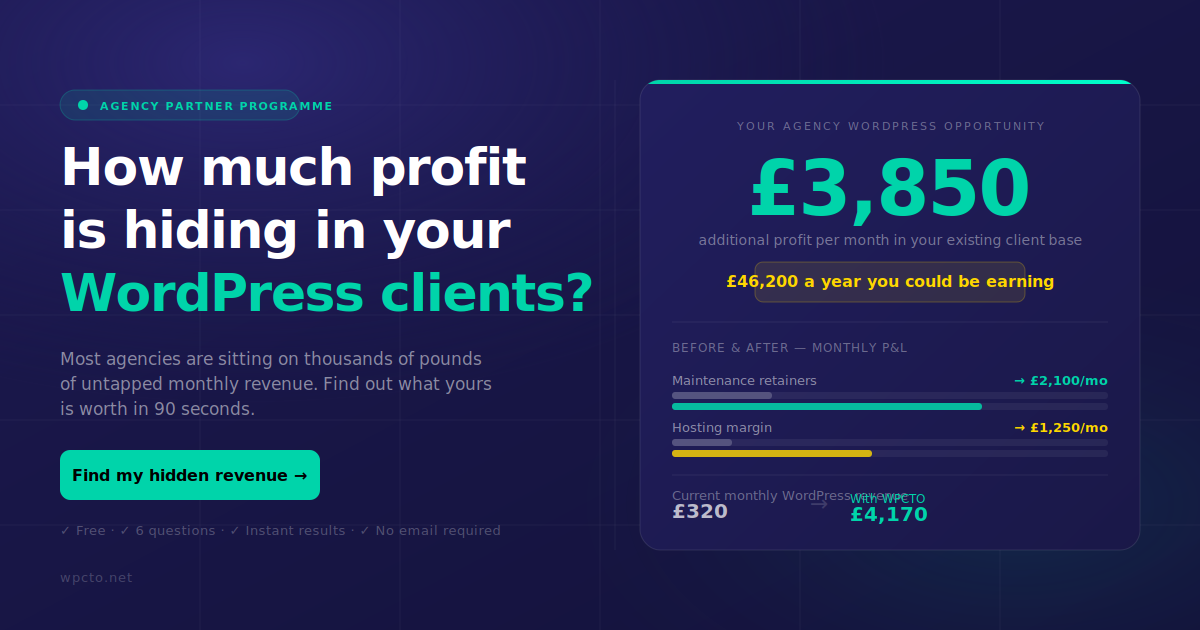
Before deciding what to outsource, work out what it is actually worth. Run your client list through the WordPress Profit Calculator and see, in under 90 seconds, how much recurring revenue is sitting unclaimed in the maintenance work you are already doing for free.
Sources
- State of WordPress Security in 2026 – Security Whitepaper
- The State of WordPress 2026 | Synmek Annual Report
- Lock Down WordPress Against 2026’s Attack Surge – LionScripts