

TL;DR:
- WordPress security involves layered controls to protect against unauthorized access, data theft, and malware. Most breaches exploit third-party plugins, weak credentials, and server misconfigurations rather than the core platform. Continuous updates, multi-factor authentication, WAFs, and regular audits are essential for effective, ongoing protection.
WordPress security is defined as the set of technical and procedural controls that protect a WordPress installation from unauthorised access, data theft, malware injection, and service disruption. The importance of WordPress security cannot be overstated: WordPress powers over 43% of the internet, making every installation a target for the automated botnets that scan millions of sites daily for exploitable weaknesses. A successful breach costs a small business an average of $25,000 in direct recovery costs alone, before reputational damage is factored in. Tools like Web Application Firewalls (WAFs), two-factor authentication (2FA), and dedicated security plugins form the front line of defence for any site owner who takes protection seriously.
What are the most common vulnerabilities in WordPress sites?
The majority of WordPress breaches do not originate in WordPress core. Over 50% of WordPress hacks exploit weaknesses in third-party plugins and themes, not the platform itself. That distinction matters enormously, because it shifts responsibility squarely onto site owners and the agencies managing those sites.
The most frequently exploited WordPress site vulnerabilities fall into four clear categories:
- Outdated or abandoned plugins and themes. Plugin authors release patches when vulnerabilities are discovered, but sites running old versions remain exposed. Plugins that are no longer maintained by their developers present a permanent risk with no fix coming.
- Weak credentials and missing 2FA. Brute-force attacks against "wp-login.php` are relentless. Without rate limiting and two-factor authentication, a guessable password is all an attacker needs.
- Exposed endpoints. Both
wp-login.phpandxmlrpc.phpare publicly accessible by default. The XML-RPC endpoint in particular enables credential-stuffing attacks at scale and should be disabled unless actively required. - Broken access controls. 3.73% of tested web applications suffer from broken access control, a vulnerability that allows attackers to access admin functions or data they should never reach.
“Most WordPress hacks exploit third-party plugins, weak credentials, and server misconfigurations rather than WordPress core.” — WordPress.com official blog
Plugin abandonment is a particularly underappreciated risk. When a developer stops maintaining a plugin, any vulnerability discovered after that point will never be patched. Site owners who do not audit their installed plugins regularly are carrying silent risk they may not even be aware of. The same applies to premium themes purchased years ago from marketplaces where support has since lapsed.
How do security best practices reduce WordPress risk?
Understanding the threat is only half the work. The other half is knowing which controls actually close those gaps, and in what order of priority.
-
Enable automatic updates for core, plugins, and themes. The median exploit window for an unpatched plugin vulnerability is just 5 hours. Manual update processes cannot reliably operate within that window. Automatic updates are not a convenience feature; they are a critical control.
-
Deploy two-factor authentication using a TOTP app. 2FA prevents compromised passwords from granting access to the WordPress admin area. Prefer TOTP apps like Google Authenticator or Authy over SMS-based codes, because SMS 2FA is vulnerable to SIM-swapping attacks that bypass the protection entirely.
-
Rate-limit login attempts and disable XML-RPC. Restricting the number of failed login attempts blocks brute-force attacks before they gain traction. Disabling XML-RPC removes an attack vector that has no legitimate use on most sites.
-
Install a Web Application Firewall. A WAF filters malicious traffic before it reaches your application layer. Cloud-based WAFs from providers like Cloudflare or Sucuri operate at the network edge, meaning attacks are blocked before they even touch your server.
-
Harden file permissions and disable dashboard file editing. Restricting write access to core files limits what an attacker can do if they do gain a foothold. Disabling the built-in theme and plugin editor in the WordPress dashboard removes a common post-breach escalation path.
Pro Tip: When rolling out 2FA across a team or client site, build in a grace period of several days before enforcement kicks in. This avoids locking legitimate users out during the transition and removes the friction that causes teams to resist the change.
Knowing why updating WordPress plugins matters is the foundation of every other security measure. Updates close the gaps that everything else is designed to protect.

Security tools compared: plugins, WAFs, and manual hardening
No single tool provides complete protection. The most resilient WordPress security posture combines multiple layers, each covering the weaknesses of the others.
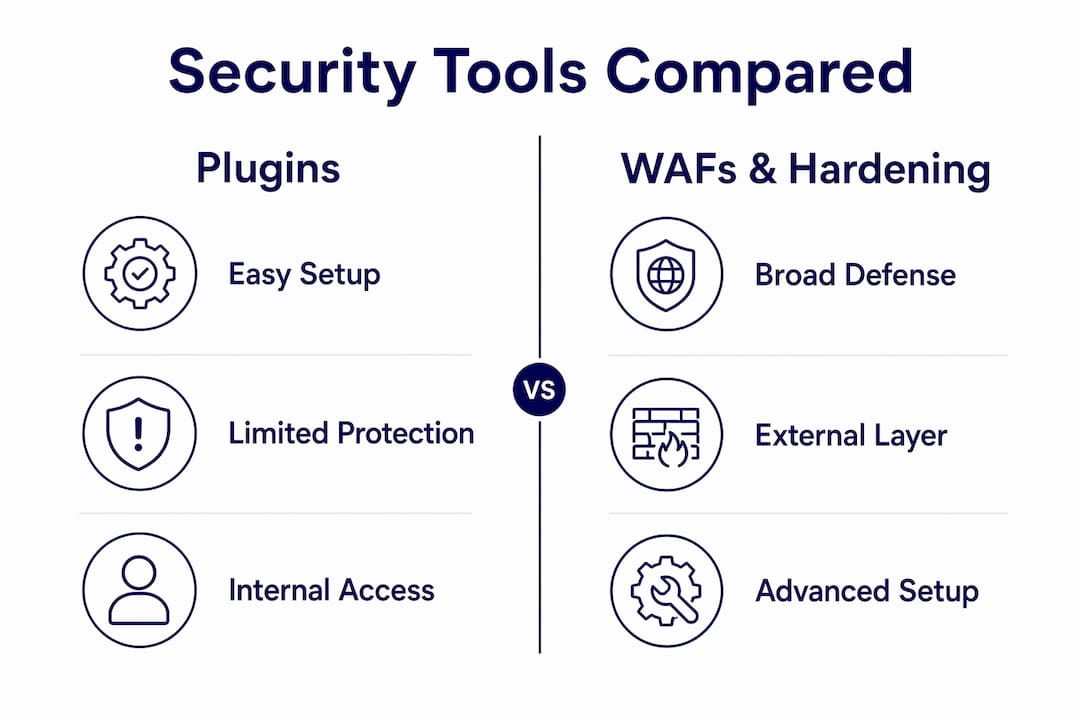
| Approach | Strengths | Limitations | Best used for |
|---|---|---|---|
| Cloud WAF (Cloudflare, Sucuri) | Blocks attacks at network edge; includes CDN performance benefits; does not consume server resources | Requires DNS-level configuration; subscription cost | All sites; especially high-traffic or business-critical |
| WordPress security plugins (Wordfence, iThemes Security) | Malware scanning, firewall rules, login protection in one dashboard | Runs inside WordPress; consumes server resources during attacks; cannot block all threats | Sites needing accessible, dashboard-level monitoring |
| Manual server hardening | Strongest protection; no plugin dependency; covers file permissions, headers, and server config | Requires technical expertise; time-intensive; must be maintained | Managed hosting environments with server access |
| Combined layered approach | Covers all attack vectors; redundancy if one layer fails | Higher complexity and cost to manage | Agency-managed client sites; e-commerce; membership sites |
The key insight from this comparison is that WordPress security plugins running inside WordPress cannot prevent all attacks, and under heavy attack conditions they can actually contribute to downtime by consuming server resources. A cloud WAF sitting in front of the site removes that problem entirely. For agencies managing multiple client sites, the combination of a cloud WAF, automatic updates, and a lightweight monitoring plugin gives the best coverage without creating a management burden.
Moving the login URL is sometimes recommended as a hardening step, but it is a weak measure on its own. Security through obscurity is not a defence. It must be paired with 2FA and rate limiting to have any meaningful effect.
Practical steps for ongoing WordPress security maintenance
One-time setup is not enough. Security is a persistent, continuous commitment, and the threat environment changes constantly as attackers adapt to new defences. The sites that stay secure are the ones with consistent, repeatable maintenance routines.
The core ongoing practices every site owner should have in place:
- Automated off-site backups, tested regularly. Backups stored on the same server as the site are useless if the server is compromised. Use a service that stores backups remotely, and test restores periodically to confirm they actually work.
- Continuous monitoring and log review. Security suites and server logs surface anomalies early, before a minor intrusion becomes a full breach. Monitoring is the difference between catching an attack in progress and discovering it weeks later.
- Routine plugin and user audits. Remove plugins that are no longer in use. Review user roles and revoke access for anyone who no longer needs it. Dormant admin accounts are a common breach vector.
- Incident response planning. Know in advance what you will do if a site is compromised. The standard sequence is: isolate the site, clean the infection, identify and close the entry point, harden against recurrence, and monitor closely for several weeks afterwards.
Pro Tip: Google blacklists over 10,000 websites daily for malware, and recovery from a blacklisting can take months. Set up Google Search Console alerts for your sites so you receive immediate notification if a site is flagged, rather than finding out from a client.
For agencies managing WordPress sites on behalf of clients, this ongoing commitment is where the real operational pressure sits. The WordPress Profit Calculator from Wpcto shows, in under 90 seconds, exactly how much revenue your agency could be capturing from the WordPress maintenance work you are currently absorbing or giving away for free. It is worth running before your next client review.
The agency security guide for 2026 from Wpcto covers how to structure these ongoing practices as a repeatable service rather than an ad hoc response.
Key takeaways
WordPress security requires layered, continuous protection across plugins, credentials, server configuration, and monitoring to be effective.
| Point | Details |
|---|---|
| Plugins are the primary risk | Over 50% of WordPress hacks exploit third-party plugins; audit and update them consistently. |
| Exploit windows are short | The median time to exploit an unpatched vulnerability is 5 hours; automatic updates are non-negotiable. |
| Layer your defences | Combine a cloud WAF, TOTP-based 2FA, and server hardening for coverage no single tool provides alone. |
| Backups must be tested | Off-site backups only protect you if restores have been verified; untested backups are not a safety net. |
| Security is a recurring service | One-time setup degrades quickly; treat WordPress security as a continuous managed commitment. |
Why I think most site owners underestimate the speed of the threat
After years of working with agencies and their WordPress client portfolios, the pattern I see most often is not ignorance of security. It is underestimation of pace. Site owners know they should keep plugins updated. They know 2FA matters. What they consistently underestimate is how quickly the window between a vulnerability being published and it being actively exploited has shrunk.
Five hours is not a comfortable margin. For any agency managing more than a handful of client sites manually, five hours is already too late. By the time someone on your team has seen the update notification, triaged it, tested it on a staging environment, and pushed it live, the automated scanners have already moved on to the next target. Or yours.
The other thing I have observed is that agencies tend to focus their security attention on the WordPress core installation, when the real risk sits in the plugin ecosystem. A well-maintained core running a dozen poorly managed plugins is far more vulnerable than a slightly older core with a disciplined update and audit process. Shift your attention to the ecosystem, not the platform.
What actually works, in my experience, is removing the human from the update loop wherever possible. Automatic updates for minor versions and security releases, combined with a cloud WAF and monitored backups, handles the majority of risk without requiring anyone to remember to act. The step-by-step security guide we put together at Wpcto walks through exactly how to set that up in a way that works at agency scale.
Security is not a project with a completion date. It is a discipline that either runs quietly in the background or creates very loud problems at the worst possible moment.
— Marcel
How Wpcto handles WordPress security for agencies
Wpcto provides specialist WordPress security and maintenance for design, brand, and digital agencies across the UK. We handle security updates, plugin and theme management, continuous monitoring, and incident response, so your team never has to touch a WordPress support ticket again. Our services run white-label, meaning your clients see your brand, not ours. If you are currently absorbing WordPress maintenance hours that are not on any invoice, use the WordPress Profit Calculator to see exactly what that is costing you. For agencies ready to hand off WordPress entirely, our agency support services are built for that exact transition.
FAQ
Why is WordPress security important for small sites?
Small sites are targeted just as frequently as large ones because automated bots do not discriminate by size. A breach costs a small business an average of $25,000 in direct recovery costs, making prevention far cheaper than remediation.
What is the most effective way to secure a WordPress site?
The most effective approach combines automatic updates, TOTP-based two-factor authentication, a cloud WAF such as Cloudflare or Sucuri, and off-site automated backups. No single measure is sufficient on its own.
How often should WordPress plugins be updated?
Plugins should be updated as soon as security patches are released, ideally within hours. The median exploit window for an unpatched plugin vulnerability is just 5 hours, which makes manual update processes insufficient for most site owners.
Do WordPress security plugins provide complete protection?
No. WordPress security plugins run inside the application and cannot block all attacks. Under heavy attack conditions they can consume server resources and contribute to downtime, which is why a cloud WAF at the network edge is a stronger primary defence.
How does a compromised WordPress site affect search rankings?
Google blacklists over 10,000 websites daily for malware. A blacklisted site loses search visibility immediately, and recovery can take months, causing sustained loss of traffic and revenue well beyond the initial incident.