

WordPress maintenance splits into three distinct models: reactive (break‑fix), which fixes problems only after they happen; basic care, which handles routine updates and backups on a schedule; and fully managed maintenance, which adds proactive monitoring, security hardening, and guaranteed response times. Reactive suits low‑budget, low‑risk clients who accept downtime as a cost of doing business. Basic care fits brochure sites and small business clients who need stability without much complexity. Fully managed is built for e‑commerce, lead‑generation, and any site where an outage costs real money.
Most agencies should default to basic care as their standard offer, then upsell fully managed to any client whose website drives revenue directly. Here’s the quick breakdown:
- Reactive maintenance — no proactive work, you fix things when clients report them broken
- Basic care — scheduled updates, backups, and light monitoring on a fixed monthly fee
- Fully managed — continuous monitoring, security hardening, defined SLAs, and priority incident response
The rest of this guide breaks down what each type actually includes, how to price them, and how to hand the delivery work to a white‑label partner without your clients ever noticing the switch.
Key Takeaways
Choosing correctly among the three types of maintenance, reactive, basic care, and fully managed, depends entirely on how much downtime and risk a client’s business can absorb.
| Point | Details |
|---|---|
| Three types, three risk profiles | Reactive suits low‑risk sites, basic care suits brochure sites, fully managed suits e‑commerce and revenue‑critical clients. |
| Default to basic, upsell to managed | Most client bases should start on basic care with a clear upgrade path to fully managed. |
| Ask about delivery discipline first | Staging workflows, tested backups, and defined SLAs matter more than price when vetting a partner. |
| Structure three tiers, sell the middle | Position the middle tier as the obvious choice using monitoring and reporting as the upgrade trigger. |
| Wpcto handles delivery invisibly | Wpcto runs all three maintenance tiers white‑label, so your agency keeps the client relationship and billing. |
Table of Contents
- What does each type of website maintenance actually include?
- How do you choose the right maintenance model or partner?
- How should agencies price and package maintenance tiers?
- What does a client migration to a white‑label partner look like?
- Why is WPCTO a practical white‑label option for agencies?
- Try the Profit Calculator and talk to Wpcto
- Sources
What does each type of website maintenance actually include?
The label “maintenance” gets used loosely across the industry, and that vagueness is exactly what causes scope disputes with clients six months into a contract. Each of the three types of maintenance carries a specific set of tasks, and knowing the boundaries protects your margin as much as your client relationship.
Reactive maintenance is the absence of a plan. You get called when the site is down, a plugin conflict has broken checkout, or a client has been locked out of their own dashboard. There’s no scheduled monitoring, no backup verification, and no proactive patching. Tasks are entirely incident driven: diagnose, fix, invoice, move on.
Basic care introduces a rhythm. A properly run basic plan typically follows a cadence something like this, adapted from the WordPress maintenance checklist for agencies:
- Daily automated backups and uptime checks
- Weekly core, theme, and plugin updates with rollback protection
- Monthly performance checks and broken‑link audits
- Quarterly credential and access reviews
Fully managed maintenance builds on all of that and adds the layer that actually changes client outcomes: continuous security monitoring, hardening (firewalls, malware scanning, login protection), performance optimisation, and a defined incident response SLA. A complete white‑label maintenance service typically covers five core areas: updates, security monitoring, uptime and performance tracking, backups with tested disaster recovery, and branded client reporting.
For agencies, reactive work is unpredictable and hard to price, but it requires no infrastructure investment. Basic care is easy to sell and simple to deliver, though it can leave real security gaps unaddressed. Fully managed commands the highest fees and the strongest retention, but it demands operational discipline you may not want to build in‑house.
Pro Tip: Build every update and change around a staging‑first workflow with a tested rollback path. Clients rarely notice good maintenance, but they always notice a broken homepage caused by an untested plugin update.
| Maintenance type | Typical scope | SLA expectation | Monitoring | Best client profile |
|---|---|---|---|---|
| Reactive (break‑fix) | Fixes only, no schedule | None, ad hoc response | None | Low‑budget, low‑risk sites |
| Basic care | Scheduled updates, backups, light checks | Best‑effort, days | Uptime only | Brochure or small business sites |
| Fully managed | Full stack: updates, security, performance, reporting | Defined response and restoration targets | Continuous, multi‑location | E‑commerce, lead‑gen, high‑value sites |
How do you choose the right maintenance model or partner?
Choosing between the three types of maintenance systems isn’t about picking a favourite; it’s about matching the model to what’s actually at stake if the site breaks. Run through this before you commit a client to any tier:
- Business impact — does downtime cost the client sales, leads, or reputation, or is it mostly cosmetic?
- Acceptable downtime — could the site be offline for a day without real damage, or does every hour matter?
- Data sensitivity — does the site handle payments, personal data, or health information?
- Commerce dependency — is the site a shop, a booking engine, or purely informational?
- Technical complexity — custom code, multiple integrations, and heavy plugin stacks all raise risk.
- Client budget — what can this account realistically sustain month to month?
If you’re evaluating a white‑label partner rather than building this in‑house, the questions get more pointed. Delivery discipline, not price, is what separates a safe outsourcing decision from a risky one, according to DigitalNeuma’s vendor selection checklist. Ask potential partners:
- What are your P1 (site down) and P2 (degraded but live) response and restoration targets?
- Do you test backup restoration, and how often?
- Is every change made on staging first, with a documented rollback plan?
- Who owns hosting credentials, and what happens to access if the relationship ends?
- Will your reporting and communications be fully white‑labelled under our brand?
Watch for red flags during evaluation: vague scope documents, no mention of staging or rollback, backups that have never actually been restored, or reluctance to confirm white‑label terms in writing. A scorecard approach weighting SLA clarity, security ownership, release quality, and commercial transparency gives you something more objective than a sales call to base the decision on.
How should agencies price and package maintenance tiers?
Pricing maintenance well means resisting the urge to sell a single flat fee for everything. A three‑tier structure, positioned as a “Care Plan” rather than plain maintenance, tends to perform better commercially, and the middle tier should be built to look like the obvious choice, according to Perkydash’s research on maintenance pricing.
Market rates for maintenance plans commonly fall within a competitive monthly range per site, and monitoring plus reporting are the features that most reliably pull clients from the base tier up to standard or premium. Essential tiers should include a web application firewall, core and plugin updates, and daily backups as the non‑negotiable floor, per Pressable’s guide to maintenance contracts.
| Tier | Example monthly price band | Core inclusions | Typical margin lever |
|---|---|---|---|
| Basic care | Entry band | Updates, backups, uptime checks | Volume across many low‑touch sites |
| Standard | Mid band | Adds security monitoring, performance checks, priority queue | Monitoring and reporting upsell |
| Fully managed | Premium band | Adds hardening, SLA‑backed response, dedicated reporting | SLA risk premium built into fee |
When you cost delivery, factor in the SLA risk premium: faster restoration promises mean you need spare capacity or a partner who can absorb spikes without blowing your margin. Your white‑label markup should sit on top of your partner’s wholesale rate, not compete with it.
For sales language, keep it specific to the client type. A brochure site owner cares about “your site staying online and looking right.” A growth client cares about “no surprises when you’re scaling ad spend.” An e‑commerce client cares about “checkout never going down during a sale.”
This is exactly the kind of uncaptured revenue most agencies are sitting on without realising it. If you’ve never worked out what your existing WordPress client base is actually worth in maintenance revenue, run it through the WordPress Profit Calculator — it takes under 90 seconds and shows you the gap between what you’re charging now and what you could be.
What does a client migration to a white‑label partner look like?
Moving a client onto a white‑label maintenance partner is where agencies either build trust or create a mess. Follow a structured sequence and neither the client nor the partner should feel any friction.
- Discovery — inventory every plugin, theme, and piece of custom code on the site before you touch anything.
- Backup and test restore — take a full backup and actually restore it in a sandbox to confirm it works.
- Staging parity — build a staging environment that mirrors production exactly, including plugin versions.
- Credential handover — transfer hosting, DNS, and admin access through a secure, documented process.
- DNS and hosting review — confirm hosting suits the maintenance tier being sold; migrate if it doesn’t.
- Stabilisation window — monitor closely for the first 30 days and resolve any legacy issues that surface.
A realistic timeline runs from discovery through staged onboarding to a 30‑day stabilisation period, broadly following the daily‑to‑yearly task cadence recommended in WP Umbrella’s maintenance checklist.
Before you migrate anyone, prepare simple communication templates: what you’re telling the client, what access you’re requesting, and any expected downtime window. Confirm ownership items too, licences for premium plugins, third‑party service access, and billing continuity, so nothing falls through the cracks between the old setup and the new one. For a deeper look at structuring these categories, our guide to WordPress maintenance categories walks through the tier design in more detail, and the Fylde Digital maintenance checklist is a useful independent reference for growth‑focused agencies building their own process.
Why is WPCTO a practical white‑label option for agencies?
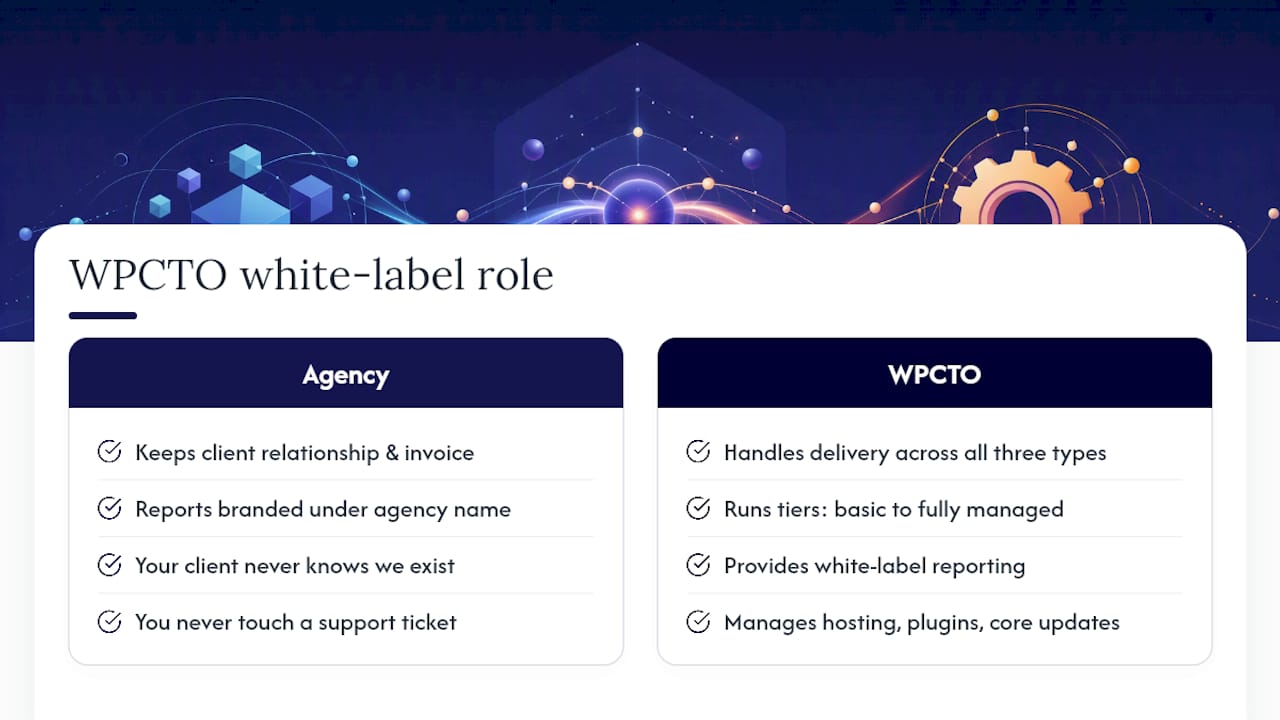
Wpcto exists to sit behind your agency’s brand, handling the delivery work across all three types of maintenance while you keep the client relationship and the invoice. We run maintenance tiers built around the same structure covered above: basic care through to fully managed retainers, each with security monitoring, tested backups, staging‑first release workflows, and defined emergency response SLAs.
Reporting comes branded under your agency’s name, not ours, because white‑label reporting is consistently the strongest retention lever in a maintenance programme. Clients who receive detailed monthly reports stay longer, according to Webhelp Agency’s research on white‑label maintenance. Our case study with a global property advisory client shows how this looks in practice on a complex, multi‑market site.
Operationally, we take on hosting management, plugin and core updates, security hardening, and quarterly restoration drills, so backups aren’t just taken, they’re proven to work. Fractional CTO support is available too, for agencies whose clients occasionally need architectural or scaling advice beyond routine care.
You never touch a support ticket. Your client never knows we exist. If you want to see what that’s worth in pounds before committing to anything, the WordPress Profit Calculator will show you the uncaptured revenue sitting in your current client list right now.
A note from Marcel
Agencies rarely lose clients over creative work. They lose them over a hacked site nobody caught for three weeks, or a plugin update that broke checkout the night before a launch. Reduce that risk, and you keep the relationship. Keep the relationship, and recurring revenue follows almost automatically, it’s the most predictable income most agencies never fully capture.
The mistake I see most often isn’t choosing the wrong maintenance tier. It’s not choosing one at all, and letting every client default to reactive by inertia. If you only do one thing after reading this, run your client list through the Profit Calculator and see what basic care alone would add to your monthly revenue.
Try the Profit Calculator and talk to Wpcto
Wpcto is the alternative to hiring an in‑house WordPress support team or absorbing maintenance work your creative staff never wanted, for agencies of any size in 2026. The concrete difference is this: your team keeps doing brand and design work, and we handle every update, backup, and emergency fix behind your name, with defined response times you can actually promise clients.
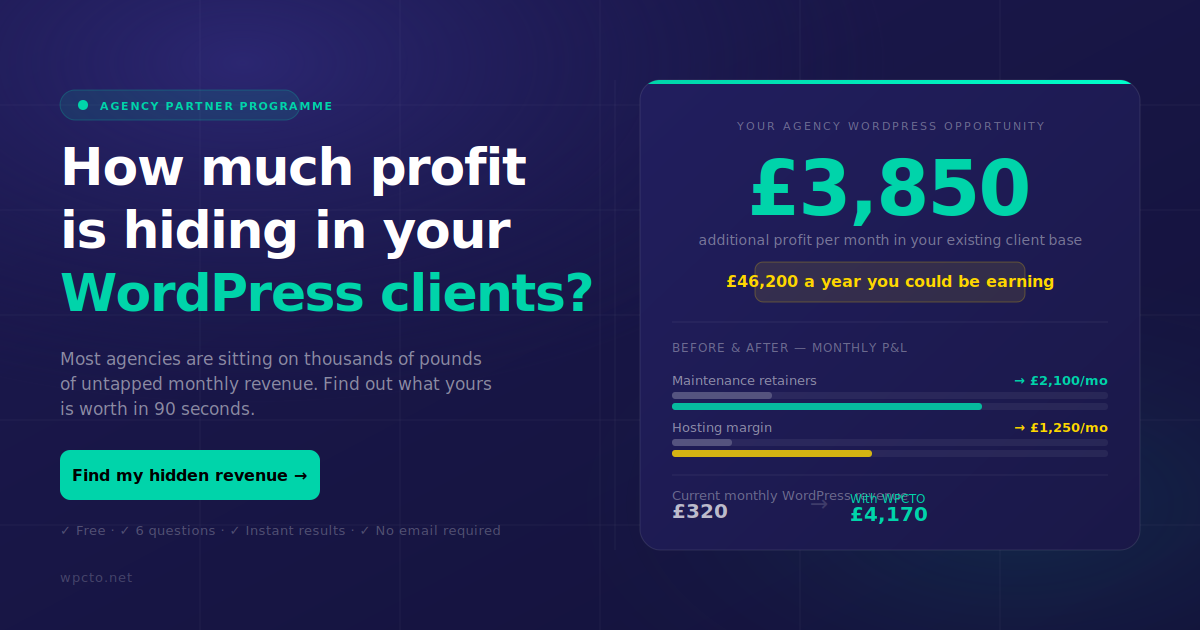
Start with the WordPress Profit Calculator. It takes under 90 seconds and shows you exactly how much recurring revenue is sitting uncaptured in your existing WordPress client base right now, no email gate, no sales call required first.
If the number surprises you, the next step is straightforward. Visit our agency services page to request a white‑label proposal, or head to our white‑label support page to see exactly how the invisible delivery model works before you book a short discovery call.
Sources
- White-Label WordPress Maintenance: Agency Guide 2026
- Outsource WordPress Support: Vendor Selection Checklist for 2026 | DigitalNeuma Blog | DigitalNeuma
- WordPress Maintenance Checklist: 27 Tasks for Agencies (2026)
- WordPress Maintenance Service: How to Build One That Pays
- WordPress Maintenance Contracts For Agencies: A Complete Guide | Pressable