

The most impactful website search optimisation tips you can apply right now are: fix crawlability issues in Search Console, write clear title tags and meta descriptions, submit a validated XML sitemap, add JSON-LD structured data, and invest in on-site search UX features like autocomplete and no-results handling. GOV.UK’s site search handles over four million queries per month, and their own testing showed that switching to Google Cloud Discovery Engine (Vertex AI Search) produced a 14% increase in click-through, 11% fewer refinements, and an 8% drop in users abandoning the search page. That is the scale of improvement available when you treat search as a product, not as an afterthought.
Here are the ten highest-priority actions, in order of impact:
- Run a Search Console crawl coverage report and fix any accidental noindex rules today.
- Submit and validate your XML sitemap; remove low-quality URLs (tag archives, attachment pages).
- Audit title tags and meta descriptions for every key landing page.
- Add JSON-LD structured data: at minimum, Organisation, Article, and BreadcrumbList.
- Check Core Web Vitals in PageSpeed Insights and patch the largest regressions first.
- Enable autocomplete on your internal search bar with accessible keyboard navigation.
- Build a no-results page that surfaces popular content and suggests alternatives.
- Set up search analytics: log query text, click position, and no-result rate in GA4.
- Run a basic A/B test on your search results ranking before committing to a new engine.
- Map your content to a shallow topic hierarchy and fix orphaned pages with a crawl tool.
Sections below cover each area in depth: technical indexation, site structure, content and metadata, performance, on-site search UX, analytics, and WordPress-specific options including Relevanssi, SearchWP, ElasticPress, Algolia, Coveo, and Google Cloud Discovery Engine.
Pro Tip: If you manage WordPress sites for agency clients, the Wpcto WordPress Profit Calculator shows you how much uncaptured revenue is sitting in your existing client base in under 90 seconds. Run it before you read the rest of this guide.
Key takeaways
Fixing crawlability and metadata issues first, then investing in on-site search UX and analytics, produces the fastest and most measurable improvements to both external rankings and internal search performance.
| Point | Details |
|---|---|
| Fix indexation before anything else | Search Console errors and accidental noindex rules block all other improvements; resolve these in week one. |
| Autocomplete drives task completion | GOV.UK data shows 92% click-through for searches using autocomplete suggestions; implement it with full keyboard and screen reader support. |
| Structured data is now an AI retrieval tool | JSON-LD with entity grounding (sameAs, Wikidata) increases the chance of appearing in AI Overviews, not just traditional SERPs. |
| Log five search signals from day one | Query text, click position, refinements, no-result rate, and abandonment rate give you everything needed to iterate on relevance. |
| Wpcto manages the WordPress delivery | Wpcto handles search integration, performance fixes, and ongoing maintenance for agencies, freeing your team for creative work. |
Table of Contents
- How do you help Google find and understand your pages?
- How should you organise site structure and URLs for findability?
- What makes content and metadata work for both search engines and users?
- Which technical performance fixes improve search visibility most?
- How do you improve on-site search UX: autocomplete, facets, and no-results pages?
- How do you measure search performance and run A/B tests that actually tell you something?
- Practical WordPress options for agencies: plugin, hosted engine, or managed partner?
- What does a realistic 30/90/180-day search optimisation roadmap look like?
- What agencies consistently get wrong about search optimisation
- Wpcto handles the WordPress work so your agency does not have to
- Sources
How do you help Google find and understand your pages?
The direct answer: open Search Console, go to Coverage, and fix every Excluded and Error URL before touching anything else. Crawlability is the foundation. If Google cannot reach a page, no amount of metadata or structured data will help it rank.
XML sitemap checklist:
- Include only canonical, indexable URLs. Remove paginated archives, tag pages, author archives, and WordPress attachment pages.
- Submit the sitemap via Search Console and validate that Google has fetched it recently.
- For WordPress, Yoast SEO and Rank Math both generate sitemaps automatically, but check that post types you do not want indexed are excluded in the plugin settings.
- Keep sitemap file size under 50,000 URLs per file; split large sites into sitemap index files.
Common WordPress sitemap pitfalls: attachment pages (every uploaded image gets its own URL by default), draft posts that somehow appear in the sitemap, and WooCommerce product variations creating thousands of thin URLs.
Robots.txt and canonical tags: a misplaced Disallow: / in robots.txt is the single most common cause of sudden ranking drops after a site migration. Check it in Search Console’s robots.txt tester after every deployment. Canonical tags should point to the preferred version of each URL; never let redirect chains exceed two hops.
Structured data (JSON-LD): Schema recommends JSON-LD as the preferred format because it sits in the <head> and does not require changes to visible HTML. The minimum schema stack for a UK site:
OrganisationwithsameAspointing to your Wikidata entity and Companies House entry.ArticleorWebPageon every content page.BreadcrumbListon every page below the homepage.LocalBusinessif you have a physical UK address.FAQPageon any page with a question-and-answer format.
The sameAs property is worth particular attention. Grounding your organisation entity to Wikidata and other authoritative sources helps AI retrieval systems identify your brand correctly, which is increasingly relevant as AI Overviews pull from structured entity graphs rather than just keyword matches. UK SEO practice in 2026 treats entity grounding as a first-tier tactic for appearing in AI-generated answers.
How should you organise site structure and URLs for findability?
Site architecture matters because both crawlers and internal search engines use link graphs to discover and weight content. A shallow hierarchy (homepage → category → page, three levels maximum) means every page is reachable in fewer hops, which correlates with faster indexation and higher crawl frequency for important pages.
URL hygiene rules:
- Use readable slugs:
/services/wordpress-maintenance/not/p=1234or/services/?cat=7. - Pick one canonical pattern and enforce it with 301 redirects (trailing slash or no trailing slash, never both).
- Avoid taxonomy bloat: WordPress creates archive pages for every tag and category. If those archives have fewer than five posts, either consolidate the taxonomy or noindex the archives.
- Redirect chains: every redirect should resolve in one hop. Use Screaming Frog or Sitebulb to find multi-hop chains and collapse them.
Internal linking and topic clusters: group related content into topic clusters with a single pillar page that links to supporting posts, and have those posts link back. Anchor text should describe the destination page’s topic, not generic phrases like “click here.” For UK-focused sites, internal links from geographically relevant pages (a London services page linking to a UK case study) carry additional contextual weight for regional queries.
Pro Tip: Run a full crawl with Screaming Frog and filter for pages with zero inbound internal links. Those orphaned pages are invisible to both crawlers and your internal search engine. Fix the worst offenders in your first sprint.
WordPress-specific note: the default permalink structure (/?p=123) is poor for both SEO and readability. Switch to /%postname%/ or /%category%/%postname%/ in Settings → Permalinks, but do this before launch or with a redirect plan in place. Attachment pages are another common source of thin, duplicate content; disable them in Yoast or Rank Math.
For agencies managing multiple client sites, a site redesign checklist is worth keeping to hand whenever a migration or restructure is on the cards, since search index resyncs after a structural change are one of the most frequently missed post-launch tasks.
What makes content and metadata work for both search engines and users?
Prioritise clear page intent and a single H1 per page. Every page should answer one primary question, and the H1 should state that answer or the topic directly. Writing metadata for humans first means your title tags and meta descriptions get clicked; writing them for robots first means they rank but nobody visits.
Title tag templates:
- Service pages:
[Service] in [Location] | [Brand](e.g. “WordPress Maintenance in London | Wpcto”) - Blog posts:
[Direct answer or benefit] — [Brand] - Keep title tags under 60 characters to avoid truncation in SERPs.
- Meta descriptions: 120–155 characters, include a call to action and the primary keyword naturally.
H2/H3 structure for AI retrieval: AI Overviews and chat-based search systems prefer short, self-contained answer passages. Write each H2 section so the first 80–150 words stand alone as a complete answer to the heading’s implied question. This is the “answer-first H2” pattern, and it directly increases the chance of being cited by AI retrieval systems.
Example H2 lead sentence: “WordPress maintenance plans typically cost between £50 and £300 per month for UK agencies, depending on the number of sites, update frequency, and whether emergency support is included.” That one sentence answers the question, contains the keyword, and gives a reader (or an AI) enough to act on without reading further.
Image alt text and file naming: alt text should describe what the image shows, not stuff keywords. File names should be descriptive (wordpress-dashboard-plugin-update.jpg, not IMG_4532.jpg). Add captions when the image contains data or a process that the surrounding text does not fully explain; captions are read by crawlers and often displayed in Google Image results.
Pro Tip: Use Google Search Console’s Search Results report filtered by Impressions to find pages ranking on page two for a target keyword. A title tag rewrite and a stronger H1 often move those pages to page one within four to six weeks, with no other changes.
Which technical performance fixes improve search visibility most?
Fix the largest performance regressions first: oversized images, render-blocking scripts, and poor hosting account for the majority of Core Web Vitals failures on WordPress sites. A slow page does not just frustrate users; it signals to Google that the page is a poor experience, which suppresses rankings.
Core Web Vitals targets for 2026:
- LCP (Largest Contentful Paint): under 2.5 seconds. The most common cause of LCP failure on WordPress is a large hero image served without WebP compression or a
srcsetattribute. - INP (Interaction to Next Paint): under 200ms. Heavy JavaScript from page builders and analytics scripts is the usual culprit.
- CLS (Cumulative Layout Shift): under 0.1. Reserve space for images and embeds with explicit width/height attributes.
Image strategy: convert all images to WebP or AVIF. Use srcset to serve appropriately sized images to different viewports. Apply loading="lazy" to all images below the fold, but never to the LCP image (the hero or first visible image), as lazy-loading the LCP element delays it unnecessarily.
Caching and CDN: use a full-page cache (WP Rocket, W3 Total Cache, or server-level caching via Nginx FastCGI) and serve static assets through a CDN. For UK sites, choose a CDN with edge nodes in London and Manchester to minimise TTFB for British visitors. Cloudflare’s free tier covers most small-to-medium WordPress sites adequately.
Practical checks to hand to your engineer:
- Run Lighthouse in Chrome DevTools and share the report.
- Check PageSpeed Insights for both mobile and desktop scores.
- Use WebPageTest with a UK test location (London) to get real TTFB figures.
- Check server response time in Search Console under Core Web Vitals.
Mobile performance deserves specific attention. Mobile internet traffic accounts for a substantial share of UK web usage, and Google’s mobile-first indexing means the mobile version of your site is what Google primarily evaluates.
For agencies looking at WordPress optimisation strategies across a client portfolio, theme choice and server configuration are the two variables that most consistently determine whether a site passes or fails Core Web Vitals.
How do you improve on-site search UX: autocomplete, facets, and no-results pages?
Invest in autocomplete, robust suggestions, and helpful no-results handling. These three features reduce friction more than any ranking algorithm change, because they address the moment a user is actively trying to find something and nearly failing.
Autocomplete design rules:
- Show a maximum of five to seven suggestions to avoid overwhelming users.
- Include keyboard navigation (arrow keys to move through suggestions, Enter to select, Escape to close).
- Announce suggestions to screen readers using ARIA live regions. GOV.UK validated this approach with accessibility specialists and found it reduced helpdesk queries from users with assistive technologies.
- Avoid surfacing suggestions that could be harmful, embarrassing, or legally sensitive (autocomplete for a health or legal site needs a curated blocklist).
The GOV.UK autocomplete data is striking: suggestions were used in 55% of searches where they were shown, and searches that used a suggestion had a 92% click-through rate. That is not a marginal improvement; it is a near-certain task completion for users who engage with autocomplete.
Accessible, inclusive search design also has a direct business case. The W3C WAI business case for accessibility documents how accessible interfaces reduce support burden and reach a broader audience, both of which translate to measurable commercial outcomes.
Relevance features: synonyms (mapping “solicitor” to “lawyer”), stemming (matching “maintenance” to “maintain”), and fuzzy matching (catching “maintenence”) all reduce the no-results rate without requiring users to know your exact terminology. Most search engines support these out of the box, but they require configuration.
No-results strategy: never show a blank page. Surface the three to five most popular pages, offer a refined search prompt, and suggest a contact or support route. A no-results page that helps is a retention tool; a blank one is an exit.
Pro Tip: Add a visible “Did you mean?” suggestion powered by fuzzy matching. For WordPress sites using Relevanssi, the Relevanssi Premium add-on includes “Did you mean?” functionality out of the box.
Which search engine platform fits your site?
The right platform depends on scale, budget, and how much relevance tuning you need.
| Platform | Best for | Integration complexity | Cost model | Synonyms / ML | Scalability | UK/EU data residency |
|---|---|---|---|---|---|---|
| Relevanssi | Small WordPress editorial sites | WordPress plugin, low | Free / Premium from — | Synonyms, stemming (manual config) | Up to ~50k posts | Data stays on your server |
| SearchWP | WordPress sites needing custom field search | WordPress plugin, low | From — | Basic synonyms | Up to ~100k posts | Data stays on your server |
| ElasticPress | WordPress sites needing Elasticsearch power | Plugin + Elasticsearch host, medium | Plugin free; hosting extra | Full synonym/ML via Elasticsearch | Large-scale | Depends on host (self-host for UK residency) |
| Algolia | Commerce, SaaS, high-traffic editorial | API + plugin/SDK, medium | Usage-based; free tier available | ML-powered, NeuralSearch | Very high | EU data centres available |
| Coveo | Enterprise, complex relevance requirements | API + connector, high | Enterprise pricing | Advanced ML, intent modelling | Enterprise | EU/UK options available |
| Google Cloud Discovery Engine (Vertex AI Search) | Large-scale sites needing semantic/AI search | API integration, high | Usage-based (GCP pricing) | Semantic ML, LLM-powered | Very high | GCP EU regions available |
Relevanssi is the natural starting point for most WordPress agencies. It replaces the default WordPress search with a relevance-ranked, full-text engine. The free version handles most editorial sites; Premium adds “Did you mean?”, user searches logging, and WooCommerce support.
SearchWP is worth considering when clients need to search custom fields, PDF content, or WooCommerce product data. Its modular approach lets you add sources incrementally without a full re-architecture.
ElasticPress connects WordPress to an Elasticsearch or OpenSearch cluster, which is a significant step up in both capability and operational complexity. It is the right choice when a site has tens of thousands of posts, needs real-time indexing, or requires faceted search across multiple content types. OpenSearch (the AWS-maintained fork of Elasticsearch) is a strong option for agencies who want to self-host and keep data within UK infrastructure.
For hosted engines, Algolia is the most agency-friendly: its InstantSearch.js library and WordPress plugin make front-end integration relatively straightforward, and its dashboard gives non-technical stakeholders visibility into search performance. Coveo is positioned for enterprise clients with complex personalisation requirements. Google Cloud Discovery Engine (Vertex AI Search) is what GOV.UK migrated to, and the results speak for themselves.
Privacy and data residency note: for UK clients handling personal data, check whether your chosen engine stores query logs in the UK or EU. Self-hosted options (Relevanssi, SearchWP, ElasticPress on UK infrastructure) give you full control. Hosted engines (Algolia, Coveo, Discovery Engine) all offer EU data centre options, but you need to configure this explicitly and document it in your data processing agreements.
If you are an agency managing WordPress sites for multiple clients and wondering whether the time you spend on search configuration, plugin updates, and performance fixes is actually profitable, the Wpcto WordPress Profit Calculator gives you a clear answer in under 90 seconds. Most agencies find they are leaving significant recurring revenue on the table.
How do you measure search performance and run A/B tests that actually tell you something?
Log query text, query refinements, click position, time to first click, and no-result rate. These five signals tell you whether your search is working. Everything else is secondary.
Essential KPIs:
- Click-through rate from search results: the percentage of searches that result in a click. GOV.UK’s baseline before their engine migration was the benchmark they used to measure the 14% improvement post-migration.
- Refinement rate: how often users modify their query after seeing results. High refinement means results are not matching intent.
- No-result rate: the percentage of queries returning zero results. Anything above 5% warrants investigation.
- Abandonment rate: users who search and then leave the site entirely.
- Conversion by search query: for commerce or lead-generation sites, which queries lead to a purchase or enquiry.
A/B testing for search: GOV.UK’s approach is a reproducible template. They ran a prototype evaluation first (qualitative), built a judgement list of queries with expected results, then gradually ramped up traffic to the new engine while monitoring all five KPIs above.
Pro Tip: Before running an A/B test on your search engine, build a judgement list of 50–100 representative queries with the expected top result for each. This gives you a repeatable quality benchmark that is independent of traffic volume.
Data pipeline: the GOV.UK site search architecture uses a three-part stack: synchronisation/indexing, a querying API, and an analytics pipeline that feeds user events back into ranking models. For most WordPress agencies, the equivalent is: search engine (Relevanssi or Algolia) → GA4 event logging → BigQuery export → periodic ranking review. You do not need the full GOV.UK stack; you need the feedback loop.

| What to log | Why it matters | How to capture it |
|---|---|---|
| Query text | Reveals vocabulary gaps and content opportunities | GA4 custom event or search engine dashboard |
| Result position clicked | Shows whether top results match intent | GA4 select_content event with position parameter |
| Query refinements | Flags poor initial relevance | Log consecutive searches within the same session |
| No-result queries | Identifies missing content or synonym gaps | Search engine’s built-in analytics or GA4 filter |
| Time to first click | Proxy for result confidence | GA4 engagement time + click event timing |
For agencies who want a structured view of how to measure and act on SEO performance data, monitoring SEO performance is a useful reference for setting up KPI dashboards that connect search analytics to business outcomes.
Practical WordPress options for agencies: plugin, hosted engine, or managed partner?
Choose by scale and need. Small editorial sites (under 10,000 posts) almost always do well with Relevanssi or SearchWP. Growth-stage sites with complex content types or high traffic should consider ElasticPress. Enterprise clients with budget for hosted relevance and ML-powered ranking should evaluate Algolia, Coveo, or Google Cloud Discovery Engine.
Comparison dimensions that matter for procurement:
- Integration complexity: plugins (Relevanssi, SearchWP) are low-effort; hosted engines (Algolia, Coveo) require API integration and front-end work; Elasticsearch/OpenSearch requires infrastructure management.
- Cost model: plugin licences are predictable annual fees; hosted engines charge by index size and query volume, which can spike unpredictably on high-traffic sites.
- Synonyms and ML: Relevanssi and SearchWP support manual synonym lists; Algolia and Coveo include ML-powered ranking that learns from click behaviour.
- Scalability: plugin-based search degrades on very large WordPress databases; hosted engines scale horizontally.
- Privacy and data residency: self-hosted options keep all data on your infrastructure; hosted engines require explicit EU/UK data centre configuration and DPA documentation.
Pro Tip: Before committing to a hosted search engine, export three months of your current search query logs and run them against the new engine in a staging environment. Compare the top-five results for your 20 most common queries. If the new engine wins on 15 or more, the migration is worth the effort.
For agencies evaluating whether to handle search configuration in-house or bring in a specialist, the Wpcto agency services page outlines how we structure WordPress engagements, from initial discovery through to ongoing maintenance and search integration support. Our white-label support option is particularly relevant for agencies who want to offer search optimisation as a client service without building the capability internally.
A quick checklist for procurement and privacy:
- Confirm the engine’s data processing agreement covers UK GDPR.
- Identify which data centre region query logs are stored in.
- Check whether the engine’s terms permit you to use query data to train ranking models.
- Verify the licence terms if you are using open-source components (Elasticsearch is licensed under SSPL; OpenSearch is Apache 2.0, which is more permissive for commercial use).
What does a realistic 30/90/180-day search optimisation roadmap look like?
One-screen action plan: fix indexation and critical performance issues in the first 30 days, tackle structure and UX in the next 90, and invest in hosted search and AI retrieval optimisation in the 180-day window.
30-day quick wins (urgent fixes):
- Run Search Console coverage report; fix all Errors and review all Excluded URLs.
- Submit and validate XML sitemap; remove attachment pages and thin taxonomy archives.
- Audit title tags and meta descriptions on the top 20 traffic pages.
- Fix the single largest Core Web Vitals failure (usually LCP from an uncompressed hero image).
- Enable search analytics logging in GA4 (Site Search settings or custom events).
90-day work (medium-term improvements):
- Clean up taxonomy structure; consolidate or noindex low-value tag and category archives.
- Build topic clusters with pillar pages and supporting posts; fix orphaned pages.
- Roll out JSON-LD structured data across all key page types.
- Improve internal search UX: add autocomplete, fix no-results page, configure synonyms.
- Run your first A/B test on search results ranking using a judgement list.
180-day initiatives (longer-term investment):
- Evaluate and, if justified, migrate to a hosted search engine (Algolia, ElasticPress, or Discovery Engine).
- Launch a topical authority programme: identify content gaps from query logs and commission supporting content.
- Implement AI retrieval optimisations:
speakableschema, entity grounding viasameAs, and answer-first H2 structure across all key pages. - Set up a quarterly search review cycle: query log analysis, KPI review, and ranking model update.
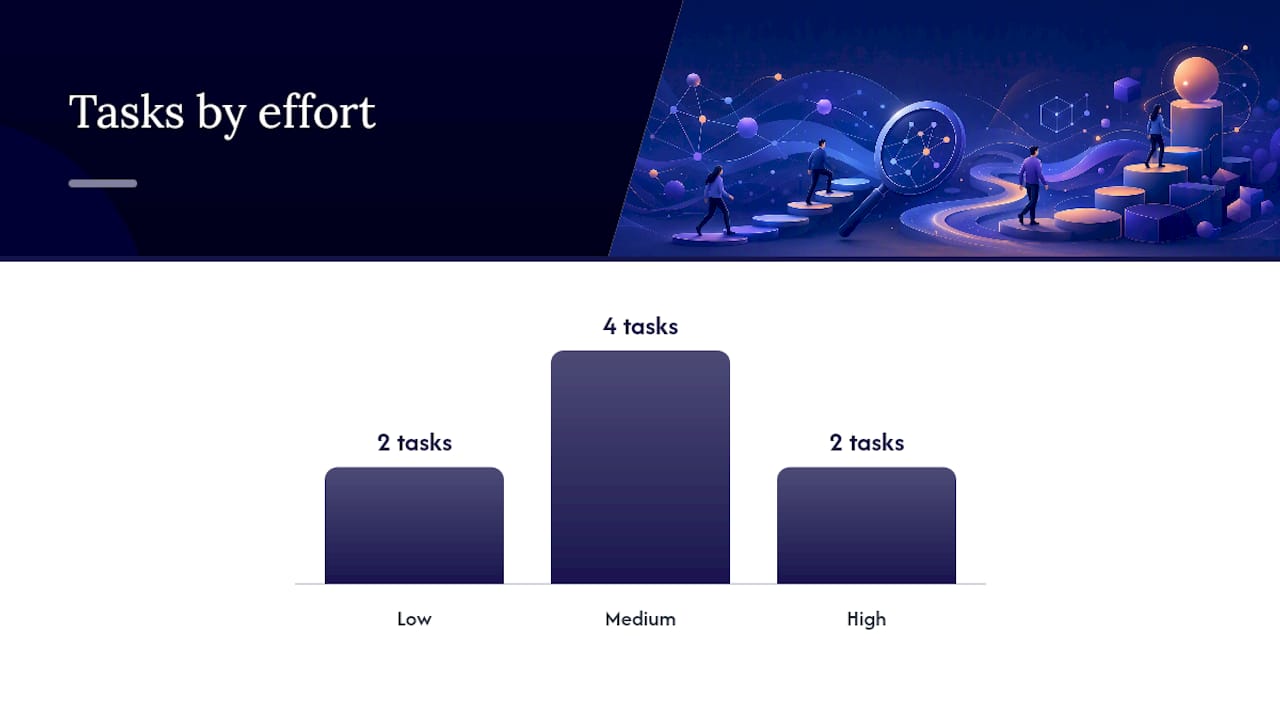
| Task | Owner | Expected impact | Effort |
|---|---|---|---|
| Fix Search Console errors | Engineer | High (indexation) | Low |
| Sitemap clean-up | Engineer / SEO | High (crawl efficiency) | Low |
| Title tag and meta audit | SEO / Copywriter | Medium (CTR) | Medium |
| Core Web Vitals patch | Engineer | High (rankings, UX) | Medium |
| Structured data rollout | Engineer | Medium (AI retrieval) | Medium |
| Internal search UX improvements | Engineer / UX | High (task completion) | Medium |
| Hosted search engine migration | Engineer | High (relevance) | High |
| Topical authority programme | SEO / Copywriter | High (long-term rankings) | High |
For agencies managing this work across multiple client sites, proactive website maintenance processes make the difference between a one-off improvement and a sustained upward trend.
What agencies consistently get wrong about search optimisation
Most agencies treat search as a launch task rather than a product. They configure a sitemap, install Yoast, and move on. The sites that perform well in search, both externally and internally, are the ones where someone is looking at query logs every month and acting on what they find.
The three blind spots we see most often when Wpcto takes on a new WordPress client:
Theme output that breaks semantic HTML. Page builders and custom themes frequently output multiple H1 tags, skip heading levels (jumping from H2 to H4), or wrap content in <div> elements where <article> or <section> would give crawlers meaningful structure. This is invisible to the client and often invisible to the agency, but it materially affects how search engines interpret page hierarchy.
Orphaned content from old campaigns. Landing pages built for a specific campaign, then abandoned without being redirected or removed, accumulate over years. They dilute crawl budget, confuse internal search engines, and occasionally rank for queries the client would rather not be associated with. A quarterly crawl audit catches these before they become a problem.
Unmanaged plugins causing performance regressions. A plugin update that introduces a render-blocking script or a database query on every page load can drop Core Web Vitals scores significantly. Without monitoring, agencies only discover this when a client complains about traffic dropping. Regular site maintenance that includes performance regression testing after every plugin update prevents this entirely.
When Wpcto structures a search improvement engagement, the first week is always discovery: crawl the site, pull three months of Search Console data, export query logs, and identify the three highest-impact fixes. Quick wins go live in week two. The iterative optimisation cycle starts in month two, once the baseline is clean.
Wpcto handles the WordPress work so your agency does not have to
Agencies that want to offer search optimisation as a client service face a familiar problem: the technical work (structured data, plugin configuration, performance fixes, search engine integration) pulls developers away from billable creative work. Wpcto sits behind your agency invisibly, handling all of that delivery while you keep the client relationship and the recurring revenue.
Our agency services cover the full search optimisation stack for WordPress: performance fixes and Core Web Vitals remediation, JSON-LD structured data implementation, search engine integration (Relevanssi, SearchWP, ElasticPress, Algolia), analytics pipeline setup, and ongoing monthly maintenance. For agencies who want to white-label the service entirely, our white-label support option means your clients never know we exist.
Most engagements deliver first measurable value within 30 days. To see how much recurring revenue your existing WordPress client base could generate, run the Wpcto WordPress Profit Calculator now. It takes under 90 seconds and gives you a number you can take into your next agency planning session.
Sources
These are the primary references behind this guide, organised by implementation phase:
- A new search engine for GOV.UK
- GOV.UK site search (publishing manual)
- Schema
- UK SEO Guide 2026: Complete Playbook for Businesses – Nurul Nahid SEO Expert London