

Imagine your WordPress site suddenly goes offline. Customers are calling, revenue is at risk, and you need immediate answers. In 2025, the demand for responsive, expert wordpress phone support has never been higher.
This guide is designed to help you master every aspect of wordpress phone support. You will discover the latest trends, learn how to choose the right provider, and gain practical steps to resolve issues quickly.
We will cover the support landscape, evaluation criteria, phone call optimisation, troubleshooting, and insider tips. Get ready to take control and secure your site with confidence.
The evolving landscape of WordPress phone support in 2025
The landscape of wordpress phone support is transforming rapidly as more businesses rely on their websites for critical operations. In 2025, the need for immediate, expert help is at an all-time high. Real-time solutions have become a priority for both small site owners and large enterprises alike.
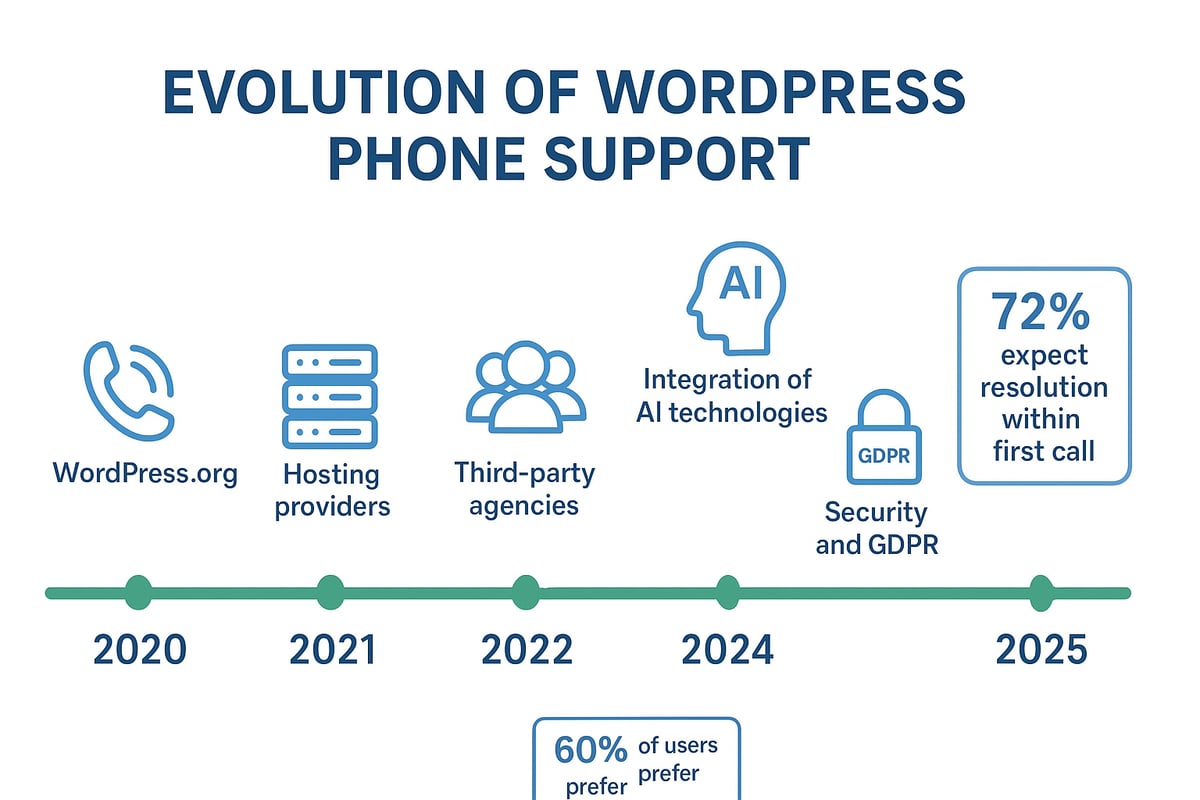
Rise in demand for real-time support solutions
The demand for real-time wordpress phone support has surged as more users expect instant resolutions to website issues. Industry reports from 2024 show that over 60% of WordPress users preferred phone support for urgent scenarios, reflecting a shift from traditional ticket or email systems. This change is driven by the business impact of website downtime, where every minute counts.
Site owners now seek reassurance that help is just a call away, especially during critical incidents such as site outages or security breaches. Fast, responsive phone support has become a key differentiator in the WordPress ecosystem.
Key players and types of WordPress phone support
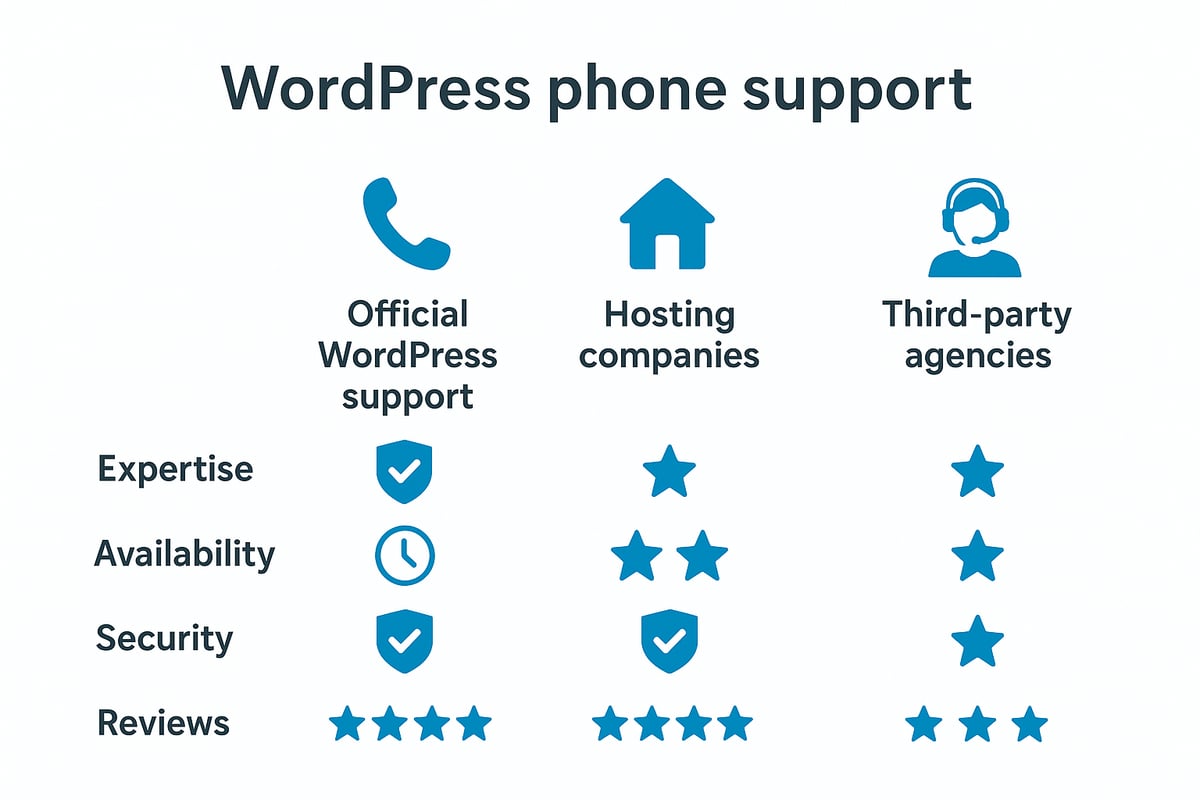
There are several types of wordpress phone support available, each catering to different needs. Official WordPress support, hosting provider helplines, and third-party agencies all play significant roles.
- Official WordPress.org: Offers extensive documentation, but not direct phone support.
- Hosting providers: Companies like SiteGround and Bluehost provide 24/7 helplines.
- Third-party agencies: Specialise in tailored phone support for complex or custom sites.
For a comprehensive overview of available support options, see WordPress website support services.
Trends shaping phone support services
A major trend in wordpress phone support is the integration of AI-driven call routing and smart triage systems. These technologies enable faster, more accurate connections between callers and the right experts.
Other innovations include seamless integration with chatbots and knowledge bases, allowing agents to access relevant information instantly. Remote diagnostics and secure screen sharing are fast becoming standard features, improving the efficiency and quality of support calls.
Limitations and challenges
Despite advances, wordpress phone support is not without its challenges. WordPress.org still does not offer direct phone assistance, which can leave some users searching for reliable alternatives.
Common drawbacks include wait times during peak hours, language barriers for international users, and varying expertise among support staff. It is important for users to manage expectations and understand the limitations of each support channel.
User expectations for 2025
Expectations for wordpress phone support in 2025 are higher than ever. Surveys indicate that 72% of users now expect their issue to be resolved within the first call.
There is a growing demand for personalised, expert-level assistance. Users value support agents who can quickly understand their technical environment and provide actionable solutions without unnecessary delays.
Security and privacy considerations
Security is a central concern in wordpress phone support. With GDPR and evolving data regulations, support providers must ensure that all communications are secure and compliant.
Verifying caller identity is critical to prevent social engineering attacks. Providers are increasingly adopting multi-factor authentication and secure protocols to protect sensitive site data during support interactions.
The future outlook
Looking ahead, automation and hybrid support models are expected to shape the future of wordpress phone support. AI and predictive technologies will continue to enhance call efficiency, while specialised WordPress consultancies will fill gaps where standard support falls short.
As the WordPress ecosystem grows, expert phone support will remain essential for businesses seeking to minimise downtime and maximise site performance.
How to choose the right WordPress phone support provider
Selecting the best wordpress phone support can make a significant difference to the stability and performance of your website. The process involves more than picking the first provider you find. You need to evaluate your requirements, compare expertise, and scrutinise every aspect of the service.
Assessing your business needs and support requirements
Begin by mapping out your website’s scale and complexity. Is your WordPress site a simple blog, a high-traffic e-commerce shop, or a multi-site network? Identify business-critical factors such as uptime, transaction security, compliance, and the potential cost of downtime.
List your top priorities. For some, 24/7 wordpress phone support is essential, while others may need specialised help with plugins or custom themes. Consider whether your team needs guidance with routine troubleshooting or advanced technical issues.
Evaluating provider expertise and credentials
Not all wordpress phone support is created equal. Look for providers with WordPress-certified experts, proven track records, and positive case studies. Ask about their experience with similar sites or industries.
A reputable provider should demonstrate success in resolving urgent incidents swiftly. Review their documentation and troubleshooting guides. For example, providers who contribute to resources like WordPress help and troubleshooting often have up-to-date knowledge and a commitment to ongoing support.
Availability, response times, and SLAs
Availability is a cornerstone of reliable wordpress phone support. Compare providers offering 24/7 cover with those limited to business hours. Review their guaranteed response times and how quickly they escalate urgent issues.
Check for published Service Level Agreements (SLAs) detailing maximum response and resolution times. Fast, predictable support can protect your business from costly outages and lost revenue.
Pricing models and transparency
Pricing for wordpress phone support varies. Common models include pay-as-you-go, monthly subscriptions, and SLA-based contracts. Transparent pricing is vital to avoid hidden charges.
Consider the average costs for UK businesses and what is included at each price point. Some providers bundle proactive maintenance, while others charge separately for emergencies. Always ask for a breakdown of services and any additional fees.
Provider comparison table
| Provider Type | Expertise | Availability | Pricing Model | Best For |
|---|---|---|---|---|
| Hosting company | General | 24/7 | Included/Subscription | All-round support |
| Third-party agency | Specialised | Extended | SLA/Pay-as-you-go | Custom/complex sites |
| Official WP support | Community | Limited | Free (no phone direct) | Basic troubleshooting |
Security protocols and data handling
Security is non-negotiable when choosing wordpress phone support. Ensure that the provider uses secure communication channels and robust verification, such as multi-factor authentication for account access.
Ask how they handle sensitive data and comply with regulations like GDPR. The right provider will have clear processes for protecting your site and customer information during every call.
Customer reviews and reputation
Finally, analyse customer feedback. Read independent reviews, testimonials, and third-party ratings. Look for patterns of unresolved complaints, poor communication, or lack of follow-up.
Red flags include inconsistent service, slow responses, and unclear escalation procedures. A provider with strong reputation and positive reviews is more likely to deliver exceptional wordpress phone support.
Step-by-step: making the most of your WordPress phone support call
Facing an urgent problem on your WordPress site can be stressful, but knowing how to approach wordpress phone support can make all the difference. Use this step-by-step guide to ensure your call is productive, efficient, and leads to a quick resolution.
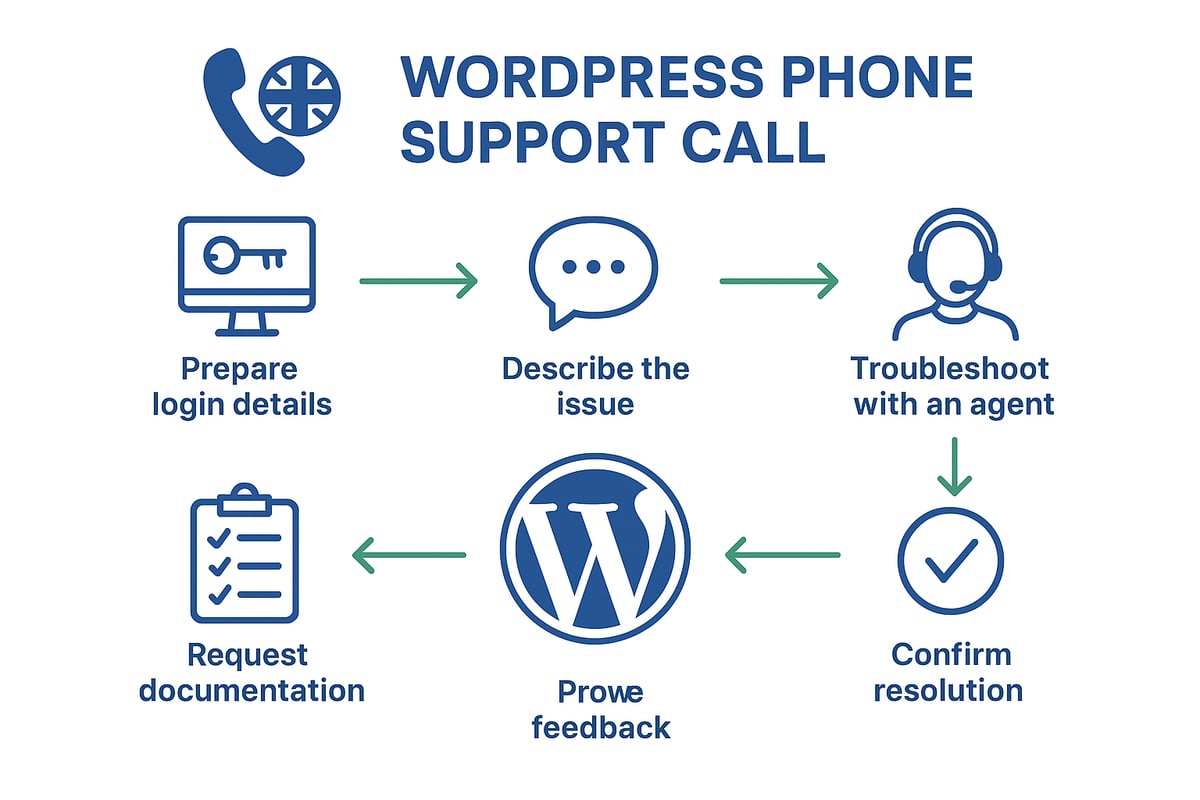
Step 1: Prepare essential site information before calling
Before you pick up the phone, gather all the details you will need for wordpress phone support. Have your WordPress admin login, hosting account credentials, and recent error messages ready. Note any recent changes to your site, such as plugin updates or new themes.
Preparation increases the chances of a swift solution. If your issue is urgent, familiarise yourself with Emergency WordPress support solutions so you know what information support teams may request.
- WordPress admin username and password
- Hosting provider logins
- Recent error codes or messages
- A list of recent site changes
Step 2: Clearly describe your issue
When speaking with wordpress phone support, use specific and concise language. Explain what happened, when it started, and which areas of the site are affected. Mention any error codes, affected URLs, or visible symptoms.
This clarity helps the support agent quickly identify the root cause. If you can replicate the issue, walk the agent through the steps so they understand exactly what you are experiencing.
- State the problem clearly
- Provide screen examples or error codes
- Share the exact steps to reproduce the issue
Step 3: Follow troubleshooting steps with the support agent
During your wordpress phone support call, the agent may guide you through basic diagnostics. Be prepared to disable plugins, switch themes, or clear your cache as instructed.
Stay near your computer so you can act on requests in real time. If you are unsure about any step, ask the agent to clarify before proceeding.
- Disable plugins one by one
- Switch to a default WordPress theme
- Clear browser and site cache
Step 4: Ask clarifying questions and take notes
Do not hesitate to ask the support agent to explain any technical terms or recommended actions. Take notes on solutions, advice, and next steps. This will help you remember what was done and why, making future troubleshooting easier.
- Request definitions for unfamiliar terms
- Write down key instructions
- Clarify any doubts before ending the call
Step 5: Confirm resolution and test your site
Before ending your wordpress phone support call, check that your issue is fully resolved. Test the affected areas, such as checkout pages, login forms, or contact forms, while the agent is still on the line.
This ensures nothing is overlooked and you leave the call with confidence. If possible, ask the agent to stay on the call as you verify each function.
- Test all impacted site features
- Confirm everything works as expected
- Ask the agent to verify with you
Step 6: Request follow-up documentation or resources
After your issue is resolved, request a summary of the call, troubleshooting steps, or links to helpful articles. Many wordpress phone support providers can send a follow-up email or provide checklists for future maintenance.
This documentation is valuable for reference and can help prevent repeat issues.
- Ask for a call summary or email
- Request links to related resources
- Save troubleshooting guides for your records
Step 7: Provide feedback on your support experience
Once your wordpress phone support session ends, share feedback on the quality of service you received. Many providers actively seek input to improve their processes.
Be honest about what worked well and where there is room for improvement. Your feedback helps refine support services for all users.
- Rate your satisfaction
- Suggest ways to improve the experience
- Highlight positive aspects of the call
Tips for efficient communication
Maximise your wordpress phone support experience by staying calm and patient, especially during complex troubleshooting. Use a hands-free device if you need to perform tasks while talking. Keep your answers brief and focused.
Effective communication speeds up resolution and ensures you get the help you need.
- Remain calm and polite
- Use speakerphone for multitasking
- Provide clear, concise responses
Troubleshooting common WordPress issues via phone support
When your site faces a sudden problem, knowing how to use wordpress phone support can make all the difference. Most users encounter recurring issues that phone agents help resolve quickly. Let us explore the most common scenarios and how to navigate them efficiently.
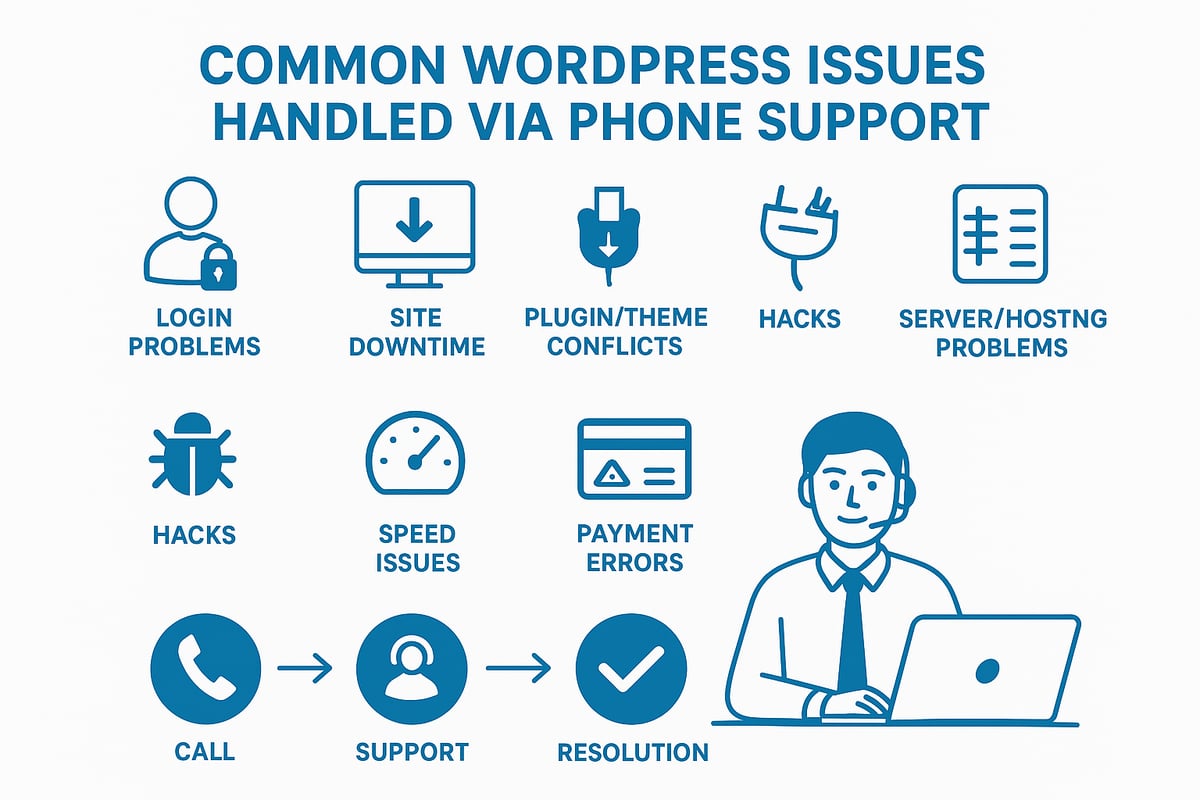
Login and access problems
Login issues are among the top reasons users seek wordpress phone support. Common triggers include lost passwords, locked accounts, or trouble with two-factor authentication. If you cannot access your dashboard, a support agent will guide you through secure password recovery or resetting authentication methods.
Tips for your call:
- Have your email address and username ready
- Share any error messages you see
- Be prepared to confirm your identity for security
With expert guidance, regaining access is often swift, ensuring minimal disruption to your site.
Site downtime and error messages
Unexpected downtime can be stressful. Many users rely on wordpress phone support when their site shows a white screen, 500 internal server error, or database connection failure. According to recent data, over 30% of urgent calls relate to such outages.
To speed up resolution, provide details such as:
- Exact error codes displayed
- Recent updates or changes
- Hosting provider information
A support agent may walk you through server checks or advise if escalation is needed. Acting quickly helps restore your site’s availability.
Plugin and theme conflicts
With thousands of plugins and themes available, conflicts are inevitable. WordPress phone support is invaluable for diagnosing sudden site errors after new installations or updates.
Standard troubleshooting steps include:
- Deactivating all plugins via the dashboard or file manager
- Switching to a default WordPress theme
- Clearing caches and cookies
Agents can help you isolate the problematic extension and recommend safe alternatives. Always note which changes were made before the issue appeared.
Security breaches and hacks
Security incidents require prompt action. If you suspect malware, phishing, or unauthorised login attempts, contact wordpress phone support immediately.
The agent may ask you to:
- Change all site and hosting passwords
- Restore a clean backup
- Update all plugins, themes, and WordPress core
They will also provide advice on preventing future breaches, such as enabling two-factor authentication and regular security scans. Fast intervention limits potential damage.
Performance and speed issues
Slow websites frustrate visitors and harm search rankings. WordPress phone support can assist in diagnosing speed problems, from high server usage to bloated plugins.
During your call, be ready to:
- Share recent performance metrics or test results
- List recent changes to plugins or hosting
- Follow instructions to disable or optimise plugins
Agents may suggest performance plugins or recommend server upgrades for long-term speed improvements. Regular checks keep your site running smoothly.
E-commerce and payment gateway errors
E-commerce sites depend on reliable transactions. If you face checkout failures or payment gateway issues, wordpress phone support will guide you through targeted troubleshooting.
Steps often include:
- Checking WooCommerce or payment plugin settings
- Reviewing payment gateway logs for errors
- Testing the checkout process with different payment methods
A support agent will help identify and resolve misconfigurations, ensuring your customers can complete purchases without interruption.
Hosting and server-related problems
Many technical issues stem from hosting or server misconfigurations. WordPress phone support is essential when dealing with DNS errors, SSL certificate problems, or server outages. Having your hosting account details ready will speed up the process.
Agents may guide you through:
- DNS record checks
- SSL certificate renewals
- Server error log analysis
For deeper insights into resolving these technical challenges, see WordPress hosting support insights. With expert assistance, even complex hosting issues can be addressed promptly, reducing downtime and risk.
Advanced tips for optimising your WordPress phone support experience
Optimising your wordpress phone support can transform your site management, providing both peace of mind and rapid solutions. As WordPress remains the backbone of over 43.5% of all websites globally, the demand for expert phone support is only increasing. Mastering these advanced strategies ensures you get the most out of every call, while building a robust foundation for your site’s ongoing success.
Building an ongoing relationship with your support provider
A consistent relationship with your wordpress phone support provider pays dividends over time. When you work regularly with the same team, they gain a deeper understanding of your site, its quirks, and your business priorities.
This familiarity allows for more personalised advice and faster problem resolution. Schedule regular service reviews, and don’t hesitate to provide feedback after each interaction. Providers can use this input to refine their approach, ensuring you always receive the highest standard of wordpress phone support.
With WordPress powering 43.5% of all websites, it’s crucial to have a dependable support partner who understands the evolving ecosystem. Building trust and open communication is essential for ongoing site resilience.
Leveraging remote diagnostics and screen sharing
Remote diagnostics and screen sharing have become essential tools for effective wordpress phone support. When an agent can see your screen in real time, troubleshooting becomes more accurate and efficient.
Always confirm the security of any remote session, using official tools recommended by your provider. Prepare your system by closing sensitive documents and ensuring your internet connection is stable.
Screen sharing allows agents to walk you through menu settings, plugin configurations, or error messages visually. This approach minimises misunderstandings and speeds up the resolution of complex issues.
Proactive site maintenance and monitoring
Proactive maintenance is a cornerstone of optimised wordpress phone support. Setting up automated alerts for uptime, security threats, and performance dips enables your provider to act quickly, often before you notice a problem.
Many support teams offer site monitoring as part of their service. This includes scanning for outdated plugins, checking for malware, and monitoring server health. With over 59,000 free WordPress plugins available, staying ahead of updates is vital for security.
Regular maintenance calls with your support provider can help you plan upgrades, review recent activity, and address emerging concerns before they escalate.
Preparing a WordPress support checklist for your team
A well-structured checklist streamlines your wordpress phone support interactions. Document key site details, such as admin credentials, hosting contacts, and recent changes, so your team is ready for any emergency.
Include escalation procedures, preferred contact numbers, and a log of previous issues. This ensures that whoever makes the call can provide accurate information quickly, helping agents diagnose problems faster.
Keep your checklist updated as your site evolves. This proactive approach minimises downtime and ensures your support calls are consistently productive.
Integrating phone support with other support channels
Combining wordpress phone support with chat and ticket-based systems offers comprehensive coverage. Multichannel strategies enable you to choose the most effective channel for each situation.
For urgent issues, phone support delivers immediate, human assistance. For non-critical questions, chat or email may suffice. Leading providers offer callback options and integrated support portals for seamless transitions between channels.
This approach also supports users with accessibility needs or those operating in different time zones, ensuring help is always within reach.
Security best practices during phone support calls
Security should always be a top priority during wordpress phone support sessions. Never share your full passwords verbally. Instead, use secure portals or temporary access links as directed by your provider.
Always verify the identity of the support agent before disclosing sensitive site information. Legitimate providers will have strict verification protocols in place to protect your data.
Document any security advice given during the call and implement recommended changes immediately. This vigilance helps prevent social engineering attacks and keeps your site safe.
Keeping up with evolving support technologies
The landscape of wordpress phone support is constantly evolving. AI-powered call assistants, predictive analytics, and advanced triage tools are becoming standard features among leading providers.
Stay informed about new tools and enhancements by subscribing to provider newsletters or attending webinars. Participating in community events, such as WordCamps, is another way to learn about the latest support trends and innovations.
Embracing new technologies ensures your support experience remains efficient and future-proof.
Training your staff for effective support interactions
Regular training empowers your team to make the most of wordpress phone support. Organise internal workshops to practise reporting issues, using checklists, and following escalation protocols.
Role-playing common scenarios builds confidence and clarity, especially for less technical team members. Encourage staff to document their calls and share learnings with the wider team.
Ongoing training ensures everyone knows how to communicate clearly with support agents, leading to faster resolutions and fewer misunderstandings.
Comparing phone support with other WordPress support channels
Choosing the right support channel is crucial when your WordPress site needs help. Each method offers different advantages and challenges, and understanding these can help you resolve issues quickly. Let's explore how wordpress phone support stacks up against other popular options, so you can make informed decisions for your website.
Phone vs. live chat support
WordPress phone support provides immediate, voice-based assistance, which is ideal for urgent or complex issues. Live chat, while also real-time, is often better for straightforward queries or when you need to share links or screenshots. The main benefit of phone support is the personal touch and clarity, as you can explain problems in detail and receive step-by-step guidance. However, you may encounter hold times during peak periods, whereas live chat often offers quicker initial responses. Both methods can be effective, but phone support shines when a human conversation is needed.
Phone vs. email/ticket-based support
With wordpress phone support, you get rapid responses and the chance to resolve issues in a single interaction. Email or ticket-based support, on the other hand, is more suitable for non-urgent problems that require detailed explanations or attachments. While phone support is less documented, tickets create a written record of all communications, which can be useful for tracking and future reference. For complex or ongoing issues, starting with phone support and following up with email can be an efficient approach.
Phone vs. knowledge bases and self-service
Self-service resources, like knowledge bases and plugin documentation, are perfect for tackling basic issues before reaching out for help. In fact, a 2024 survey found 47% of users resolve their problems using these tools before calling. With over 59,000 free WordPress plugins available, there is a wealth of guides and FAQs at your disposal. Still, wordpress phone support is invaluable when the problem is urgent, unclear, or requires expert input.
Hybrid and multichannel support strategies
Many businesses now combine wordpress phone support with other channels, such as chat and email, for comprehensive coverage. This hybrid approach allows users to choose the most appropriate method based on urgency and complexity. For global WordPress sites, multichannel support is especially valuable, as WordPress fully supports 65 languages, ensuring accessibility for a diverse user base. Integrating channels can reduce downtime and improve overall satisfaction.
Cost and resource considerations
WordPress phone support is resource-intensive, often requiring dedicated staff and infrastructure. However, businesses investing in premium phone support frequently report lower average downtime and faster issue resolution. While other channels, like email or chat, may reduce operational costs, they can lead to longer wait times for urgent problems. Evaluating your site's needs and budget will help determine the right balance between cost and support quality.
Accessibility and user experience
For some users, especially those with accessibility needs or limited internet access, wordpress phone support remains vital. Phone conversations offer a direct, human connection that can be more reassuring during stressful technical issues. Multilingual phone support further broadens accessibility, making it easier for site owners worldwide to get the help they need. This focus on user experience is driving the evolution of support services in 2025.
When to escalate from one channel to another
Knowing when to switch from chat or email to wordpress phone support is essential for efficient problem-solving. If your issue is unresolved, time-sensitive, or too complex for written communication, escalating to a phone call is recommended. Clear escalation paths within your support provider's system ensure that critical incidents are prioritised and addressed quickly. This strategic approach minimises downtime and keeps your WordPress site running smoothly.
As you navigate the evolving world of WordPress phone support in 2025, having reliable, expert help just a call away can make all the difference for your business. Whether you’re facing urgent technical issues or looking for ways to future proof your website, you deserve support tailored to your unique needs. At WPCTO, we’re committed to providing rapid response, strategic advice, and ongoing care so you can focus on what matters most—growing your business with confidence. If you’re ready for immediate assistance or want to take your WordPress site to the next level, Contact us now for immediate services and support.