

When your website goes down unexpectedly, every minute can feel like an eternity—especially when lost revenue and customer trust are at stake. In 2025, digital businesses, agencies, and site owners face greater risks than ever, making wordpress emergency support a critical safety net.
This guide is designed to help you confidently identify, respond to, and prevent WordPress emergencies using the latest tools and strategies. You will discover the most common threats, step-by-step response actions, how to choose the right support, and proven prevention methods.
Ready to protect your site and your bottom line? Read on for expert advice and actionable solutions.
Understanding WordPress emergencies in 2025
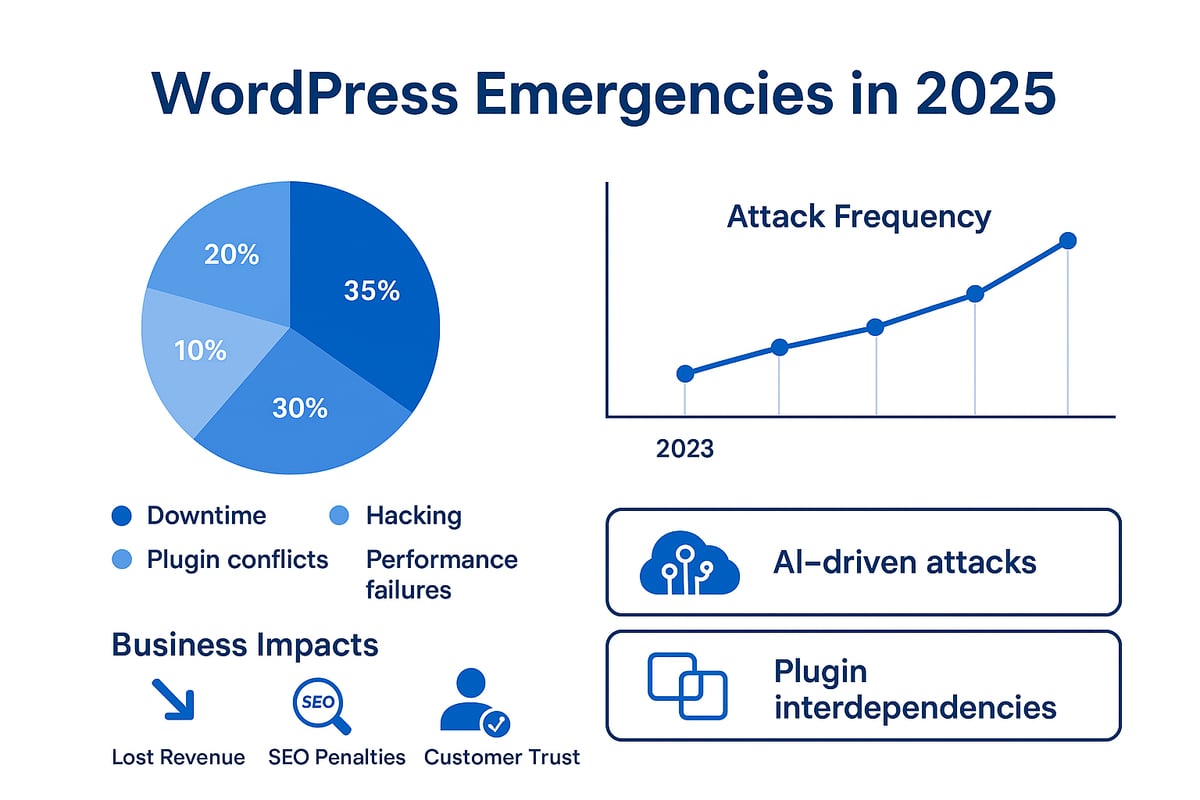
WordPress emergencies are fast becoming a critical concern for site owners in 2025. If your website suddenly goes offline, is hacked, or displays unexpected errors, you are facing a WordPress emergency. These incidents can include site downtime, malicious attacks, severe plugin or theme conflicts, or major performance failures that disrupt normal operations.
The landscape of threats and technical issues is evolving rapidly. According to the 2024 Annual WordPress Security Report by Wordfence, plugin vulnerabilities and DDoS attacks have grown in both frequency and complexity. AI-driven attacks are now targeting WordPress sites, exploiting interdependencies between plugins and themes that did not exist just a few years ago. This means wordpress emergency support must keep pace with increasingly sophisticated risks.
For businesses, the impact of these emergencies is immediate and significant. Downtime can result in thousands of pounds lost per hour for e-commerce sites. A compromised site risks losing customer trust, damaging reputation, and suffering penalties in search rankings. Even a brief outage can lead to customer frustration and long-term loss of revenue. These are not just technical setbacks; they are business-critical events that demand urgent wordpress emergency support.
It is crucial to distinguish between urgent and non-urgent issues. For example, a minor layout bug may inconvenience users but does not require immediate intervention. In contrast, a complete site outage, hacked content, or a critical checkout error demands instant wordpress emergency support. Real-world cases show that swift identification and response save both time and money.
Recent statistics reinforce the need for vigilance. Industry insights reveal that more than 40 percent of WordPress sites experienced a major security or performance incident in the past year. With threats becoming more unpredictable, every site owner and manager must adopt a preparedness mindset. The key is recognising problems early and taking decisive action with wordpress emergency support to minimise downtime and limit damage.
Immediate steps to take during a WordPress emergency
When a WordPress emergency strikes, every minute counts. The right approach can mean the difference between a swift recovery and hours of lost revenue. This step-by-step guide outlines how to take decisive action, leveraging wordpress emergency support best practices to minimise disruption and protect your business.
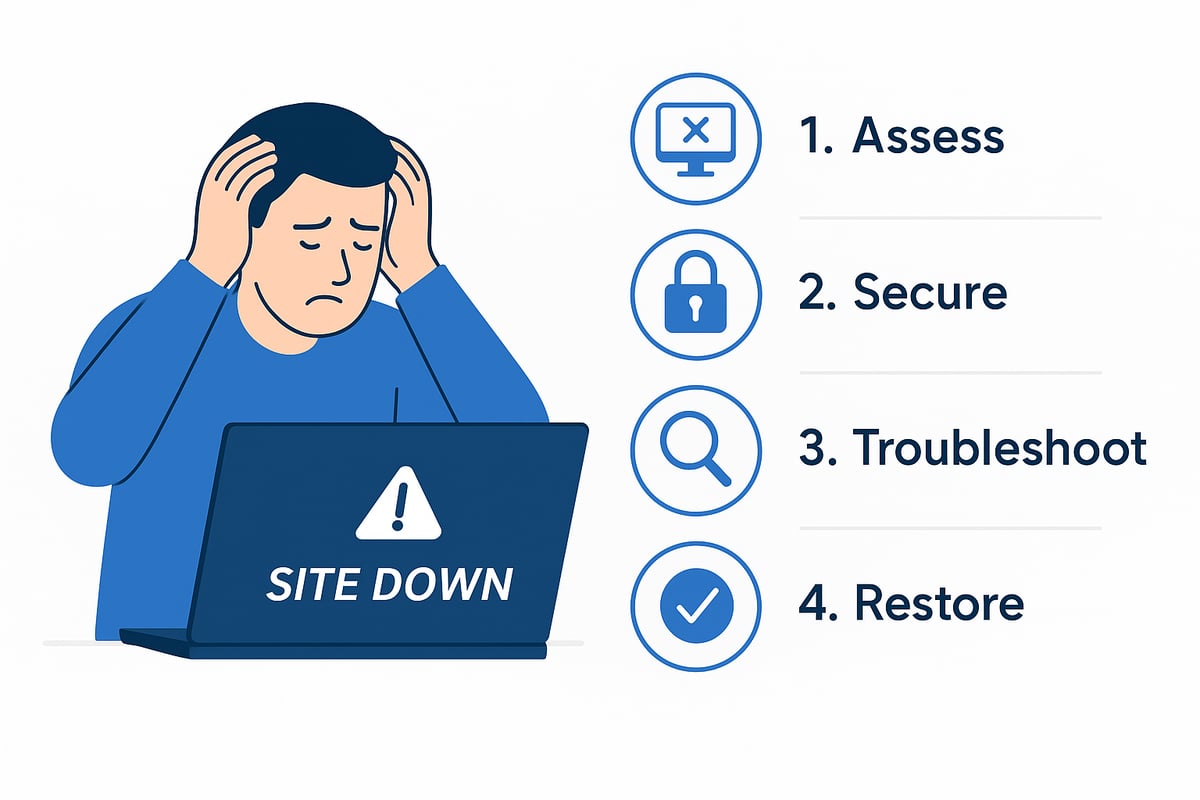
Step 1: Assess the situation quickly
Start by identifying symptoms. Is your site showing a white screen, error messages, suspicious redirects, or is it simply slow? Determine if the issue affects just one page or the entire website.
Use uptime monitoring tools to confirm downtime. Services like UptimeRobot or Pingdom can alert you instantly when your site is offline. Check your email for any recent alerts.
Next, gather information on what changed recently. Did you update a plugin, install a new theme, or add a new user? These clues are vital for effective wordpress emergency support.
For example, a WooCommerce shop owner noticed a sudden drop in sales. Their monitoring tool flagged a checkout error within minutes, letting them act before losing significant revenue.
- Identify visible symptoms (error messages, white screens)
- Confirm the scope (single page vs. entire site)
- Use monitoring tools for alerts
- Note recent changes or updates
The faster you assess, the sooner you can activate wordpress emergency support protocols.
Step 2: Secure your website and data
Before attempting any fixes, back up your entire site. Use your hosting provider’s backup system or a trusted plugin. This ensures you can restore your site if something goes wrong during troubleshooting.
Change all administrator passwords immediately. Review user accounts for any suspicious additions or privilege changes. If sensitive data is at risk, activate maintenance mode or take the site offline to protect visitors.
Run a vulnerability scan to isolate infected files or malicious code. Many competitors recommend security plugins for this purpose. Document everything you find as you go.
For instance, one business owner backed up their site before troubleshooting a suspected hack. When an error occurred during the fix, they restored from the backup—avoiding data loss and minimising downtime thanks to a robust wordpress emergency support strategy.
- Back up your site before making changes
- Change admin passwords and check user accounts
- Use maintenance mode if needed
- Scan for vulnerabilities and document findings
Taking these steps protects your data and reputation while you resolve the crisis with wordpress emergency support.
Step 3: Troubleshoot and diagnose the root cause
With your site secure, begin systematic troubleshooting. Disable all plugins and switch to a default theme like Twenty Twenty-Four to check for conflicts. If the site loads, reactivate plugins one at a time to identify the culprit.
Check your server and WordPress error logs for technical clues. For example:
[25-May-2025 14:22:01 UTC] PHP Fatal error: Uncaught Error: Call to undefined function...
Use a staging environment to test solutions safely before applying them to your live site. If you need rapid results, consider leveraging Quick fixes for urgent WordPress issues, a service designed for immediate intervention during emergencies.
Consult the official WordPress support forums or reputable communities for advice on common errors. Real-world example: a plugin update caused a fatal error, which was quickly identified by disabling plugins and reviewing logs—a textbook wordpress emergency support response.
- Disable plugins and switch to default theme
- Review server and debug logs
- Use staging to test fixes
- Seek guidance from official sources
This methodical approach increases your chances of a fast and effective wordpress emergency support outcome.
Step 4: Restore functionality and monitor
Once you have identified and fixed the root cause, restore your site to full operation. Update or revert plugins as needed, patch vulnerabilities, or roll back to a clean backup if necessary.
Re-enable features gradually, monitoring for any recurring problems. Set up real-time monitoring tools to catch new issues quickly. Maintain transparent communication with your users—let them know what happened and how you are resolving it.
Research shows that sites with clear communication protocols retain more customer trust during outages. For ongoing peace of mind, document your emergency response process for future reference and ensure your wordpress emergency support plan is up to date.
- Apply targeted fixes and restore from backups if needed
- Re-enable features step by step
- Monitor site health in real time
- Communicate openly with users
By following these steps, you can minimise downtime and strengthen your overall wordpress emergency support readiness.
Choosing the right WordPress emergency support in 2025
Choosing the right wordpress emergency support in 2025 is a crucial decision for any business, agency, or site owner. The wrong choice can mean the difference between swift recovery and prolonged downtime. With the stakes higher than ever, making an informed selection is essential.
Evaluating your support options
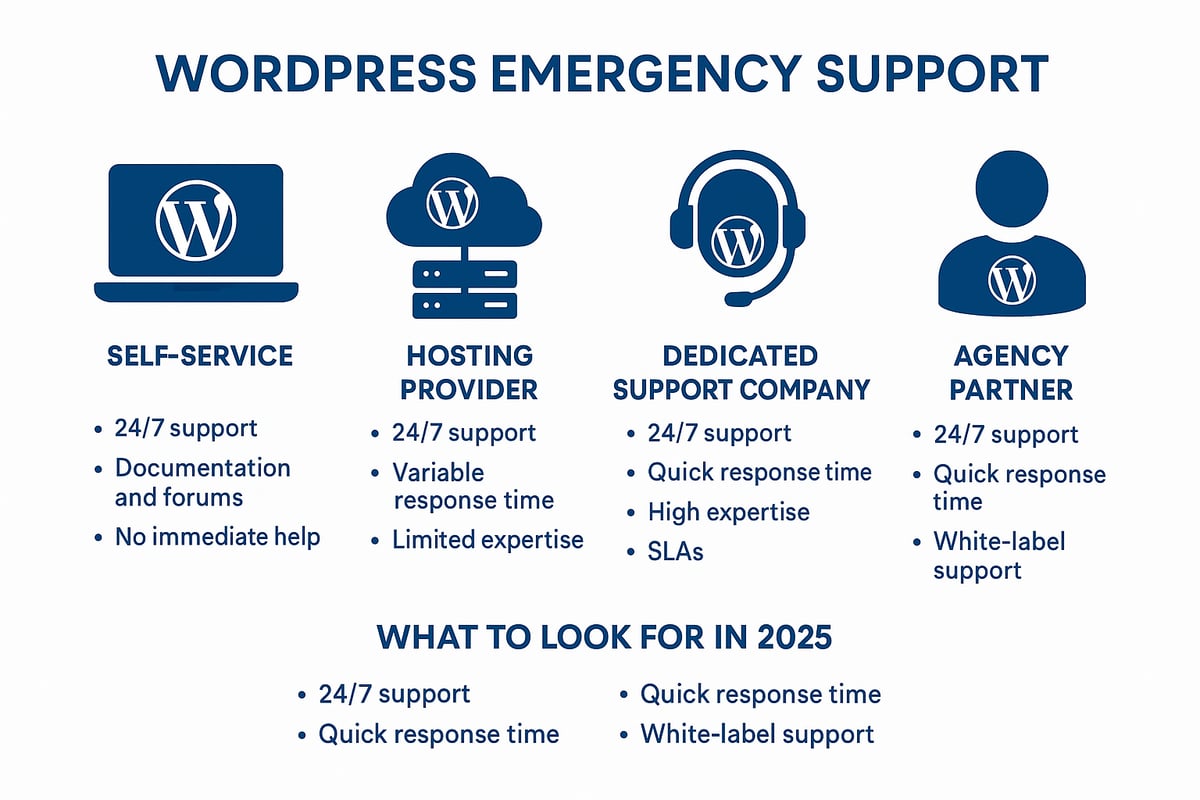
Several wordpress emergency support options are available, each with distinct advantages and limitations. Self-service approaches rely on your own technical skills and time, which can be risky during high-pressure incidents. Hosting providers often offer basic support, but may lack expertise with complex WordPress issues or advanced site configurations.
Dedicated WordPress support companies and agency partners deliver more comprehensive cover. They typically provide round-the-clock availability, fast response times, and deeper understanding of plugin and theme conflicts, security breaches, or performance failures. For an in-depth look at support structures and what each offers, see the WordPress support services overview.
| Provider Type | 24/7 Support | WordPress Expertise | Advanced Features | Response Time | White-label |
|---|---|---|---|---|---|
| Self-service | No | Varies | Limited | Slow/Varies | No |
| Hosting Provider | Some | Basic/Moderate | Basic | Moderate | No |
| Dedicated Support | Yes | Advanced | Extensive | Fast | Yes |
| Agency Partner | Yes | Advanced | Extensive | Fast | Yes |
Comparing features and specialist providers
When selecting wordpress emergency support, focus on these key features:
- 24/7 availability for urgent incidents
- Rapid response, ideally under 30 minutes
- Experience with complex setups, e-commerce, or high-traffic sites
- Proactive monitoring and managed updates
- White-label solutions for agencies managing client portfolios
Specialist providers stand out by offering proactive threat detection, automated backups, and tailored service-level agreements. Pricing varies: pay-as-you-go suits occasional needs, while monthly retainers or SLAs provide predictable costs and priority access. Agencies may benefit from white-label arrangements, allowing them to safeguard multiple client sites under their own brand.
Testimonials, red flags, and real-world examples
Client ratings and testimonials are vital when assessing wordpress emergency support. Top providers like Bobcares and WP Buffs boast Trustpilot ratings of 4.9 out of 5, reflecting reliability and expertise. Look for genuine customer quotes describing rapid issue resolution, clear communication, and ongoing peace of mind.
Beware of warning signs:
- Lack of transparency about pricing or services
- Slow or inconsistent response times
- Limited support scope, especially for custom or high-traffic sites
For example, one digital agency protected dozens of client websites by leveraging white-label emergency support, ensuring seamless recovery and client satisfaction.
Key insight: Making the right choice
The right wordpress emergency support provider can prevent hours of costly downtime and reputational damage. Prioritise those with proven expertise, clear SLAs, and a proactive approach. Investing in the right partner pays dividends in business continuity and customer trust.
Preventing future WordPress emergencies: Best practices for 2025
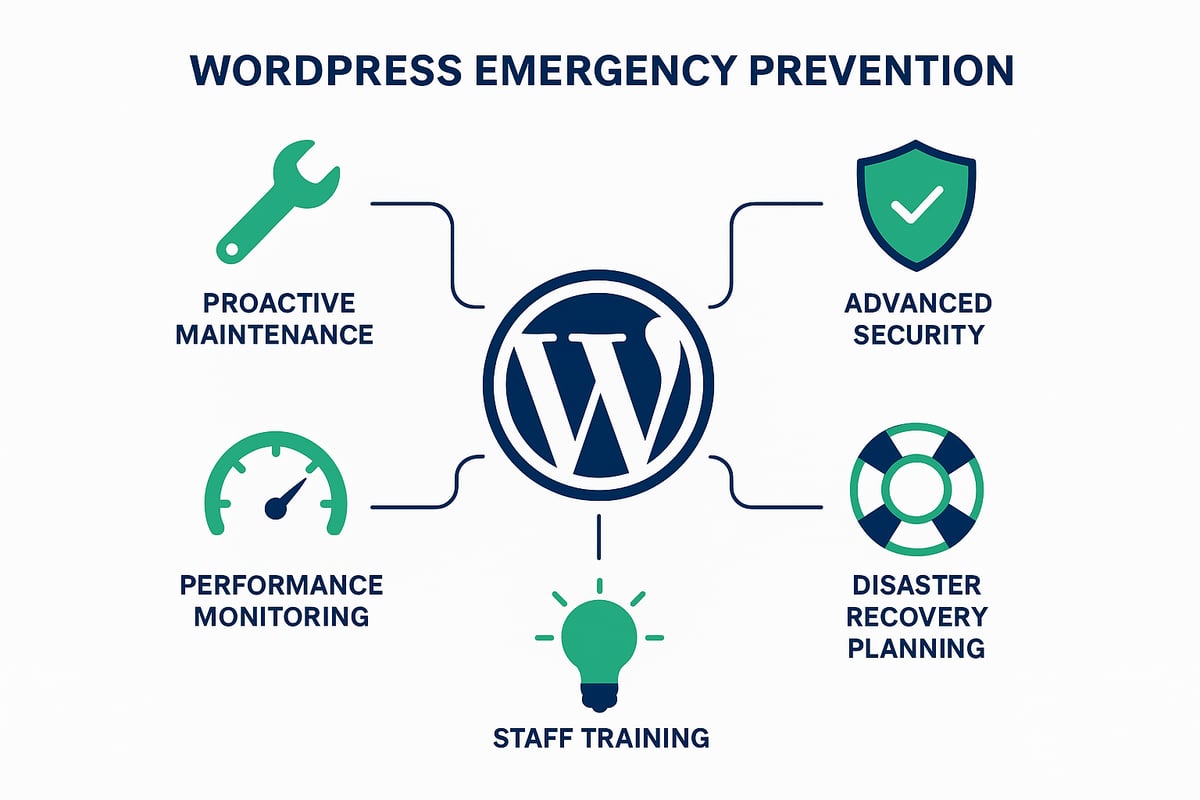
Preventing future issues is the cornerstone of robust wordpress emergency support. Rather than waiting for a crisis, a proactive approach ensures your website remains resilient and responsive. Every business, agency, or site owner should treat prevention as an ongoing investment rather than a one-off task.
Proactive maintenance and updates
Consistent maintenance is essential for effective wordpress emergency support. Schedule regular updates for core files, plugins, and themes. Use staging environments to safely test changes before putting them live, reducing the risk of unexpected failures.
Automate backups with reliable plugins or managed hosting, and verify their integrity weekly. Document your update policies and ensure all team members follow them. For a deeper dive into the fundamentals, see WordPress website support essentials.
- Regularly update WordPress, plugins, and themes
- Test updates in a staging environment
- Automate and verify backups
By embedding these habits, you lay the groundwork for a stable, resilient website.
Advanced security strategies
Security is non-negotiable for wordpress emergency support. Implement multi-factor authentication for all admin accounts, and enforce strong password policies. Regularly audit user roles to prevent privilege creep.
Adopt trusted vulnerability scanners to catch issues early. Apply patches promptly and monitor for zero-day threats. For a comprehensive guide to best practices, read Security and updates for WordPress.
- Use multi-factor authentication
- Enforce strong password policies
- Scan for vulnerabilities and patch quickly
By prioritising security, you dramatically reduce the risk of emergencies.
Performance optimisation and monitoring
Performance problems often lead to emergencies requiring wordpress emergency support. Set up 24/7 uptime monitoring to catch outages instantly. Weekly reporting and real-time alerts help you respond before users are affected.
Optimise your database and hosting environment to minimise downtime. Implement caching, a CDN, and image optimisation to keep your site fast, even during traffic spikes.
| Optimisation Area | Recommended Action |
|---|---|
| Uptime Monitoring | Enable real-time alerts |
| Database | Regularly optimise tables |
| Hosting | Choose scalable solutions |
| Caching/CDN | Activate for all content |
Continuous monitoring and optimisation keep your website healthy and responsive.
Disaster recovery planning
A clear recovery plan is vital for reliable wordpress emergency support. Document emergency response steps, assign roles, and keep contact details up to date. Conduct regular drills to ensure everyone knows their responsibilities.
Maintain offsite backups and verify restoration procedures. Rapid recovery protocols help you bounce back quickly if disaster strikes.
- Write and share your emergency plan
- Hold regular simulation drills
- Keep offsite, easily accessible backups
Preparedness transforms emergencies from chaos into manageable events.
Staff training and awareness
People are your first line of defence in wordpress emergency support. Train staff to recognise phishing attempts, suspicious activity, and basic troubleshooting. Assign clear responsibilities for both prevention and emergency response.
Regularly review your team's understanding and update training as threats evolve. Awareness empowers your team to act decisively and confidently.
- Educate on phishing and suspicious activity
- Assign emergency communication roles
- Refresh training regularly
A knowledgeable team reduces both risk and recovery time.
Example and statistics
Consider a business that avoided a major outage by proactively updating plugins and monitoring site health. Their preparedness meant a critical vulnerability was patched before it could be exploited, eliminating the need for reactive wordpress emergency support.
According to industry benchmarks, businesses with a documented disaster plan recover twice as fast as those without. Investing in prevention strategies not only protects your reputation but also saves time and money in the long run.
Essential tools and resources for WordPress emergency management
Every minute counts during a crisis, so having the right set of tools and resources is essential for effective wordpress emergency support. With the threat landscape evolving and sites becoming more complex, site owners and agencies must be ready to respond quickly, restore service, and prevent future incidents.
Top monitoring and backup tools
Continuous monitoring is the backbone of wordpress emergency support. Uptime monitoring tools such as UptimeRobot and Pingdom instantly alert you when your site goes down. Activity log plugins like WP Activity Log provide detailed records of user actions, helping you track suspicious behaviour. Automated backup solutions, including UpdraftPlus and BlogVault, enable near-instant site restoration. Always schedule backups to run daily and store them offsite for added security.
| Tool | Function | Notable Feature |
|---|---|---|
| UptimeRobot | Uptime monitoring | Real-time alerts |
| WP Activity Log | User activity logs | Detailed audit trails |
| UpdraftPlus | Backups | Cloud storage integration |
By integrating these tools, you gain visibility and control, which are vital for fast incident response in any wordpress emergency support scenario.
Security plugins and firewall protection
Securing your site is non-negotiable in 2025. Leading security plugins such as Wordfence, Sucuri Security, and iThemes Security offer malware scanning, firewalls, and vulnerability patching. According to the State of WordPress Security In 2024, the number of plugin vulnerabilities continues to grow, making proactive protection critical. Enable firewall rules, schedule regular scans, and keep plugins updated to reduce exposure to threats.
Troubleshooting resources and knowledge bases
When facing a wordpress emergency support incident, official WordPress support forums, Stack Exchange, and knowledge bases are invaluable. They offer peer-reviewed solutions and up-to-date advice. Learning from common pitfalls is crucial, as highlighted in the 2024 WordPress Vulnerability Report Shows Errors Sites Keep Making, which details the recurring mistakes site owners make. Bookmark these resources for quick reference during a crisis.
White-label and agency solutions
Agencies managing multiple clients require scalable wordpress emergency support. White-label services from providers like WP Buffs and Bobcares enable agencies to offer 24/7 coverage under their own brand. These solutions include proactive monitoring, managed updates, and instant incident response, ensuring clients’ sites remain protected and operational.
Tips for evaluating new tools
When selecting tools for wordpress emergency support, prioritise compatibility with your WordPress version, regular updates, and strong user reviews. Test tools in a staging environment before deploying to live sites. Look for solutions with clear documentation and responsive support channels.
Example: A digital agency’s toolkit
A London agency responsible for 50+ client sites uses a combination of real-time monitoring, automated backups, security plugins, and white-label support to deliver seamless wordpress emergency support. This integrated approach minimises downtime and keeps client trust intact.
The right mix of tools and resources empowers your team to tackle wordpress emergency support challenges swiftly and confidently.
You’ve seen how quickly WordPress emergencies can escalate in 2025, costing time and revenue if not addressed fast. With the right preparation and expert support, you can minimise downtime and keep your business running smoothly—whether it’s a sudden outage, a security breach, or a complex plugin conflict. If you ever need immediate help or tailored consultancy, there’s no need to tackle it alone. The WPCTO team is ready with proven solutions and a responsive approach, so you can get back on track with confidence.
Contact us now for immediate services and support