

An Azure migration works best as seven steps in a fixed order: plan, discover and assess, build a landing zone, replicate, run a test migration, cut over, then operate and secure. Skip one and the cost shows up later, usually as an outage at the worst possible moment. This guide walks through each step for agencies moving client workloads, including WordPress sites, into Azure, and flags where the work stops being a one-off project and becomes a support burden.
We look after WordPress for design, brand and digital agencies, so we see what happens after the migration project closes. The agency has moved the servers, the client is happy for a week, and then the tickets begin. Much of what follows is about making sure they do not.
TL;DR
- Microsoft’s own guidance splits a migration into discovery and assessment, planning with an Azure landing zone, and execution with a test migration before the final cutover.
- Build the landing zone first. It sets governance, identity, networking and security before any workload moves.
- Never treat a straight “lift and shift” as the finish line. The NCSC warns it carries your existing problems into the cloud.
- Backups are not switched on for you in Azure. Design them, protect them and test restores.
- Work out what ongoing WordPress support is costing your agency with our WordPress Profit Calculator.
Table of Contents
- What an Azure migration actually involves
- Step 1: Plan before you touch the portal
- Step 2: Discover and assess what you have
- Step 3: Build the Azure landing zone first
- Step 4: Replicate your machines to Azure
- Step 5: Run a test migration
- Stop and check: what is ongoing WordPress support costing you?
- Step 6: Plan and execute the cutover
- Step 7: Operate, secure and back up the new environment
- Common mistakes we see agencies make
- Our perspective: the project is the easy part
- How WPCTO fits after the move
- FAQ
- Sources
What an Azure migration actually involves
People search for “Azure migration step by step” expecting a button-click checklist. The tooling does help, but the hard parts are decisions: which workloads move, in what order, with what controls, and who looks after them afterwards.
Microsoft describes the foundation in three phases. First comes discovery and assessment, where you deploy an Azure Migrate appliance to profile on-premises workloads. Then planning, which includes setting up an Azure landing zone for governance. Finally, execution, which includes running test migrations before the production cutover. The same documentation notes that migration projects use a central hub in the Azure portal to track metadata, assessments and migration jobs.
For an agency the scope is usually one of these:
- A client’s on-premises or legacy hosted servers moving into Azure virtual machines.
- A group of client web properties, often WordPress, consolidating onto infrastructure you can manage in one place.
- Your own internal systems, such as file servers and line-of-business tools.
The steps below apply to all three. Where WordPress changes the picture, we say so.
Step 1: Plan before you touch the portal
Start with a written scope. For each workload, record:
- What it does and who depends on it (client, agency team, third-party integrations).
- Where it runs today, and what operating system, database and web stack it uses.
- Its acceptable downtime, and how much data you can afford to lose if something goes wrong.
- Who owns it commercially. Is this your cost, the client’s cost, or a recharge?
That last point is the one agencies skip. If you migrate a client’s site and then absorb the hosting, patching and support without a line on the invoice, you have created unpaid work. Decide at planning stage what you will charge for and what you will hand to a specialist.
Choose a migration strategy per workload, not one for everything. Rehosting (often called lift and shift) is the quickest. Replatforming and refactoring take longer but leave you with a better-run system. We cover why that matters in Step 7.
Step 2: Discover and assess what you have
You cannot size Azure resources from memory. Azure Migrate exists to profile what is running and estimate what it will need in the cloud.
The process in outline:
- Create an Azure Migrate project in the subscription you will use. Microsoft’s documentation states that from November 2025, project creation requires the Owner role or a specific Azure Migrate Owner role, so sort permissions before the day you plan to start.
- Deploy the appliance in your environment. Before deploying it by any method, your Azure account and subscription must meet the role-based access requirements.
- Let it collect data across a representative period. Sizing from a quiet Tuesday will undersize a client site that peaks during a campaign launch.
- Build assessments that show readiness, recommended VM sizes and estimated monthly cost.
Treat the assessment as a conversation starter, not a quote. A server that has been running at 5% CPU for years may simply be oversized, or it may be the box that wakes up every quarter for a payroll or reporting job. Ask the people who use it.
A WordPress-specific discovery list
If WordPress is in scope, capture this alongside the Azure data:
- WordPress, PHP and database versions, and the web server in use.
- Every active plugin and theme, with licence status and last update.
- Scheduled jobs, mail sending method, and any CDN or caching layer.
- Third-party connections: payment gateways, CRMs, form handlers.
- Where media files live and how big the uploads folder is.
A plugin audit is usually where surprises appear: abandoned plugins, a theme modified directly instead of through a child theme, licence keys tied to an old domain. Our guide to checking which plugins a site uses without logging in covers a quick way to start.
Step 3: Build the Azure landing zone first
This is the step most rushed, and the one that decides whether the environment stays manageable. Microsoft explains that an Azure landing zone is the platform foundation for your environment, using management group hierarchies to enforce governance, security and networking standards across subscriptions before you migrate a single workload.
In plain terms, you decide once:
- Identity: how people sign in, using Microsoft Entra ID, and who gets which role.
- Networking: how environments connect to each other and to the internet.
- Security and monitoring: what is logged, who is alerted, and which policies are enforced.
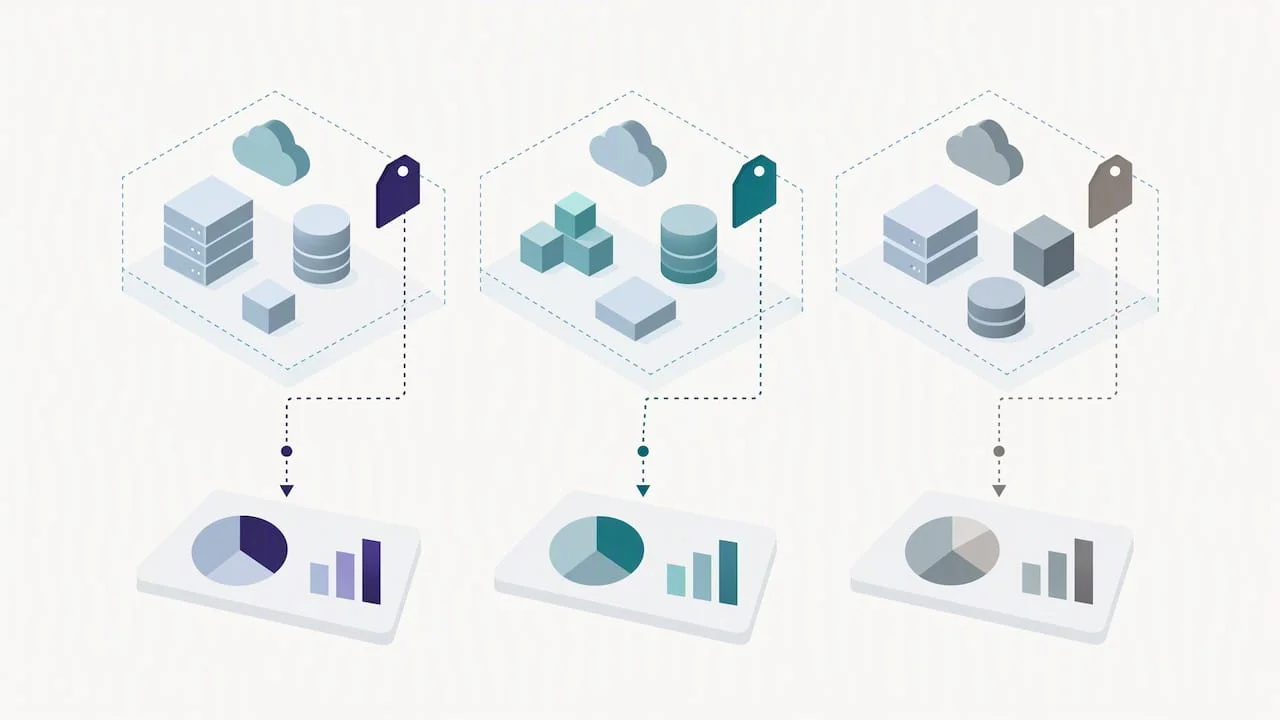
- Governance: naming, tagging, cost allocation and guardrails through Azure Policy.
Microsoft says landing zones manage these shared capabilities centrally, which avoids ad hoc, insecure configurations for each new workload. Its design principles also state that landing zones are meant to support migrations and development, rather than pure infrastructure lift and shift.
On how to build it, Microsoft recommends the infrastructure-as-code accelerator for deploying and managing the platform landing zone, with Bicep or Terraform for scale. A portal accelerator exists for smaller or simpler deployments, which is often the realistic starting point for a small agency with a handful of client environments.
The practical agency question is how to separate clients. A sensible default is one subscription or resource group structure per client, tagged so costs can be reported and recharged. Do not put every client in one flat pile because it was quicker on day one.
Step 4: Replicate your machines to Azure
With the foundation in place, set up replication. Azure Migrate’s migration tool replicates servers into your subscription while the originals keep running. Microsoft’s tutorial shows the same Migration and modernization tool can migrate machines treated as physical servers, which is useful for machines running elsewhere, such as in another public cloud or on a hypervisor you cannot connect directly.
Typical sequence:
- Prepare Azure: permissions, target resource group, virtual network and storage.
- Install the replication appliance or agent and connect it to the project.
- Select the machines and replication settings.
- Wait for initial replication to finish, then let delta replication keep the copy current.
Migrate in waves. Start with a low-risk internal system to prove the process, then move client workloads, least critical first. Do not schedule your busiest client for wave one.
An agency that also needs fresh servers rather than migrated ones should think about how new environments get created. Our note on automating server provisioning is a useful lens for the operational changes that come after the move, because repeatable builds matter as much as the move itself.
Step 5: Run a test migration
This is the step agencies are tempted to skip when a deadline looms. Do not. Microsoft’s guidance is to run a test migration into a non-production virtual network, so you can validate the application and its identity dependencies without touching the live system.
What to check during the test:
- The site or application loads and behaves correctly end to end.
- Logins work, including single sign-on and any directory integration.
- Database connections, scheduled jobs and outbound email function.
- Performance is acceptable under realistic load.
- Backups and monitoring are actually reporting.
For WordPress, do the test on a staging copy with a hosts-file override or temporary URL, then check forms, checkout, search, caching and any plugin that stores absolute URLs. Our staging checks for WordPress themes list the sort of things that break first.
Write down what failed and how you fixed it. That becomes the runbook for the real cutover.
Where this is likely to break
Connectivity and identity are the usual culprits. The NCSC points out that trusted identity is a critical dependency for recovery: if your identity system is compromised or poorly configured, everything downstream is at risk. A test migration is where you find out that a service account, a DNS entry or a firewall rule was quietly holding the old setup together.
Stop and check: what is ongoing WordPress support costing you?
Before the cutover, it is worth pausing on the business side. Every client site you migrate will generate updates, fixes and questions long after the project fee is paid. If those hours are going unbilled, the migration has made the problem bigger, not smaller.
Our free WordPress Profit Calculator for agencies takes under 90 seconds and shows how much uncaptured revenue is sitting in your existing WordPress client base. Run it before you finalise the plan, and you will know whether the support work belongs in your team or with a specialist behind you.
Step 6: Plan and execute the cutover
The cutover is the moment production traffic moves. With a tested runbook it should be dull. Make it dull.
- Agree the window with the client in writing, ideally outside their trading peak. Avoid Friday evenings; nobody wants a weekend of recovery.
- Lower DNS TTLs a few days ahead so the switch propagates quickly.
- Freeze changes on the source system: no content edits, no plugin updates, no orders if it is a shop.
- Run the final migration, which performs a last sync and brings the Azure copy up.
- Validate against the same checklist you used in testing.
- Switch DNS and traffic, then monitor closely.
- Keep the source system untouched and offline-ready for a defined rollback period.
Many agencies fail here by rushing. Set a rollback decision point in advance: if X is not working by a stated time, you revert and try again. Deciding this under pressure leads to bad calls.
If the site is public-facing and its address or URLs change, protect search visibility too. Redirect mapping and post-move crawl checks matter, and a good primer on site migration SEO and mapping every URL will help your team plan the redirect work.
Step 7: Operate, secure and back up the new environment
The migration is not finished when traffic flips. This is where many projects quietly fail, because the team treats Azure as somebody else’s data centre.
The NCSC is direct on this. Its guidance describes lift and shift as replicating an existing system machine for machine in the cloud, and its blog notes that a basic lift and shift leaves you with the highest level of management responsibility compared with other strategies. In other words, you keep the old patching, the old vulnerabilities and the old technical debt, and you now pay cloud prices for them.
Backups need designing
Backups are not automatically enabled when you migrate. You have to configure them, and the NCSC’s principles for more resilient cloud backups stress that testing your backup regime matters as much as taking backups. The NCSC also advises treating backups as a primary infrastructure dependency and keeping them separate from the main production environment, so that ransomware cannot reach both. Its incident guidance adds that restoring from backups can take considerable time, so align expectations with your business continuity plan.
For WordPress, that means separate rules for files and the database. Our articles on matching recovery targets to WordPress backups and backup baselines and handoff checklists set out frequencies that make sense for agency-managed sites.
Security and patching
After the move, set up recurring work:
- Operating system, PHP, WordPress core, plugin and theme updates on a schedule, tested on staging first.
- Monitoring and alerting tied to someone who will actually respond.
- Access reviews so former staff and contractors lose their rights.
- Malware and vulnerability checks. See our practical tasks to prevent website hacking for what is worth doing every week.
None of that is glamorous, and none of it is why a client hired a brand or design studio. It is, however, what keeps the site up.
Common mistakes we see agencies make
| Mistake | What goes wrong | What to do instead |
|---|---|---|
| Skipping the landing zone | Each client environment is configured differently and nobody can govern them | Build the foundation first and reuse it |
| Sizing from a short sample | Servers are too small at peak or too large all year | Collect data over a representative period |
| No test migration | Identity, DNS or plugin issues appear in production | Test in a non-production network and write the runbook |
| Assuming backups exist | A failure or attack finds nothing to restore | Configure, isolate and test restores |
| Treating Azure as a data centre | Old patching and security gaps move with the workload | Adopt automated patching and managed identity |
| Absorbing support for free | Hours leak out and margins shrink | Agree a paid support model before cutover |
Our perspective: the project is the easy part
We have sat on the other side of many agency migrations, and the pattern is consistent. The migration project has a start, an end and a budget. What follows has none of those, and that is where agencies lose money and attention.
A migration is usually sold as a technical event. In practice it hands the agency a new set of responsibilities: patching, monitoring, backups, incident response, and a client who now believes you are their technical safety net. If your team is made up of designers, strategists and account managers, that is not a role you set out to take on. The Sunday evening call about a site that is down is not a creative problem, and it rarely arrives with a purchase order.
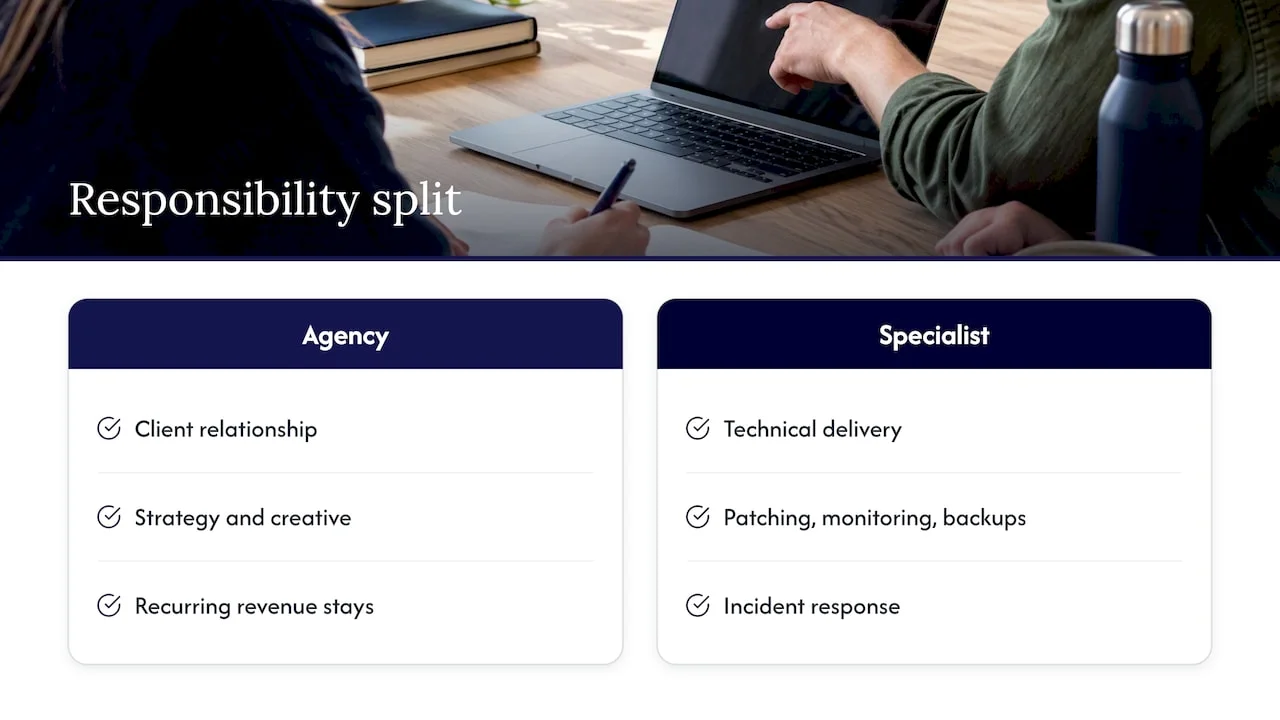
Our advice is to decide who owns each part before you migrate. Keep the client relationship, the strategy and the creative work. Put the technical delivery in the hands of a specialist who works invisibly behind your brand, so your team never touches a support ticket and the recurring revenue stays with you. That is what we built WPCTO to do, and it is why we recommend agencies work through the commercial question as seriously as the technical one.
If you have a planned migration and are not sure what it will leave you holding, talk to us before the cutover, not after the first outage.
— Marcel
How WPCTO fits after the move
Once your client sites are running where you want them, we can take the ongoing WordPress work off your hands. That includes hosting, re-hosting and migration services, security updates and enhancements, and fractional CTO input when you need a senior technical view on architecture or suppliers. Our Service Level Agreements are published at £450 a year for Bronze, £750 a year for Silver and £1,850 a year for Gold, so you can see how support would be structured. For one-off requests there is also Buy Time, and our services page covers quick fixes and advice.
The quickest way to see whether this makes commercial sense for you is the WordPress Profit Calculator. It takes under 90 seconds, costs nothing and shows the revenue your current client base is not yet capturing.
FAQ
How long does an Azure migration take?
It depends on the number of workloads, their complexity and how much data must replicate. A single simple server can move within days once the landing zone and permissions are in place, while a multi-client estate is planned in waves over weeks or months. The assessment data collection period and the test migration are the stages you should not compress.
Do I need an Azure landing zone for a small migration?
Microsoft treats the landing zone as the foundation for governance, identity, networking and security before workloads move. For a small environment you can use the portal accelerator rather than a full infrastructure-as-code approach. Skipping it altogether tends to create inconsistent setups that are hard to secure later.
Is lift and shift a good way to start?
It is the fastest route, but the NCSC cautions that it keeps the highest level of management responsibility with you and carries existing problems across. It can be a sensible first stage if you plan to modernise afterwards, with patching, identity and backups addressed straight away.
Are backups included when I migrate to Azure?
No. You must design and configure them yourself, keep them separate from production and test that restores work. Treat them as a core dependency of your recovery plan, not an afterthought.
Who should manage WordPress sites after migration?
Someone with the time and skills to update, monitor, secure and restore them. If your agency would rather focus on creative and strategic work, a specialist WordPress partner can handle delivery behind your brand while you keep the client relationship.
Sources
- Migrate machines as physical servers to Azure, Microsoft Learn
- What is an Azure landing zone?, Microsoft Learn
- Azure landing zone design principles, Microsoft Learn
- Platform landing zone implementation options, Microsoft Learn
- How to lift and shift successfully, NCSC
- New cloud guidance: how to lift and shift successfully, NCSC
- Our new principles to help make cloud backups more resilient, NCSC
- What to do when cyber attacks disrupt your organisation, NCSC