

A single missed update can turn a WordPress site into an easy target for cyber attacks. With millions of websites relying on WordPress, keeping your site current is no small matter. Updates do more than patch security holes, they also introduce new features and speed improvements that keep your site running smoothly. Whether you manage a business or a personal blog, knowing the real impact of WordPress updates can be the difference between a thriving website and a vulnerable one.
Table of Contents
- Defining The Role Of WordPress Updates
- Types Of Updates: Core, Themes, Plugins
- How Updates Improve Security And Performance
- Risks Of Skipping Or Delaying Updates
- Best Practices For Managing WordPress Updates
Key Takeaways
| Point | Details |
|---|---|
| Importance of Updates | WordPress updates are essential for security, performance, and functionality, protecting against cyber threats and improving site efficiency. |
| Types of Updates | There are three main types of updates: Core (platform-wide improvements), Theme (aesthetic and structural changes), and Plugin (enhancements and security fixes). |
| Risks of Neglect | Failing to update can lead to severe security vulnerabilities, decreased performance, and technological obsolescence, compromising your digital presence. |
| Best Practices | Utilize staging environments for testing updates and implement comprehensive backup strategies to safeguard against unforeseen complications during updates. |
Defining the Role of WordPress Updates
WordPress updates are far more than routine software maintenance. They represent strategic interventions that protect, enhance, and evolve your website’s core functionality, security, and performance. Understanding these updates requires recognising their multifaceted role in maintaining a robust digital presence.
At its fundamental level, a WordPress update serves multiple critical purposes. Security patches form the primary defensive mechanism, closing potential vulnerabilities that could expose your website to cyber threats. According to WordPress, the platform’s global influence and commitment to continuous improvement underscores the importance of staying current with these updates.
The role of WordPress updates extends beyond mere security. These updates introduce:
- Performance optimisations that improve website loading speeds
- Bug fixes that resolve underlying technical issues
- New features and functionalities that expand website capabilities
- Compatibility improvements with emerging web technologies
With WordPress’s substantial global community of 2.3 million social media followers and millions of event participants, updates represent a collaborative effort to continuously refine and strengthen the platform. WordPress Update Service can help website owners navigate these critical maintenance processes efficiently and strategically.
Effective WordPress updates are not just technical procedures but strategic investments in your digital infrastructure. They ensure your website remains secure, fast, and competitive in an increasingly dynamic online landscape. Regular, professional management of these updates can prevent potential disruptions, protect against security risks, and maintain optimal website performance.
Types of Updates: Core, Themes, Plugins
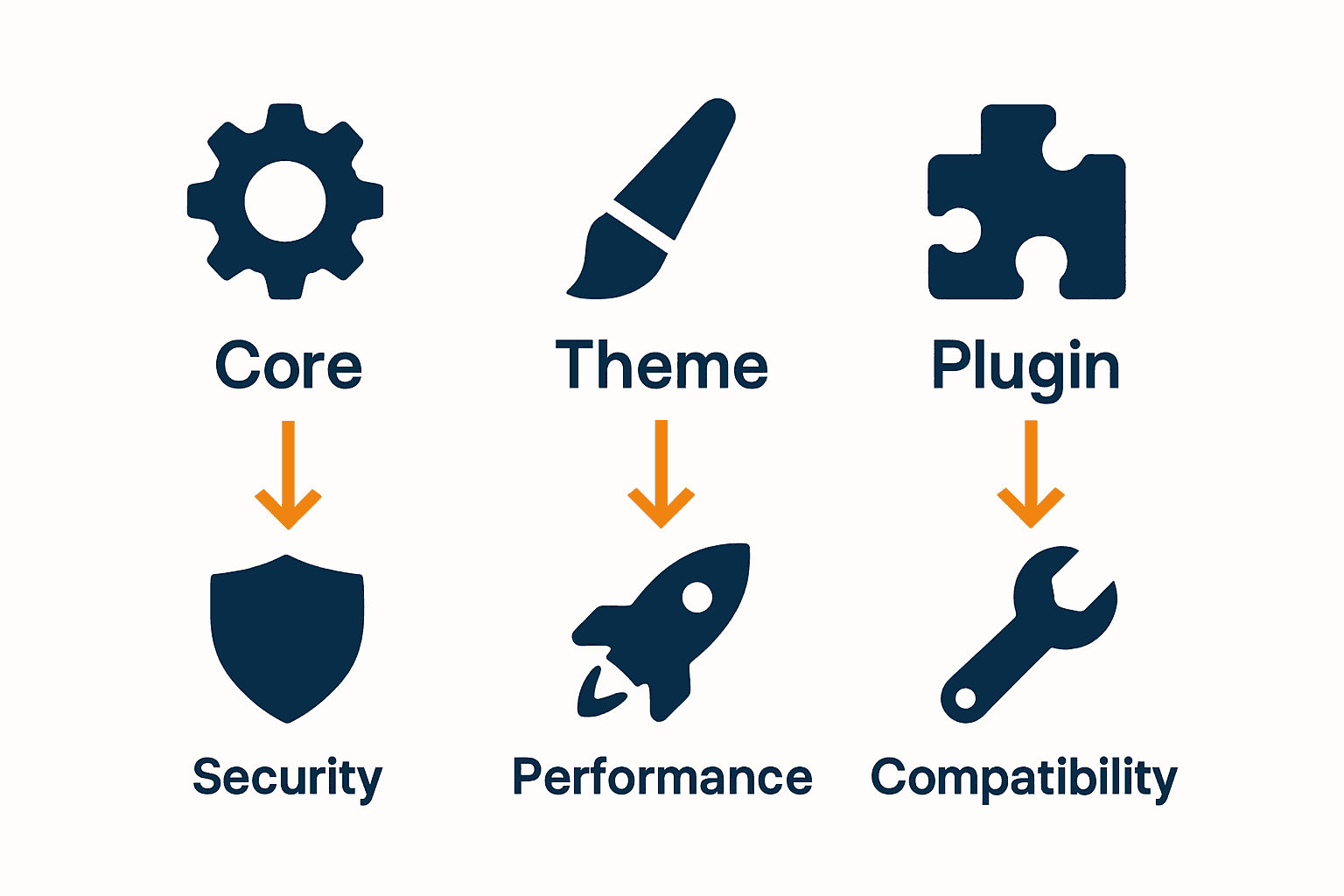
WordPress updates are categorised into three distinct types, each serving a unique and critical purpose in maintaining your website’s health, functionality, and security. Understanding these different update types is essential for comprehensive website management and strategic digital maintenance.
Core Updates represent the fundamental backbone of WordPress functionality. These updates are released directly by WordPress developers and encompass critical improvements across the entire platform. They typically include:
- Security patches to address potential vulnerabilities
- Performance optimisations
- Bug fixes
- New features and functionalities
- Compatibility enhancements with emerging web technologies
Theme Updates focus specifically on the visual and structural elements of your website. These updates can introduce design improvements, fix theme-specific bugs, enhance responsiveness across different devices, and ensure compatibility with the latest WordPress core versions. Regularly updating themes helps maintain a professional, modern appearance while preventing potential design and functionality conflicts.
Plugin updates are perhaps the most diverse and critical component of WordPress maintenance. Each plugin update can potentially:
- Resolve security vulnerabilities specific to that plugin
- Improve performance and efficiency
- Add new features or integrations
- Ensure compatibility with the latest WordPress core and other plugins
Navigating these updates requires a strategic approach. WordPress Maintenance Explained offers comprehensive insights into managing these critical updates effectively. By understanding and proactively managing core, theme, and plugin updates, website owners can ensure their digital presence remains secure, performant, and technologically current.
How Updates Improve Security and Performance
WordPress updates are a strategic shield against digital vulnerabilities, acting as a continuous improvement mechanism that protects and enhances your website’s core infrastructure. These updates go far beyond simple maintenance, representing a proactive approach to digital security and operational efficiency.
Security enhancements form the primary objective of most WordPress updates. According to prashantwp, recent developments like WordPress 6.8’s introduction of bcrypt password hashing demonstrate the platform’s commitment to robust security. This advanced password protection mechanism increases the computational complexity required to breach user credentials, providing a sophisticated defence against potential cyber threats.
Performance optimisation is another critical dimension of WordPress updates. These updates systematically address:
- Code inefficiencies
- Database query optimisations
- Reduced loading times
- Enhanced server resource management
- Improved caching mechanisms
Ethernet Servers emphasises that performing regular updates across core systems, themes, and plugins is fundamental to closing potential security gaps. This approach not only mitigates risks but also ensures your website remains technologically contemporary and operationally resilient.
Ultimately, WordPress updates represent an ongoing investment in your digital infrastructure. By consistently applying these updates, website owners can maintain a secure, high-performing online presence that adapts to evolving technological landscapes and emerging cybersecurity challenges. Regular, strategic updates transform potential vulnerabilities into opportunities for continuous improvement and digital excellence.
Risks of Skipping or Delaying Updates
Procrastinating on WordPress updates is not merely a technical oversight but a potentially catastrophic decision that exposes your digital assets to significant vulnerabilities. The consequences of neglecting these critical updates extend far beyond simple performance issues, potentially compromising your entire online infrastructure.
Security vulnerabilities represent the most immediate and dangerous risk of delaying updates. According to Wordfence, many sites intentionally disable automatic updates, even for critical security issues, which dramatically increases their chances of being compromised. This approach transforms your website from a protected digital space into an open invitation for cybercriminals.
The potential risks of skipping WordPress updates include:
- Increased susceptibility to malware infections
- Potential data breach scenarios
- Compromised user information
- Reduced website performance
- Higher likelihood of complete system vulnerability
WP Engine emphasises that un-patched core installations are often the primary attack vector, as WordPress updates are specifically designed to close existing security gaps. Delaying these updates is equivalent to leaving your digital front door wide open, inviting potential cyber threats to explore and exploit your system’s weaknesses.
Beyond security, skipping updates can lead to progressive technological isolation. As WordPress evolves, outdated websites become increasingly incompatible with modern web standards, plugins, and emerging technologies. This can result in degraded user experience, reduced site functionality, and potential complete system failure. The minimal time investment in regular updates pales in comparison to the potential costs of a comprehensive website rebuild or recovery from a significant security breach.
Best Practices for Managing WordPress Updates
Managing WordPress updates requires a strategic, systematic approach that balances security, performance, and operational continuity. Successful update management is not about blind automation but thoughtful, informed decision-making that protects your digital infrastructure while minimising potential disruptions.
Staging environments play a critical role in update management. Before applying any updates to your live website, creating a duplicate testing environment allows you to preview potential changes, identify compatibility issues, and mitigate risks. This practice enables website owners to:
- Verify plugin and theme compatibility
- Test functionality across different configurations
- Identify potential conflicts before production deployment
- Validate performance impacts
- Ensure seamless user experience
According to Ethernet Servers, regularly updating WordPress core, themes, and plugins is fundamental to closing potential security gaps. 7-Step Website Maintenance Checklist recommends establishing a consistent update schedule that minimises potential downtime and security vulnerabilities.
Implementing robust backup strategies is another crucial aspect of WordPress update management. Before initiating any updates, creating comprehensive backups ensures you can quickly restore your website to a previous state if unexpected complications arise. This approach transforms update management from a potential risk into a controlled, predictable process that maintains your website’s integrity and performance.

Keep Your WordPress Site Secure and Performing at Its Best
Understanding the crucial role of WordPress updates reveals the risks of skipping vital security patches and performance improvements. If you feel overwhelmed by the technical challenges of managing core, theme, and plugin updates or worry about introducing disruptions on your live site, you are not alone. These updates are essential yet often complex tasks that require expert handling to protect your website from vulnerabilities and keep it running smoothly.
Take control of your WordPress maintenance today with professional support from WPCTO.net. Our specialised services ensure your site benefits from timely updates, robust security enhancements, and seamless performance optimisation without the headache. Learn how our strategic consulting and hands-on management can transform your update process and safeguard your digital presence. Explore how WordPress Maintenance Explained can guide your journey or visit our homepage at WPCTO.net to get started with expert assistance now.
Frequently Asked Questions
What are the main types of WordPress updates?
WordPress updates can be categorized into three main types: core updates, theme updates, and plugin updates. Core updates improve the fundamental functionality of WordPress, theme updates enhance the visual and structural aspects, and plugin updates ensure additional functions and security in specific extensions.
How do WordPress updates improve website security?
WordPress updates include security patches that close vulnerabilities, enhance password protection, and introduce advanced security features to protect against cyber threats, reducing the chance of malware infections and data breaches.
What risks are associated with skipping WordPress updates?
Neglecting WordPress updates can lead to increased vulnerabilities, including heightened susceptibility to malware, potential data breaches, and reduced website performance. It can also result in technological isolation as outdated sites may struggle with compatibility issues.
What are best practices for managing WordPress updates?
Best practices for managing updates include using staging environments to test changes before going live, establishing a consistent update schedule, and implementing robust backup strategies to ensure website integrity and minimize downtime.