

Did you know that WordPress sites face tens of thousands of cyberattacks every day, with vulnerabilities on the rise for 2025? As digital threats evolve, reliable wordpress website support is more crucial than ever for business owners seeking peace of mind. This expert guide will walk you through essential support strategies, from routine maintenance and airtight security to troubleshooting and performance optimisation. You will also discover how to choose the right support partner and prepare for future trends, empowering you to keep your website secure, fast, and resilient in the year ahead.
Understanding WordPress Website Support in 2025
WordPress website support in 2025 means more than just fixing problems as they arise. It is about creating a robust system that keeps your site secure, fast, and reliable, no matter what the year brings.
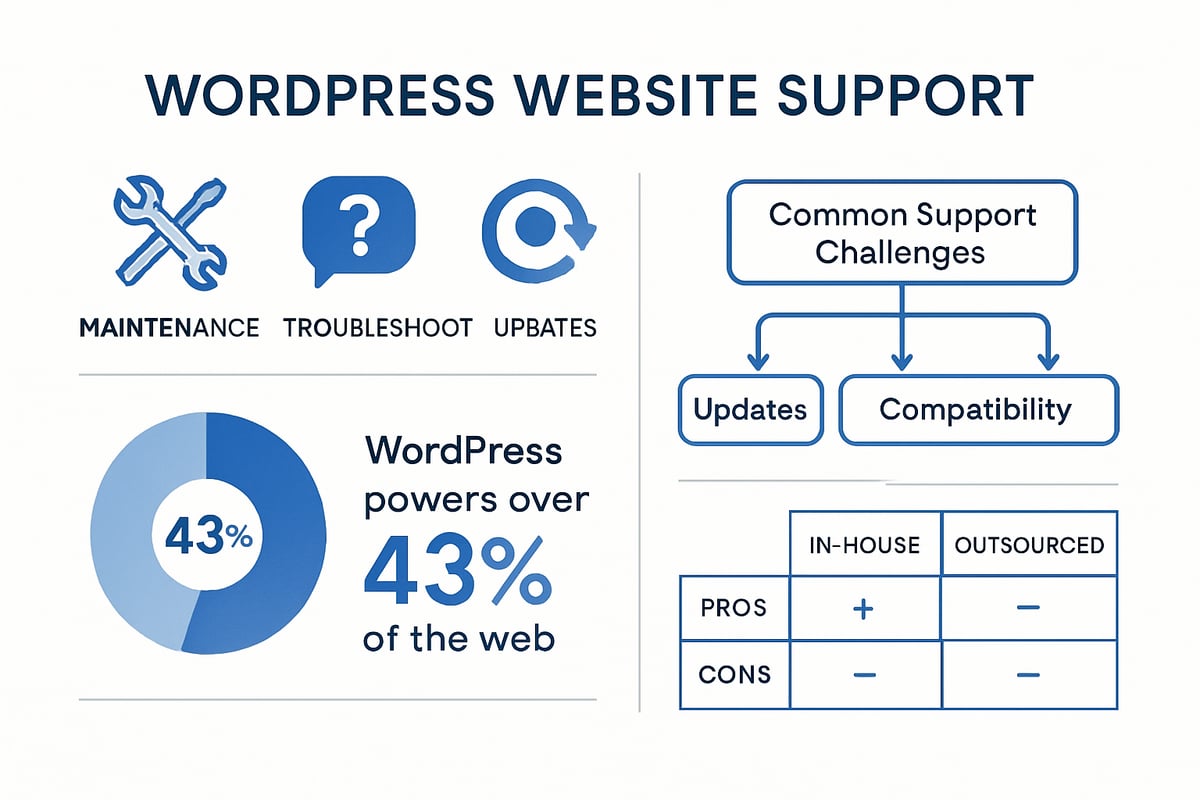
What Constitutes WordPress Website Support?
At its core, wordpress website support covers ongoing maintenance, troubleshooting, regular updates, and performance optimisation. This proactive approach differs from ad-hoc fixes, which only address issues after they arise, often leading to higher risks.
Key components of wordpress website support include:
- Security monitoring and threat prevention
- Speed and performance tuning
- Timely updates for WordPress core, themes, and plugins
- Automated backups with restore options
- User and admin support
Proactive support focuses on preventing problems, not just reacting to them. This results in a more stable and secure website environment.
Why Support Matters More Than Ever in 2025
In 2025, wordpress website support is crucial because WordPress now powers over 43% of all websites globally. This popularity makes it a prime target for hackers and malicious bots.
The rise in cyberattacks and plugin vulnerabilities means that even small gaps in support can lead to serious breaches. Downtime is costly, not only in lost sales but also in damaged search rankings and reputation.
Reliable wordpress website support reduces these risks, ensuring your site is always available, fast, and trusted by users and search engines alike.
Key Support Challenges Facing Site Owners
Site owners face unique challenges with wordpress website support in 2025. Frequent updates for WordPress core and plugins are now the norm, making it easy to fall behind.
Compatibility issues between plugins or themes can lead to unexpected errors and site breakage. Sophisticated security threats, including malware and phishing, require constant vigilance.
Common support challenges include:
- Keeping all components up to date
- Preventing and resolving plugin or theme conflicts
- Detecting and removing malware quickly
Effective wordpress website support means staying ahead of these issues before they impact your business.
Types of Support Available: In-House vs. Outsourced
There are two main ways to approach wordpress website support: managing it internally or outsourcing to experts. Handling support in-house gives you direct control but demands time, technical skill, and ongoing training.
Outsourcing offers access to comprehensive expertise, rapid response times, and up-to-date best practices. Support models include retainers, pay-as-you-go, and emergency-only services. For a detailed comparison, see Comparing In-House vs. Outsourced Support.
Choosing the right model ensures your wordpress website support matches your business’s needs and resources.
Essential Maintenance Tasks for WordPress Sites
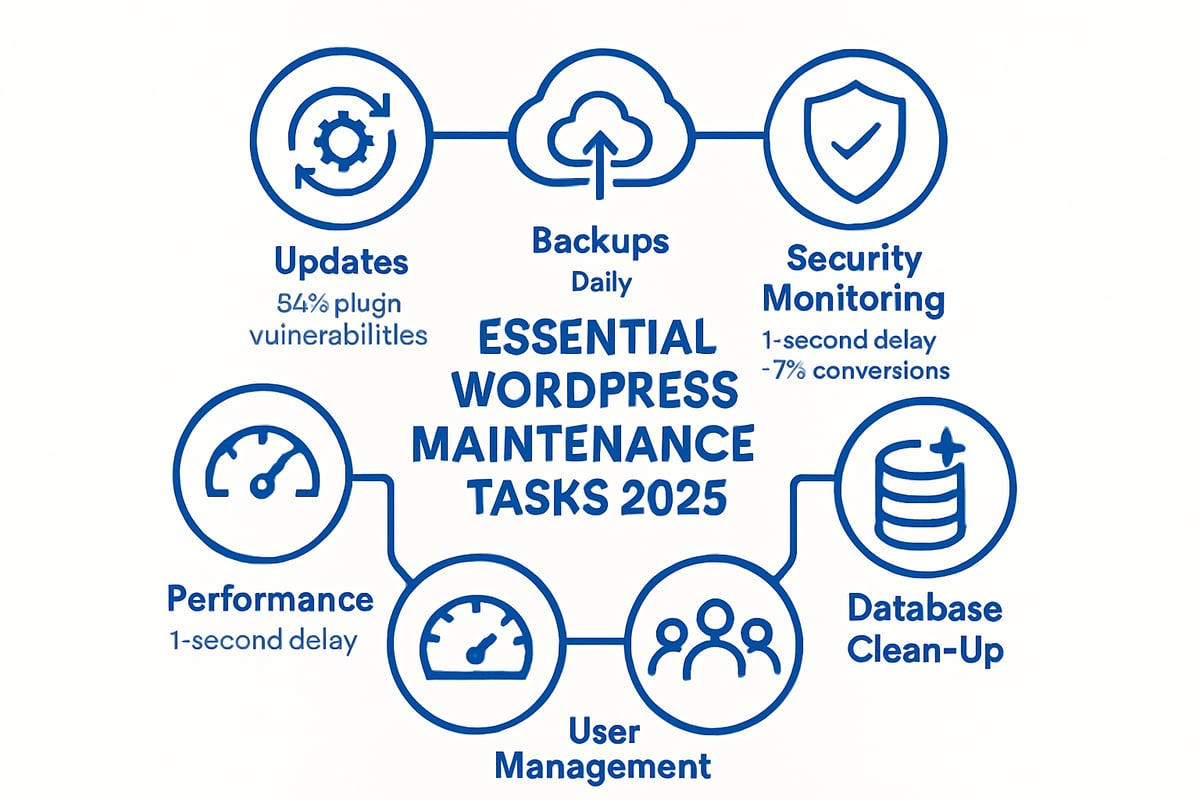
Maintaining a robust WordPress website support routine is critical for keeping your site secure, fast, and reliable in 2025. Each task below forms a pillar in your ongoing maintenance strategy. Let us break down the essentials, so you can build a resilient and future-proof online presence.
Regular Updates: Core, Themes, and Plugins
Keeping your WordPress site updated is non-negotiable for effective wordpress website support. Every outdated plugin or theme increases your vulnerability to attacks. In fact, 52% of WordPress vulnerabilities are linked to plugins, according to recent reports.
Always schedule core, theme, and plugin updates promptly. Create a staging environment and back up your site before applying changes to avoid disruptions. Use a checklist for each update cycle to ensure nothing is missed.
Best practices include:
- Testing updates on a staging site first
- Backing up before every update
- Reviewing changelogs to anticipate compatibility issues
For an in-depth overview of these critical maintenance routines, see WordPress Security Updates and Enhancements.
Backups and Restore Strategies
Reliable backups are the backbone of wordpress website support. If disaster strikes, a recent backup can be the difference between a quick fix and a catastrophic loss.
Set up automated daily or weekly backups, depending on how often your site changes. Use both cloud and local storage to diversify your safety net. Incremental backups are efficient for larger sites, capturing only changes since the last full backup.
Consider this backup schedule:
Daily: Database only
Weekly: Full site (files + database)
Monthly: Archive to offsite/cloud
A real-world example: after a hack, one UK business restored operations within an hour thanks to regular, offsite backups. Always test your restore process so you are never caught off guard.
Security Monitoring and Malware Protection
Security is at the heart of wordpress website support. Brute force attacks, SQL injections, and plugin exploits are on the rise in 2025. Proactive security monitoring, firewalls, and malware scans are essential.
Invest in tools that provide real-time alerts and automatic blocking of suspicious activity. Schedule regular security audits and monitor user activity logs for anomalies. According to recent malware infection trends, sites without active monitoring are three times more likely to suffer persistent breaches.
Top security steps:
- Enable a web application firewall (WAF)
- Run scheduled malware scans
- Monitor login attempts and suspicious changes
Staying ahead of threats requires vigilance and the right technology stack.
Performance Optimisation and Uptime Monitoring
Speed and reliability directly impact your site's success and are central to wordpress website support. A one-second delay in page load can reduce conversions by 7%, as industry studies confirm.
Optimise performance by enabling caching, compressing images, and using a content delivery network (CDN). Regularly test your site speed with tools like GTmetrix or Google PageSpeed Insights.
Uptime monitoring tools will alert you the moment your site goes offline. Establish a response protocol to investigate and resolve issues quickly.
Performance checklist:
- Enable page and object caching
- Optimise images and scripts
- Use a reputable CDN for global reach
- Monitor uptime 24/7 and review incident logs
Database and File Clean-Up
Database bloat can undermine your wordpress website support efforts by slowing down your site and causing errors. Over time, post revisions, spam comments, and unused files accumulate, affecting performance.
Schedule monthly clean-ups to remove unnecessary data. Use plugins that safely delete post revisions, spam, and orphaned files. Always back up before running clean-up routines.
Example:
- Clean up post revisions and drafts weekly
- Delete spam and trashed comments monthly
- Remove unused themes and plugins quarterly
Regular maintenance can deliver noticeable performance gains and minimise the risk of database corruption.
User Management and Role Security
Strong user controls are essential to effective wordpress website support. Unused accounts and weak passwords create vulnerabilities, especially at the admin level.
Review all user accounts and permissions regularly, ensuring only trusted individuals have elevated access. Enforce strong password policies and implement two-factor authentication (2FA) for all administrators.
Key steps:
- Audit user accounts quarterly
- Remove or downgrade inactive users
- Enforce 2FA and regular password changes
By managing users proactively, you reduce the risk of unauthorised access and data breaches.
Troubleshooting Common WordPress Issues
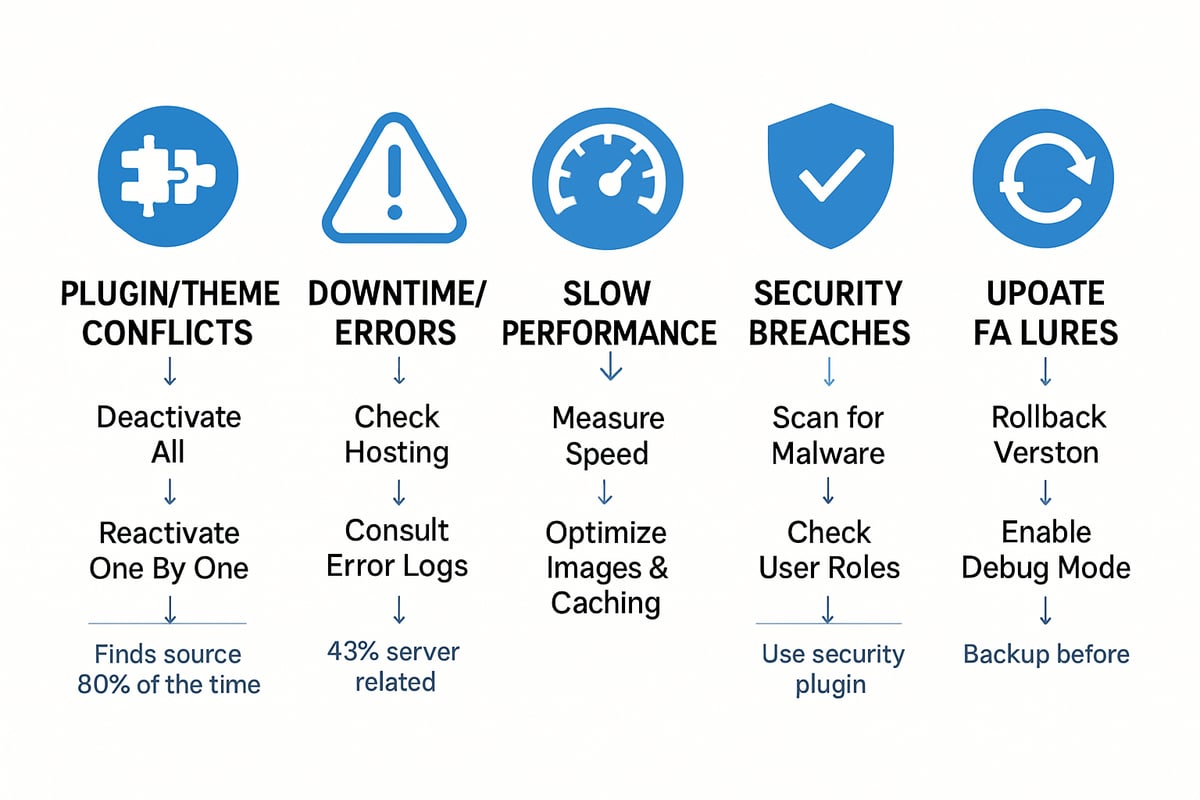
WordPress website support is never just about prevention. Even with the best maintenance, issues will arise. Knowing how to troubleshoot common problems efficiently is vital for keeping your site running smoothly. Let’s break down the most frequent headaches faced by site owners and how to address them.
Diagnosing and Fixing Plugin or Theme Conflicts
Plugin and theme conflicts are a leading cause of WordPress headaches. Effective wordpress website support starts with a systematic approach to diagnosis.
Begin by deactivating all plugins, then reactivating them one by one to pinpoint the culprit. Switch to a default theme such as Twenty Twenty-Four to rule out theme issues. Always use a staging site for testing, never your live site.
Check your site’s error logs for clues. For example, a WooCommerce update might break your layout if your theme isn’t compatible. Once you identify the issue, update or replace the faulty plugin or theme. Document your steps for future reference.
Handling Downtime and Critical Errors
Unexpected downtime can be stressful, especially for businesses relying on their site. Robust wordpress website support means knowing what to do when your site goes offline.
First, check your hosting provider’s status page. If the server is up, restore your latest backup. Look for recent changes—plugin updates or new code—that might have triggered the problem.
If you see a “white screen of death” or critical error, enable debugging in your wp-config.php file to reveal error messages. Identify and fix the root cause before bringing the site back online. Downtime can cost UK SMEs thousands in lost revenue, making rapid response essential.
Resolving Slow Site Performance
Slow-loading sites frustrate users and damage SEO. To provide effective wordpress website support, start by identifying bottlenecks.
Use tools like GTmetrix or PageSpeed Insights to analyse load times. Common culprits include bloated plugins, large images, or poor hosting. Perform a plugin audit and disable unnecessary features.
Optimise your database and enable caching. A recent case study showed that after removing outdated plugins and compressing images, one business cut page load times by 40%. Regular speed checks are essential for ongoing performance.
Addressing Security Breaches and Hacks
A hacked site is every owner’s nightmare. WordPress website support should include a clear protocol for breaches.
Watch for signs like unexpected redirects, new admin users, or Google warnings. Immediately put your site in maintenance mode to stop further damage. Scan with security tools such as Wordfence or Sucuri.
Restore from a clean backup and reset all passwords. Clean your database and files thoroughly. For more expert guidance, explore WordPress Support Insights and Guides, which offer detailed steps for recovery and prevention.
Managing WordPress Updates Gone Wrong
Update failures are common, especially when plugins or themes lag behind core updates. Reliable wordpress website support minimises the risk and helps you recover quickly.
If you encounter a white screen or broken site after updating, use your backup to roll back. Always update in a staging environment first to test for conflicts.
Keep a log of updates and outcomes. Learning from recent update disasters in 2024, many site owners now wait for plugin compatibility confirmation before applying major updates. Safe update protocols and regular backups are your best defence.
Choosing the Right WordPress Support Partner
Selecting the right partner for wordpress website support can make or break your site's reliability and performance. With so many providers on the market, knowing what to look for is essential. Your decision impacts everything from daily operations to long-term business growth.
What to Look for in a Support Provider
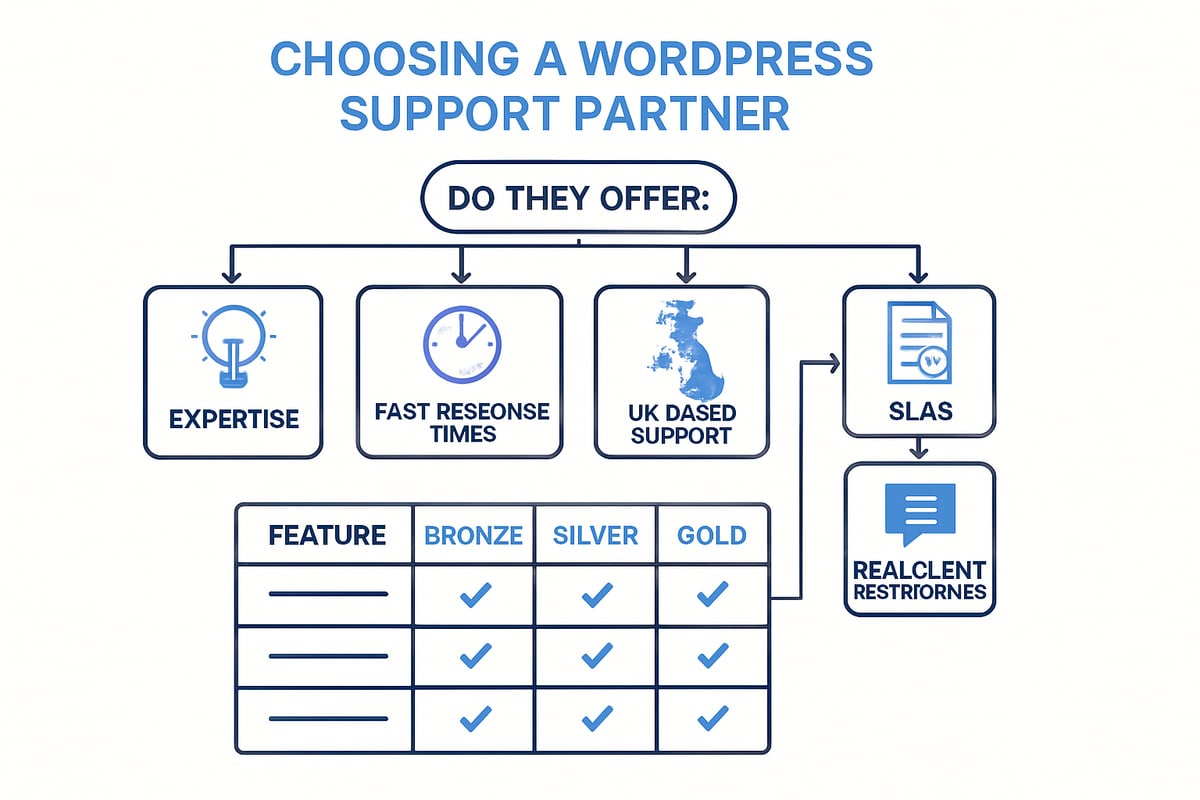
When evaluating wordpress website support providers, start by assessing their expertise with the platform and proven track record. Look for transparent response times, clear service level agreements (SLAs), and a well-defined support process.
UK-based support can be crucial for compliance, especially with GDPR and data sovereignty. Local providers also offer better communication and an understanding of regional business challenges.
Compare leading UK support companies based on their experience, client reviews, and the range of services. This ensures your chosen partner aligns with your site's needs and your expectations for wordpress website support.
Comparing Support Plans and Pricing Models
Support providers typically offer several wordpress website support plans, such as Bronze, Silver, Gold, and Platinum. Each tier includes different levels of service, from basic maintenance to premium, hands-on management.
| Plan | Updates & Backups | Security Monitoring | Performance Tuning | Emergency Response | Monthly Price |
|---|---|---|---|---|---|
| Bronze | ✓ | Basic | – | – | £ |
| Silver | ✓✓ | Enhanced | ✓ | Standard | ££ |
| Gold | ✓✓✓ | Advanced | ✓✓ | Priority | £££ |
| Platinum | Full | Comprehensive | Full | 24/7 | ££££ |
Match the plan's features and costs to your business goals and website complexity. For a detailed breakdown of plan tiers and SLAs, see the WordPress Support Service Levels page.
Questions to Ask Before Signing Up
Before committing to a wordpress website support provider, ask these critical questions:
- What SLAs guarantee response and resolution times?
- How are backups managed and how often are they tested?
- What security protocols are in place to protect my site?
- Can you share real client testimonials or case studies?
These questions help ensure your investment in wordpress website support is well placed and gives you confidence in your chosen partner.
WPCTO: Expert WordPress Support & Consultancy
WPCTO offers tailored wordpress website support for businesses of all sizes, from startups to established enterprises. Their services include ongoing maintenance, advanced security, performance optimisation, and strategic consultancy.
You can engage WPCTO on a pay as you go basis, with monthly retainers, or for ad hoc advice. Hundreds of UK and international clients trust WPCTO for their proactive, expert led wordpress website support, ensuring sites stay secure, fast, and future ready.
Future-Proofing Your WordPress Website: Trends & Expert Tips for 2025
Staying ahead in the digital landscape is crucial for robust wordpress website support. As we look towards 2025, site owners must embrace emerging trends and expert strategies to protect, optimise, and future-proof their online presence. The following insights will help you adapt to the evolving world of WordPress.
The Rise of AI and Automation in WordPress Support
AI is rapidly transforming wordpress website support, making routine maintenance smarter and more efficient. Automated security scans now detect threats faster than ever, while AI-driven update managers streamline core, theme, and plugin updates. Chatbots powered by machine learning handle common user queries and admin tasks, reducing manual support workload. For example, some businesses have reported a 30% drop in support tickets after deploying AI-based solutions. Integrating these intelligent tools into your workflow not only saves time but also ensures your site operates at peak reliability. Embracing AI is no longer optional for future-ready support.
Preparing for Emerging Security Threats
The threat landscape for wordpress website support is constantly shifting, with 2025 seeing a surge in supply chain attacks and sophisticated plugin exploits. Proactive vulnerability management is essential, along with rapid response plans for zero-day threats. E-commerce plugins are being targeted more frequently, increasing risk for online retailers. According to Patchstack's 2025 WordPress Security Report, plugin vulnerabilities account for the majority of new incidents, highlighting the need for vigilant monitoring. Staying informed and updating security protocols regularly will help safeguard your site against evolving attacks.
Adapting to Core Web Vitals and SEO Changes
Search engine algorithms are evolving, and wordpress website support must prioritise performance and usability. Google now factors in Core Web Vitals, measuring speed, interactivity, and visual stability. Sites with “Good” Core Web Vitals experience 24% less user abandonment, underlining the impact on engagement and rankings. Regular performance audits, mobile optimisation, and accessibility improvements are essential. Using tools like Google PageSpeed Insights and implementing best practices for caching and image optimisation can keep your site competitive. Adapting swiftly to new SEO requirements ensures continued visibility and success.
Enhancing Accessibility and Compliance
Legal requirements for digital accessibility are tightening across the UK and EU, making compliance a core part of wordpress website support. New laws mandate that websites meet specific accessibility standards, such as WCAG 2.2. Regularly auditing your site with automated checkers and accessibility plugins helps you stay ahead. These tools identify issues like poor colour contrast or missing alt text, making fixes straightforward. A proactive approach not only avoids potential fines but also ensures your content is usable by everyone, including those with disabilities. Prioritising accessibility is both a legal necessity and a business advantage.
Sustainable Website Practices
Environmental sustainability is becoming a key focus within wordpress website support. Site owners are increasingly choosing eco-friendly hosting providers and optimising code to reduce server loads. Efficient caching, image compression, and minimal plugin use can all lower your website’s carbon footprint. Green hosting options, such as those powered by renewable energy, are gaining popularity among responsible businesses. By adopting sustainable practices, you contribute to a healthier planet while often improving site speed and reliability. Sustainability is set to become a defining feature of modern web support.
Building a Resilient Support Plan for the Future
A resilient wordpress website support plan combines proactive maintenance with rapid incident response. This includes scheduled updates, regular backups, and robust documentation. Training internal staff and clarifying responsibilities ensures issues are addressed quickly, minimising downtime. Collaborating with expert partners can provide an additional layer of expertise and peace of mind. Continuous improvement—tracking support tickets, reviewing reports, and refining processes—keeps your website healthy. Future-proofing your support strategy is essential for long-term stability and growth.
Building an In-House Support Workflow: Step-by-Step
Establishing a robust in-house workflow is vital for effective wordpress website support. A clear, systematic approach ensures your site stays secure, fast, and reliable. Let us break down each step to help your team manage support with confidence.
Step 1: Audit Your Current Website and Support Needs
Begin your in-house wordpress website support journey with a thorough site audit. Inventory all plugins, themes, and any custom code in use. Identify which plugins are critical for business operations and highlight any outdated or unsupported components.
Security should be a top priority. Use recent industry insights, such as those in the Wordfence 2024 Annual WordPress Security Report, to understand the latest vulnerability trends. This knowledge helps you pinpoint areas of risk that require urgent attention.
Create an audit checklist that covers:
- Active and inactive plugins
- Theme versions and updates
- Custom code or integrations
- User account review
- Security plugin status
A detailed audit sets the stage for a proactive wordpress website support plan.
Step 2: Set Up Maintenance Schedules and Tools
Next, implement structured maintenance routines as part of your wordpress website support workflow. Select reliable plugins for backups, security scanning, and performance monitoring. Popular choices include UpdraftPlus for backups, Wordfence or Sucuri for security, and WP Rocket for optimisation.
Establish a schedule for:
- Core, theme, and plugin updates (weekly or bi-weekly)
- Automated daily or incremental backups
- Monthly performance audits
Use a shared calendar or project management tool to assign tasks and track completion. Consistency in scheduling prevents lapses that can expose your site to threats or performance issues. By automating as much as possible, you reduce the risk of human error in your wordpress website support process.
Step 3: Document Processes and Assign Roles
Comprehensive documentation is the backbone of reliable wordpress website support. Write clear standard operating procedures (SOPs) covering updates, backups, troubleshooting, and user management. Store them in a central, accessible location for your team.
Assign specific responsibilities:
- Who applies updates?
- Who reviews security logs?
- Who manages user accounts?
A simple role matrix can clarify accountability:
| Task | Responsible Person | Backup Person |
|---|---|---|
| Updates | Sarah | Mike |
| Backups | Mike | Sarah |
| Security Review | Alex | Sarah |
With well-defined roles and up-to-date documentation, your wordpress website support operations become more resilient and efficient.
Step 4: Monitor, Review, and Improve
Ongoing monitoring is essential for long-term wordpress website support success. Track incidents, support tickets, and performance metrics regularly. Review reports to identify recurring issues or opportunities for process improvement.
Stay informed about evolving threats and compliance requirements by consulting resources such as the State of WordPress Security 2025. Adjust your workflow as new security trends emerge, and update SOPs when tools or best practices change.
Encourage a culture of continuous improvement. Hold quarterly reviews to discuss what is working and where your in-house wordpress website support can be enhanced. This approach ensures your website remains secure, fast, and ready for the future.
After exploring the essential strategies for maintaining, securing, and optimising your WordPress site in 2025, it’s clear that expert support can make all the difference. Whether you’re dealing with frequent updates, tackling security challenges, or aiming to boost your site’s performance, having a knowledgeable partner by your side helps you stay ahead of potential issues and focus on growing your business. If you’re ready to take your website’s reliability and results to the next level, let’s start the conversation and see how tailored support can help you reach your goals.
Ready to transform your WordPress website?