

As more businesses seek greater control over their digital presence, many find themselves limited by what Wix can offer. In 2025, the demand for flexible, scalable websites is higher than ever, prompting organisations to explore better solutions.
This guide is your roadmap for a successful wix to wordpress migration. It delivers a comprehensive, step-by-step process designed to minimise disruption and maximise SEO benefits during your transition.
You will discover each key stage—preparation, migration, rebuilding, SEO, and launch—explained in detail. By highlighting Wix’s constraints and showcasing how WordPress empowers business growth, this guide inspires confidence and action. Get ready for expert strategies that ensure your migration is smooth, secure, and future-proof.
Why migrate from Wix to WordPress in 2025?
As we look ahead to 2025, many businesses find themselves outgrowing the platform that once made launching a website easy. Wix is popular for its intuitive drag and drop builder, but as your business scales, you may encounter significant roadblocks. This is where a strategic wix to wordpress migration becomes essential for long-term success.
Limitations of Wix for growing sites
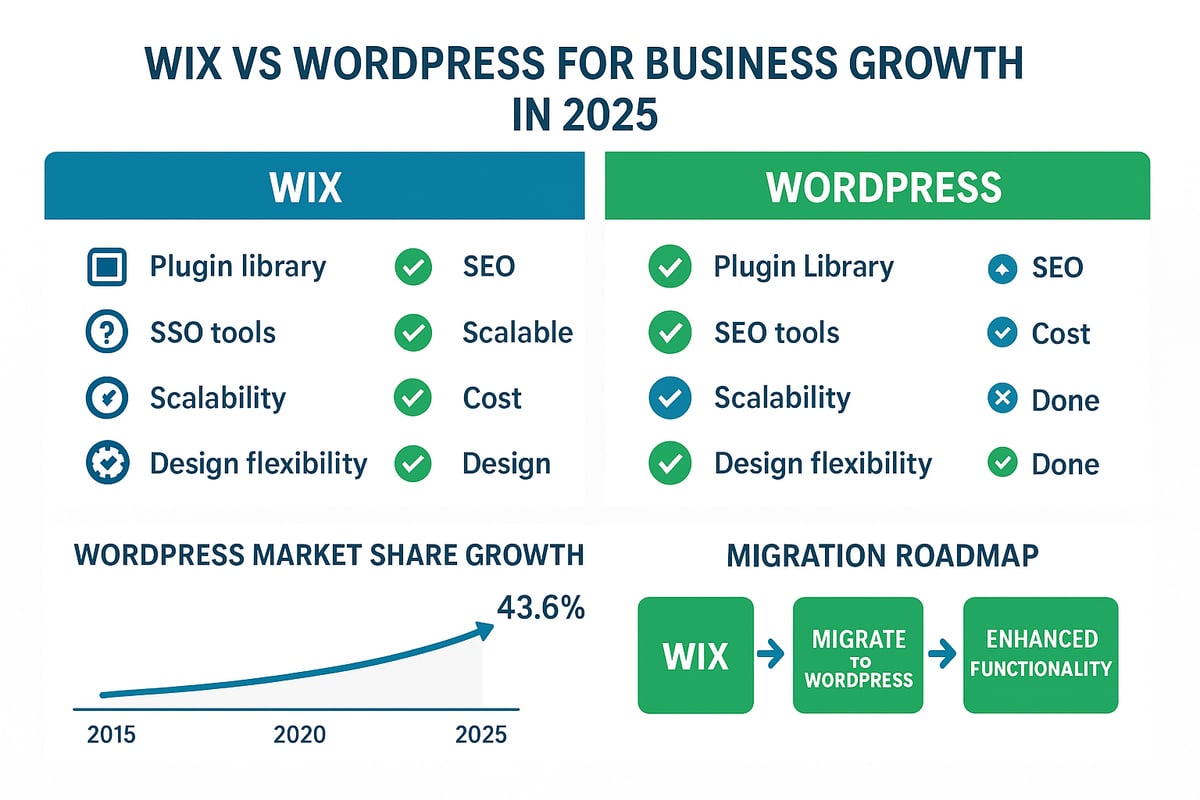
Wix is known for its simplicity, but this can become a double-edged sword as your website grows. Customisation options are limited, making it difficult to implement unique features or advanced integrations. The plugin library is much smaller compared to WordPress, which offers over 60,000 plugins.
SEO control is restricted on Wix, with fewer options for adjusting technical elements or deploying structured data. Design constraints can hinder your brand’s visual identity. For e-commerce or membership sites, Wix’s built-in tools often fall short, leading to missed opportunities for growth.
Cost is another factor. Wix charges ongoing subscription fees, while WordPress allows you to select hosting that fits your needs and budget. As your business matures, the case for a wix to wordpress migration becomes increasingly compelling.
Key benefits of WordPress for future-proofing
WordPress stands out by giving you full ownership of your site files, hosting, and data. With thousands of themes and plugins, you can add nearly any feature or integration your business requires. Advanced SEO capabilities, like custom permalinks and rich schema support, are readily available through plugins such as Yoast SEO and Rank Math.
Scalability is a major advantage. Whether you need to handle a sudden surge in traffic or launch international versions of your site, WordPress adapts with you. The community is large and active, ensuring regular updates and reliable support.
The popularity of WordPress speaks for itself. According to recent data, WordPress powers 43.6% of all websites, making it the most trusted platform globally. For businesses planning a wix to wordpress migration, this ecosystem provides security and peace of mind.
Real-world migration scenarios
Many businesses find that Wix’s features simply cannot keep up with their growth. A small retailer may start on Wix but soon outgrow its e-commerce limitations, prompting a wix to wordpress migration to take advantage of WooCommerce’s flexibility.
Agencies seeking to offer white-label solutions or bespoke functionality often make the switch to WordPress. Bloggers and content creators also migrate, looking for more robust SEO tools and improved content management.
The need for advanced forms, multilingual support, or custom post types often triggers this transition. Each scenario highlights how a wix to wordpress migration enables more control and future scalability.
Risks of poor migration
Without careful planning, a wix to wordpress migration can result in lost SEO rankings, broken links, or even downtime. Content may be lost if not properly backed up and transferred. Broken links can frustrate visitors and damage your search visibility.
These risks underline the importance of a structured, step-by-step migration process. Ensuring all content, media, and metadata are accounted for is critical. Redirects must be set up to preserve your existing URLs and search engine rankings.
Investing time in a thorough wix to wordpress migration strategy helps avoid these common pitfalls and protects your online presence.
2025 trends influencing migration decisions
The digital landscape in 2025 demands fast, secure, and mobile-optimised websites. Site speed is now a ranking factor, and users expect instant access on any device. Security and data privacy are growing concerns, especially with evolving regulations.
Businesses want more control over their data and digital assets. Flexible marketing strategies require platforms that can adapt quickly. A wix to wordpress migration positions your website to meet these trends head-on, ensuring you remain competitive and compliant.
Deciding to migrate now means your business is ready to take on the challenges and opportunities that 2025 will bring.
Step 1: Prepare for your Wix to WordPress migration
Transitioning from Wix to WordPress starts with a solid foundation. Proper preparation is essential to ensure your wix to wordpress migration is smooth, efficient, and secure. Let’s break down the critical first steps.
Audit your current Wix website
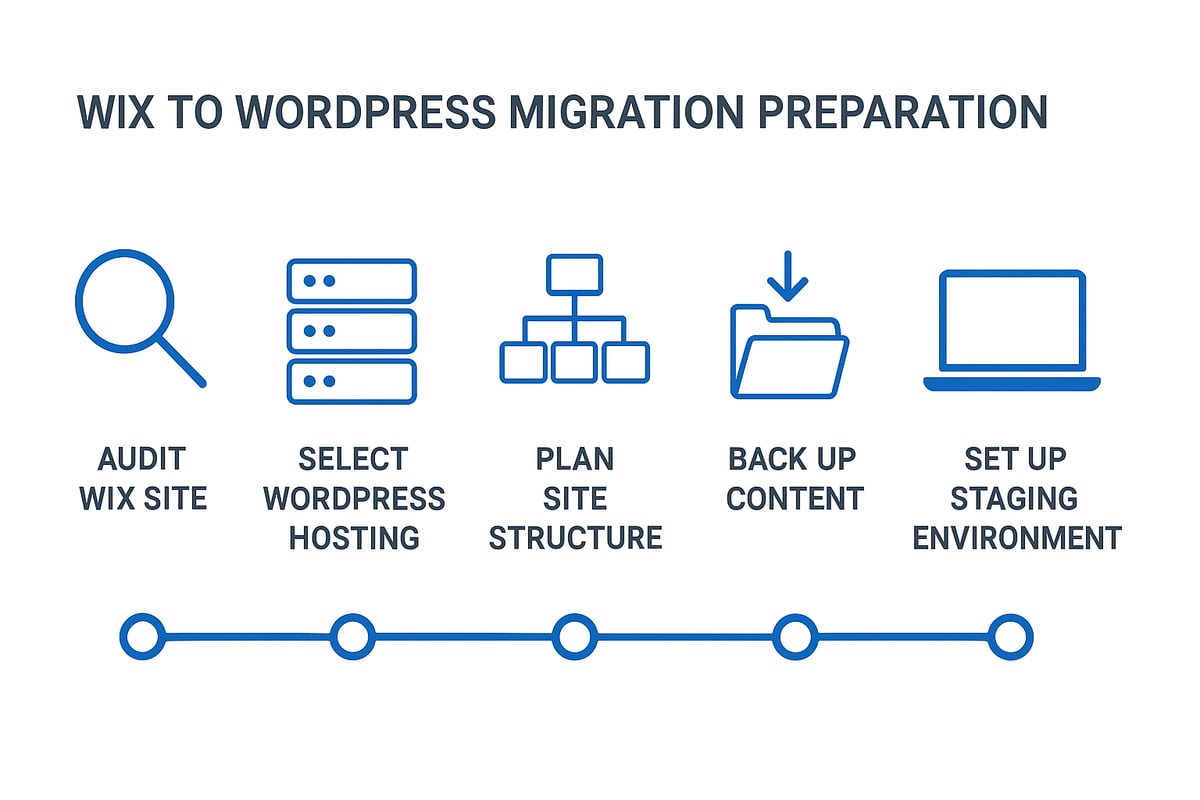
Begin by thoroughly reviewing your existing site. List every page, post, media file, and custom element. This step is vital for a successful wix to wordpress migration, as it helps you identify mission-critical features such as forms, galleries, and e-commerce tools. Use a spreadsheet or a site crawler to create a complete content inventory.
Do not forget to note any third-party integrations, analytics scripts, or custom code snippets. This information ensures nothing is overlooked during migration. Careful auditing now prevents surprises later.
Choose the right WordPress hosting and domain strategy
Selecting the right hosting is crucial for your wix to wordpress migration. Compare shared, managed, and VPS hosting options, considering your expected site traffic and technical requirements. Leading providers offer WordPress-specific features that streamline setup and boost performance.
You will also need to plan your domain approach. Decide between transferring your domain or updating DNS records to point to your new host. For a detailed breakdown of hosting essentials, visit the WordPress hosting and maintenance guide. Remember, DNS changes can take up to 48 hours to propagate fully.
Plan your site structure and user experience
Mapping your site’s navigation is a core part of the wix to wordpress migration process. Review your current menu structure and identify areas for improvement. Consider how users will navigate your new WordPress site and what features or design changes you want to introduce.
Prepare a spreadsheet mapping old Wix URLs to the new WordPress structure. This will be invaluable for setting up redirects and maintaining SEO. Planning user experience now pays off after launch.
Backup and safeguard your Wix content
Wix does not provide an official export tool, so manual backup is essential for a successful wix to wordpress migration. Download all available assets, including text, images, and downloadable files. Save copies of every important page and post.
Organise these files in folders for easy access during the rebuild. Taking this precaution protects your content from accidental loss and ensures you have everything you need to recreate your site in WordPress.
Set up a staging environment
A staging environment is a safe place to build your new site without affecting your live Wix site. This step is often overlooked but is key to a stress-free wix to wordpress migration. Use a subdomain, a local server, or your host’s staging tools to develop and test your WordPress site.
Keeping your Wix site live until the WordPress version is ready avoids downtime or disruption for your users. Tools like LocalWP or built-in host staging make this process straightforward and efficient.
Step 2: Set up your WordPress environment
Successfully setting up your WordPress environment is essential for a smooth wix to wordpress migration. This stage lays the groundwork for a robust, scalable website, ensuring your new platform is secure, fast, and tailored to your business needs. Let’s break down each vital step.
Install WordPress on your chosen host
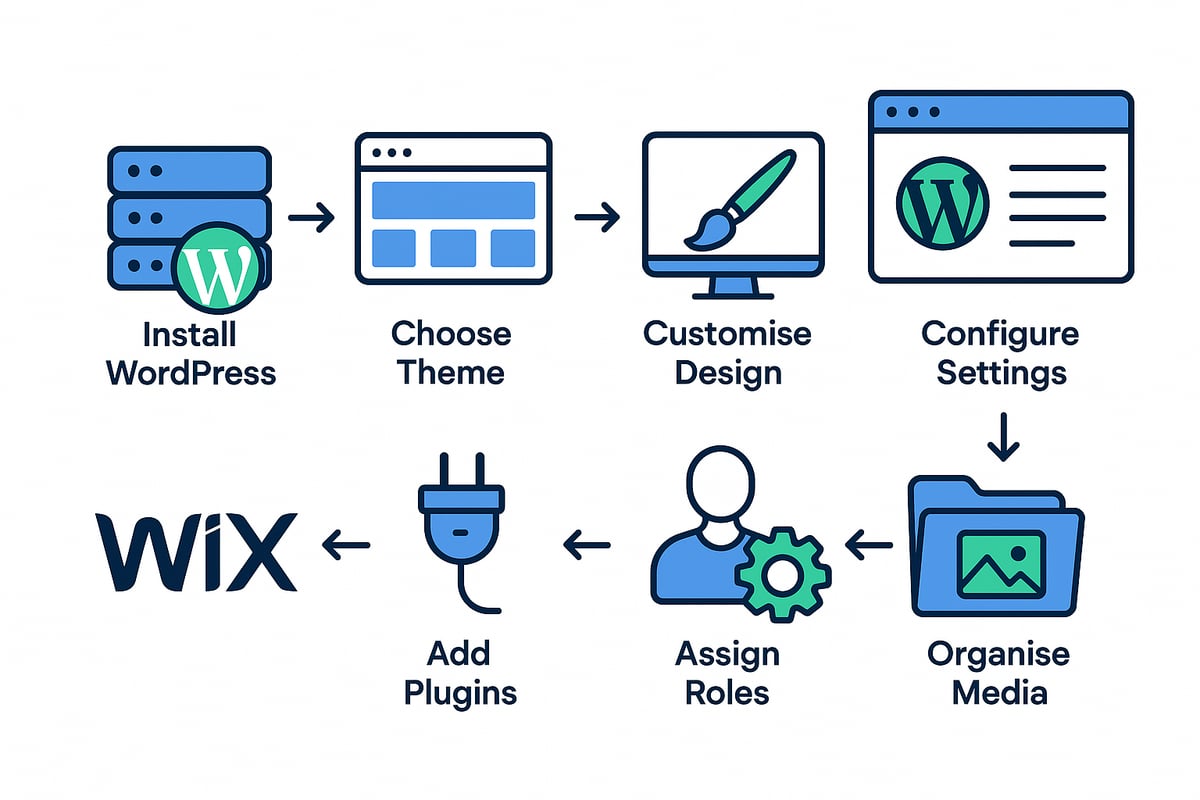
Begin your wix to wordpress migration by installing WordPress on your selected hosting provider. Most reputable hosts, such as SiteGround, WP Engine, or Bluehost, offer one click installers for a rapid start. Alternatively, you can opt for manual installation using FTP, which is ideal for those wanting more control.
Before proceeding, verify your host supports the latest PHP version and SSL certificates. This ensures your site remains secure and compatible with WordPress updates in 2025. After installation, access your WordPress dashboard to confirm everything is working as expected.
Select and install a suitable theme
Your site's appearance is shaped by the theme you choose during your wix to wordpress migration. Browse free themes on WordPress.org for a cost effective solution, or explore premium options from ThemeForest and StudioPress for advanced functionality and support.
Prioritise themes that are mobile responsive and compatible with the Gutenberg block editor. This guarantees your site looks great on all devices. Consider using this opportunity to refresh your brand’s look, or select a theme that closely matches your existing Wix design for consistency.
Customise your site’s look and feel
With your theme in place, it’s time to bring your brand to life. Use the WordPress Customizer or Site Editor to adjust colours, fonts, and layout settings. Upload your logo and favicon to reinforce your business identity.
Recreate your navigation menus to mirror or improve upon your Wix structure. This step in the wix to wordpress migration helps users navigate easily and supports a positive user experience. Always preview changes before publishing to ensure everything aligns with your vision.
Configure essential settings for performance and SEO
Configuring your site’s core settings is key to a successful wix to wordpress migration. Set your site title, tagline, timezone, and language in the WordPress settings panel. Choose an SEO friendly permalink structure, such as /post-name/, to make URLs readable and optimised for search engines.
Enable SSL and force HTTPS to protect user data and boost trust. These foundational settings help your site perform well and support your long term SEO strategy from the outset.
Install must-have plugins for functionality and security
Plugins extend your website’s capabilities beyond the basics. For every wix to wordpress migration, start with essentials: install Yoast SEO or Rank Math for search optimisation, Wordfence or Sucuri for security, and WP Rocket or W3 Total Cache for improved speed.
Add a backup solution like UpdraftPlus to safeguard your data. With over 60,000 plugins available, choose only those relevant to your needs and keep them updated. For ongoing advice, refer to WordPress site management tips to maintain peak performance.
Set up user roles and permissions
Assigning the correct user roles is crucial during your wix to wordpress migration. WordPress offers granular control, with roles such as administrator, editor, and contributor. Allocate permissions based on team responsibilities to enhance workflow and protect sensitive site areas.
Create unique login credentials for each user and update passwords regularly. This approach helps maintain security and ensures only authorised personnel can manage content or settings on your new site.
Prepare the WordPress Media Library
Finally, prepare your WordPress Media Library to handle all images and assets from your wix to wordpress migration. Organise files using folders or media management plugins for efficient access. Plan bulk uploads to save time, and ensure all assets are optimised for web use to maintain site speed.
Review each upload for quality and relevance. A well structured media library streamlines content updates and keeps your site running smoothly as you grow.
Step 3: Migrate your content from Wix to WordPress
Migrating your site content is the heart of the wix to wordpress migration process. This stage requires careful planning and methodical action to maintain accuracy, SEO, and user experience. Whether you are moving a small brochure site or a complex e-commerce store, following a structured approach is vital for a successful migration.
Manual content transfer process
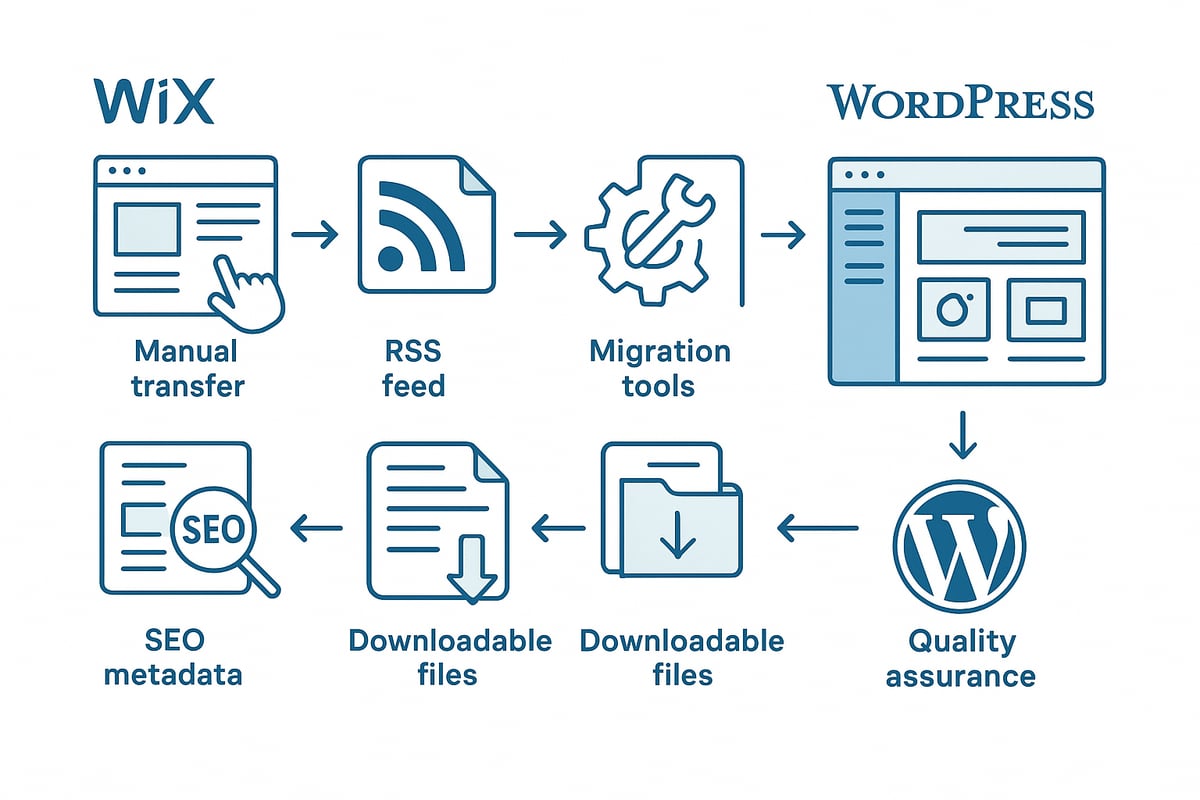
The most reliable way to begin your wix to wordpress migration is through manual content transfer. Start by copying and pasting your page content, blog posts, and images from Wix into WordPress. This method is ideal for smaller websites, where attention to detail and quality control are crucial.
- Open each page in Wix and copy the text
- Paste the content into WordPress using the block editor
- Re-upload images through the Media Library
- Recreate layouts and structure for consistency
Manual transfer allows you to review every element, ensuring nothing is lost or out of place. It is time-consuming, but it provides the highest level of content fidelity.
Automate blog migration with RSS feeds (if available)
For larger blogs, the wix to wordpress migration can be streamlined using RSS feeds. Check if your Wix site provides an RSS feed, usually found at /feed.xml or /blog-feed.xml. Export this feed and use the WordPress RSS Importer tool to transfer your posts.
- Export the feed from Wix
- Import into WordPress through Tools > Import > RSS
- Review imported posts for formatting and completeness
Note that images and categories may not import automatically. Manual adjustments are often required to ensure the migrated content matches your original design and structure.
Use third-party migration tools for efficiency
If manual methods are impractical for your wix to wordpress migration, consider third-party migration tools such as CMS2CMS. These tools offer semi-automated solutions for transferring pages, posts, images, and metadata.
- Choose a reputable migration tool
- Map content types and fields between platforms
- Review transfer settings and initiate migration
While these tools save time, they may not handle complex elements or custom widgets perfectly. Always conduct a post-migration review to catch missing or misconfigured content.
Rebuild forms, galleries, and interactive elements
Wix sites often use custom forms, galleries, or interactive sections that do not transfer automatically during a wix to wordpress migration. Identify all such features on your current site and plan to rebuild them with WordPress plugins.
- Recreate contact and newsletter forms with WPForms or Gravity Forms
- Build galleries using plugins like Envira Gallery
- Replace Wix widgets with equivalent WordPress plugins
This approach ensures your users retain access to all critical functionality, while also allowing you to enhance features with more flexible WordPress solutions.
Migrate SEO metadata and on-page elements
Preserving your SEO during a wix to wordpress migration is essential. Manually copy over meta titles, descriptions, and image alt texts from Wix. Use SEO plugins such as Yoast SEO or Rank Math to input this metadata into WordPress.
- Transfer each page’s SEO metadata
- Add structured data and schema where possible
- Double-check that important keywords and descriptions are retained
Proper SEO migration helps maintain your search rankings and ensures your new WordPress site is well-optimised from day one.
Handle downloadable files and media
Download all important files from your Wix site, including PDFs, videos, and audio, to ensure a complete wix to wordpress migration. Upload these assets to your WordPress Media Library and update any links throughout your posts and pages.
- Download assets from Wix manually
- Bulk upload to the WordPress Media Library
- Replace old links with new WordPress URLs
This step guarantees that your users have uninterrupted access to downloadable resources, preventing broken links and lost content.
Quality assurance and troubleshooting
Once the main content is migrated, thorough quality assurance is vital for a successful wix to wordpress migration. Check for missing content, formatting issues, and broken links. Preview every page, and use revision tools to correct errors.
- Test all site features and forms
- Verify navigation and internal links
- Solicit feedback from colleagues or stakeholders
For ongoing support and troubleshooting, consider reviewing the WordPress support services overview to ensure you have expert help available when you need it most. A robust QA process will ensure your new site meets user expectations and business goals.
Step 4: Rebuild site structure, design, and functionality
Rebuilding your site’s structure, design, and features is a pivotal stage in any wix to wordpress migration. This is where your business vision takes shape on a new, robust platform. Careful planning here ensures your site not only matches but surpasses your previous Wix experience, delivering improved performance, flexibility, and scalability.
Recreate essential pages and navigation
Start your wix to wordpress migration by listing all vital pages on your Wix site. Core pages typically include:
- Home
- About
- Services or Products
- Blog
- Contact
- Landing or campaign pages
Rebuild each page in WordPress using the block editor or a page builder. Focus on improving layouts, adding engaging visuals, and ensuring clear calls to action. Carefully mirror or enhance your original navigation structure for a seamless user journey.
Set up primary and secondary menus under Appearance Menus. Consider introducing mega menus or dropdowns if your new structure requires deeper navigation. This step sets the foundation for a smooth wix to wordpress migration, making sure visitors can easily find what they need.
Customise your chosen theme for branding
Once your key pages are in place, turn your attention to branding. Select a theme that aligns with your company’s identity and values. Use the WordPress Customiser or Site Editor to adjust colours, fonts, and layout elements.
Upload your logo and favicon, and add brand assets throughout your site. Customise headers, footers, and widget areas to reinforce your brand presence. If your wix to wordpress migration involves a visual refresh, take this opportunity to modernise your design while staying consistent with your existing identity.
Enhance functionality with plugins
One of the main advantages of wix to wordpress migration is access to thousands of plugins. Add features that were limited or unavailable on Wix, such as advanced contact forms, pop-ups, or membership functionality.
For e-commerce, consider WooCommerce, which now holds WooCommerce’s 33.87% e-commerce market share, making it the most popular choice for online shops. Plugins for analytics, email marketing, and social sharing can further extend your site’s capabilities. Each plugin should serve a clear purpose and enhance the user experience.
Optimise for speed, security, and accessibility
Optimisation is crucial to ensure your wix to wordpress migration delivers a faster, safer, and more accessible site. Install caching plugins to speed up load times and image optimisation tools for media efficiency.
Set up security plugins to guard against threats and enable two-factor authentication for all users. Check your site with accessibility tools to meet WCAG 2.1 standards, ensuring everyone can navigate and interact with your content. Optimisation at this stage sets the stage for long-term growth.
Set up redirects and preserve old URLs
A successful wix to wordpress migration requires careful handling of URLs. Use a plugin like Redirection to map all old Wix URLs to their new WordPress equivalents. Maintain a spreadsheet to track redirects and ensure nothing is missed.
Implementing 301 redirects helps preserve your SEO rankings and avoids broken links, which can frustrate users. Test each redirect thoroughly before launch to confirm seamless transitions for both search engines and visitors.
Test site across devices and browsers
Before you launch, test your entire site on multiple devices and browsers. Check how pages look and function on mobiles, tablets, and desktops. Use tools like Google’s Mobile-Friendly Test and BrowserStack for accurate results.
This stage of wix to wordpress migration ensures that your site delivers a consistent and polished experience, no matter how your audience accesses it. Address any issues with responsiveness or compatibility immediately.
Add legal and compliance pages
Do not overlook legal requirements during your wix to wordpress migration. Create or update essential compliance pages, including:
- Privacy policy
- Cookie notice
- Terms of service
For UK and EU audiences, ensure GDPR compliance by updating privacy policies and cookie banners. Regularly review these pages to keep them current with evolving regulations. A compliant site builds trust and protects your business.
Step 5: SEO, testing, and launching your new WordPress site
Launching your new site after a wix to wordpress migration is the most critical phase. A successful transition depends on thorough SEO checks, careful testing, and a strategic launch plan. This step ensures your hard-earned search rankings remain intact and your users experience a seamless switch.
Perform a comprehensive SEO audit pre-launch
Before going live, conduct a meticulous SEO audit. Review on-page elements such as titles, meta descriptions, header tags, and image alt text. Ensure your XML sitemap is generated and up to date using your SEO plugin. Double-check your internal linking structure and fix any inconsistencies that may have occurred during the wix to wordpress migration.
Create a checklist to track progress:
- Page titles and meta data match original site
- Headings (H1-H3) are correctly structured
- Images have relevant alt text
- XML sitemap is accessible and error free
- Internal links are updated
A detailed audit helps maintain your SEO authority and avoids search ranking drops during the wix to wordpress migration.
Submit your site to search engines
Once your site passes the SEO audit, submit it to search engines. Add and verify your site in Google Search Console and Bing Webmaster Tools. Upload your XML sitemap for indexing.
If you changed your domain as part of the wix to wordpress migration, use the Change of Address tool in Google Search Console. This signals the migration to Google, helping preserve your search equity.
Prompt indexing is essential. Regularly check coverage reports for potential issues. Submitting your sitemap ensures your new WordPress site is quickly crawled and indexed after migration.
Monitor and preserve search rankings
After launch, closely monitor your search rankings and traffic. Set up Google Analytics to track user behaviour and Google Search Console to monitor indexing status.
Keep an eye on keyword rankings, especially for your primary pages. If you notice significant drops post wix to wordpress migration, investigate any missing redirects, broken links, or on-page SEO discrepancies.
Install the Broken Link Checker plugin to catch and resolve any 404 errors. Regular monitoring allows for swift action to maintain your site's visibility and authority.
Post-migration quality assurance
Thorough quality assurance is essential after a wix to wordpress migration. Test all forms, CTAs, and e-commerce functionality to ensure everything works as intended.
Review the site for missing images, broken formatting, or incorrect links. Use WordPress’s preview and revision features to check each page in detail. Solicit feedback from team members or trusted users for real-world testing.
A systematic QA process ensures a polished, user-friendly site that reflects your brand’s professionalism after migration.
Launch strategies for zero downtime
Plan your launch for minimal disruption. Schedule the transition during low-traffic periods to reduce risk. Keep your old Wix site live on a subdomain or temporary URL until you confirm the new WordPress site is fully functional.
Update your DNS records to point your domain to the new host. Be aware DNS propagation can take up to 48 hours. For a smooth wix to wordpress migration, use a temporary development URL and only switch DNS when all checks are complete.
For broader context on why businesses migrate and the evolving market landscape, explore CMS market share trends in 2025.
Ongoing maintenance and performance monitoring
Post-launch, proactive maintenance is vital. Set up regular backups using plugins or host tools. Enable automatic updates for WordPress core, themes, and plugins to reduce vulnerabilities.
Monitor site uptime and speed with tools like UptimeRobot or Pingdom. Security is especially important after a wix to wordpress migration. For detailed guidance on safeguarding your new site, see Secure your WordPress site.
Routine performance checks help you catch issues early and maintain site reliability.
Plan for future growth and scalability
A successful wix to wordpress migration sets the foundation for future growth. Regularly review your plugin and theme choices to ensure compatibility as WordPress evolves.
Consider advanced features like multilingual support, membership portals, or custom post types as your business expands. Stay active in the WordPress community for best practices and updates.
With ongoing optimisation and strategic planning, your WordPress site will remain robust, scalable, and ready to support your goals for years to come.
Post-migration best practices for long-term WordPress success
Migrating your site is just the beginning. To ensure your wix to wordpress migration delivers long-term value, you need to adopt best practices for ongoing success. The following strategies will help you keep your WordPress site secure, fast, and ready to grow.
Regular updates and proactive maintenance
After completing your wix to wordpress migration, keeping everything up to date is essential. WordPress core, themes, and plugins receive regular updates to address vulnerabilities and improve performance.
Set a schedule for weekly or bi-weekly updates. Use a maintenance plugin or managed hosting for automated updates and monitoring. This reduces the risk of security issues and ensures compatibility.
Here's a simple table to guide your routine:
| Task | Frequency |
|---|---|
| Core updates | Weekly |
| Plugin updates | Weekly |
| Theme updates | Monthly |
| Backups | Daily/Weekly |
| Security scans | Weekly |
Strengthen security and protect your investment
Security should be a top priority after any wix to wordpress migration. Enable a firewall and use malware scanning tools like Wordfence or Sucuri.
Require strong passwords and enable two-factor authentication for all users. Regularly audit user accounts and permissions to minimise risk.
Set up offsite backups to a secure location. This provides a safety net in case of hacking or accidental data loss.
Optimise site speed and user experience
A successful wix to wordpress migration should also improve your site's speed. Use caching plugins and a content delivery network (CDN) to serve content quickly.
Compress images and enable lazy loading to reduce load times. Monitor site performance with Google PageSpeed Insights and address any flagged issues.
Improved speed not only benefits users but also supports higher search rankings.
Enhance SEO and content strategy
SEO is a core benefit of a wix to wordpress migration. Continue using SEO plugins to optimise new content, titles, and meta descriptions.
Monitor your keyword rankings and adjust your strategy based on performance. Build internal links to boost authority and help users navigate your site.
Promote your content through outreach and backlink building to enhance visibility.
Leverage analytics for business growth
To maximise the results of your wix to wordpress migration, set up Google Analytics 4 and track key performance indicators (KPIs).
Review traffic patterns, bounce rates, and conversion rates regularly. Use this data to identify opportunities for improvement.
A/B test your landing pages and calls to action to increase conversions and refine your marketing efforts.
Plan for scalability and future enhancements
WordPress is renowned for its scalability. As your business grows, your wix to wordpress migration enables you to add features like membership portals, multilingual support, or advanced e-commerce.
Stay informed on the latest trends and updates. The WordPress community continues to expand, offering new plugins and support. For a deeper understanding of this growth and its impact on your migration decisions, explore WordPress’s continued growth and insights.
Regularly review your hosting resources and upgrade as needed to handle more traffic and content.
Build a support and maintenance plan
Sustaining the benefits of your wix to wordpress migration requires a clear maintenance plan. Assign team members to manage updates, security, and backups.
Document your maintenance processes and onboarding steps for new staff. Consider partnering with WordPress professionals for technical support or emergencies.
A proactive approach ensures your site remains robust, secure, and aligned with your business goals.
After exploring the step by step process of moving from Wix to WordPress and understanding how much more control and flexibility WordPress offers for your business growth in 2025, it is clear that a seamless migration is essential for long term success. You deserve a website that not only meets your current needs but also supports your ambitions for the future. If you are ready to enhance performance, security, and scalability with tailored WordPress solutions, let us help you navigate the transition with confidence and ease. Ready to transform your WordPress website?