

Update PHP as soon as your current branch enters security-only maintenance, or immediately if it has already reached end of life. For most WordPress sites in 2026, that means running PHP 8.2 or 8.3 as a minimum, with 8.4 as the preferred target where plugin compatibility allows. If you are still on PHP 7.4 or 8.0, both are end of life and you should treat this as urgent.
Immediate actions to take right now:
- Check your current PHP version via WordPress Site Health (Tools → Site Health → Info → Server)
- Take a full off-server backup of files and database before touching anything
- Clone to a staging environment and test the target PHP version there first
- Confirm your plugins and theme are compatible with your chosen target version
Recommended target version for most WordPress sites: PHP 8.3 (active support, strong plugin compatibility). PHP 8.4 is the newest active branch and worth targeting for new builds. PHP 8.1 is in security-only maintenance and should be treated as a scheduled upgrade within the next few months.
An update is urgent when your branch is end of life, when WordPress or a critical plugin flags a compatibility warning in Site Health, or when your host notifies you that a version is being deprecated.
Key takeaways
Updating PHP is not optional maintenance. Running an end-of-life PHP version leaves every WordPress site on that branch exposed to unpatched vulnerabilities, and no host backport changes that.
| Point | Details |
|---|---|
| Update trigger | Upgrade when your PHP branch enters security-only maintenance; treat end-of-life as urgent. |
| Recommended version | PHP 8.4 for new builds; PHP 8.3 for existing sites with complex plugin stacks. |
| Always use staging | Test the target PHP version on a staging clone before switching production. |
| Backup before every change | Take a full off-server backup and verify it restores before touching PHP. |
| Wpcto for agencies | Wpcto handles PHP updates, staging, and rollback across agency client portfolios under white-label. |
Table of Contents
- What happens if you delay updating PHP
- How the PHP release lifecycle works and what end-of-life dates mean
- How to check the PHP version your WordPress site is using
- Pre-update checklist: what to prepare before changing PHP
- How to update PHP across common hosting setups
- Which PHP version should you choose for WordPress sites today?
- Testing and troubleshooting after a PHP update
- Agency rollout plan: batch testing and scheduling for multiple client sites
- Why agencies should stop treating PHP updates as one-off work
- Wpcto handles PHP updates so your agency does not have to
- Sources
What happens if you delay updating PHP
Running an outdated PHP version is not a passive risk. It is an active one, and the consequences compound over time.
Security exposure is the most immediate concern. Once a PHP branch reaches end of life, Php for newly discovered vulnerabilities. That means any exploit found after the EOL date goes unpatched at the language level. Automated scanning tools routinely probe for sites running known-vulnerable PHP versions, and a site on PHP 7.4 (EOL since November 2022) or PHP 8.0 (EOL since November 2023) is a visible target. The risk is not theoretical. Malicious actors use version fingerprinting to identify and prioritise sites running unpatched runtimes.
Performance costs are real and measurable. Each PHP major version has delivered meaningful throughput improvements over its predecessor. Industry practitioners report performance gains ranging from single-digit percentages per incremental update to substantially larger gains when jumping multiple versions. For a WordPress site handling significant traffic, that translates directly into faster page loads, lower server resource consumption, and reduced hosting costs. Staying on an older version means leaving those gains on the table.
Beyond security and speed, there are compatibility costs that tend to sneak up on agencies:
- Plugin and theme authors drop support for EOL PHP versions, meaning you lose access to updates or receive warnings in the WordPress dashboard
- Composer-managed dependencies enforce minimum PHP version constraints; an outdated runtime blocks library upgrades and creates technical debt
- Emergency fixes for compatibility failures on live sites cost far more in time and client goodwill than a planned, staged upgrade
One common scenario: a client’s WooCommerce store is running PHP 7.4. A critical security patch is released for a payment gateway plugin, but the updated plugin requires PHP 8.1. The agency is now forced into an emergency PHP upgrade under pressure, without a staging environment, and with a client watching. That is the cost of delay made concrete.
How the PHP release lifecycle works and what end-of-life dates mean
Understanding the PHP release cycle is what separates a reactive upgrade from a planned one. According to php.net, each PHP branch follows a four-year support window: two years of active support (bug fixes and security patches) followed by two years of security-only maintenance. After that, the branch is end of life and receives nothing.
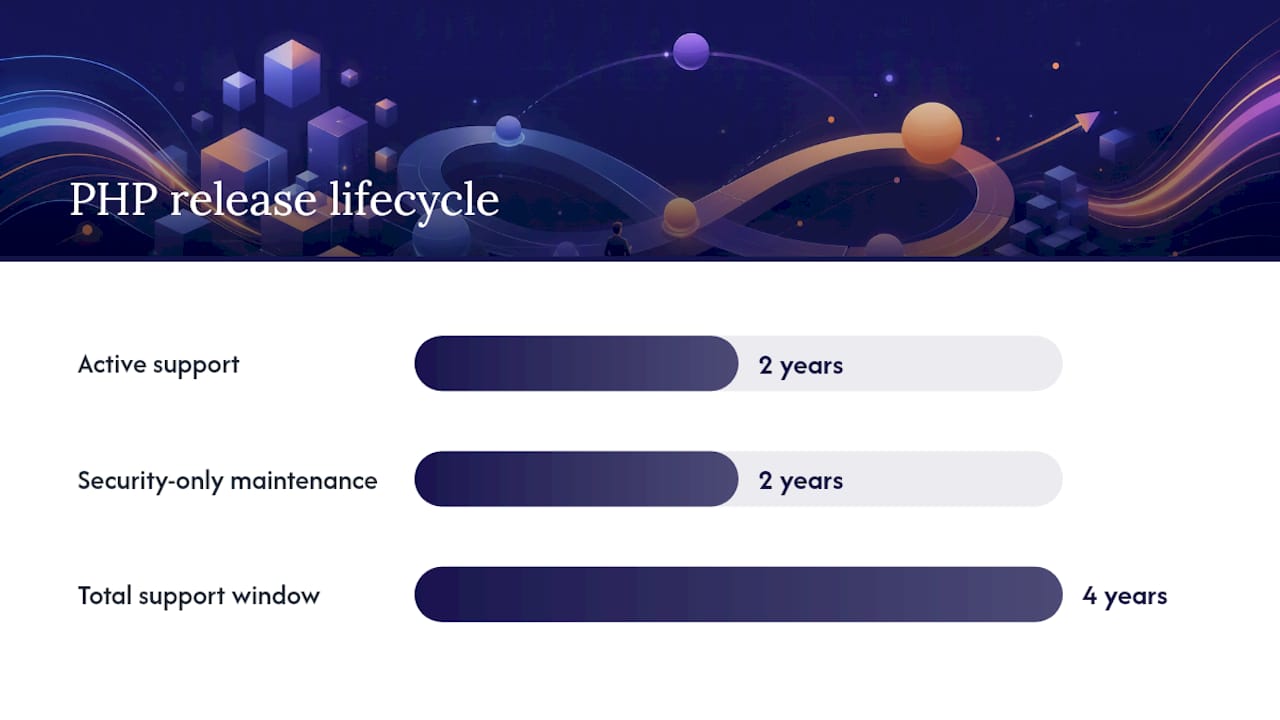
The PHP release process documentation explains how support windows are calculated, with end-of-year counting used to determine when each phase closes. This means the dates on php.net are authoritative and should be your primary reference.
What “security-only” actually means in practice:
- Bug fixes stop. If a non-security bug causes problems on your site, there is no upstream fix coming.
- Only critical security vulnerabilities receive patches, and the bar for what qualifies as “critical” is high.
- The branch is effectively on borrowed time. Treat security-only as a scheduled upgrade trigger, not a safe resting place.
The table below shows the current support status of active and recently active PHP branches, sourced from php.net and cross-referenced with Endoflife:
Note: PHP 8.1 reached end of life on 31 December 2025. If any of your client sites are still running 8.1, that is an urgent upgrade. PHP 8.2 is now in security-only maintenance and should be on your upgrade schedule for 2026. PHP 8.3 entered security-only maintenance at the end of 2025 but has a long security window remaining. PHP 8.4 is the only currently active branch.
endoflife.date provides a frequently updated snapshot of branch lifetimes and latest point releases, which is useful for a quick agency reference. Always cross-check against php.net for authoritative policy.
How to check the PHP version your WordPress site is using
Before you plan any upgrade, confirm exactly what version is running. There are three reliable methods, and they sometimes give different answers.
Method 1: WordPress Site Health
- Log into your WordPress admin dashboard.
- Go to Tools → Site Health.
- Click the Info tab.
- Expand the Server section.
- Look for the PHP version row.
This shows the PHP version the web server is passing to WordPress. It is the most relevant number for your site’s actual runtime. WordPress points site owners here as the first check.
Method 2: Host control panel
Most UK hosting providers expose PHP version management through cPanel, Plesk, or a custom dashboard:
- cPanel: Navigate to Software → PHP Selector or MultiPHP Manager. Your current version is shown per domain.
- Plesk: Go to Websites & Domains → PHP Settings for the relevant domain.
- Custom panels (e.g. Kinsta, WP Engine, Cloudways): each has a dedicated PHP version selector in the site or environment settings.
Method 3: CLI and phpinfo() for technical users
If you have SSH access, run:
php -v
This returns the CLI PHP version. Note that the CLI version and the web server version can differ, particularly on servers using PHP-FPM pools. If they disagree, the web server version (shown in Site Health) is what your WordPress site actually uses.
For a full runtime view, create a temporary file at your web root:
<?php phpinfo(); ?>
Access it via your browser, note the PHP version and loaded extensions, then delete the file immediately. Leaving a phpinfo() file publicly accessible exposes sensitive server configuration data.
When versions disagree: if Site Health shows a different version from your host control panel, your host may be running multiple PHP-FPM pools or your domain may not have been updated in the panel. Contact your host to clarify which pool is serving your site before proceeding.
Pre-update checklist: what to prepare before changing PHP
Rushing a PHP upgrade on a live site is how agencies end up with a client calling on a Friday afternoon. The preparation below takes longer than the upgrade itself, and that is exactly the point.
Before you touch the PHP version:
- Full off-server backup. Export both the database and all site files to a location outside the hosting account. Verify the backup restores correctly. A backup you cannot restore is not a backup.
- Update WordPress core, themes and plugins first. Running the latest versions reduces the chance of a compatibility failure after the PHP switch. WordPress.org recommends completing these updates before changing PHP.
- Audit plugins for abandonment. Check the WordPress plugin repository for any plugins that have not been updated in over 12 months or that explicitly list a maximum tested PHP version below your target. These are your highest-risk items.
- Clone to a staging environment. Switch PHP on the staging clone first. Run through the site manually and check error logs before touching production.
- Define a rollback plan. Know exactly how you will revert: either by switching the PHP version back in the host panel or by restoring from backup. Write it down. Brief anyone else involved.
- Choose a maintenance window. Pick a low-traffic period. For most UK business sites, early Sunday morning works well. Notify stakeholders in advance.
For a broader view of what a healthy maintenance routine looks like, the WordPress maintenance checklist covers the full picture beyond PHP.
Pro Tip: Some managed hosts backport security patches to EOL PHP branches. This sounds reassuring but WordPress.org is clear that backporting is not equivalent to upstream php.net support. Backported builds can diverge from official releases in unpredictable ways, and they give a false sense of security. Do not treat a host’s backport as a reason to delay upgrading.
How to update PHP across common hosting setups
The mechanics vary by hosting environment, but the principle is the same: switch on staging first, verify, then switch production during a planned window.
Shared hosting and cPanel
- Log into cPanel and navigate to MultiPHP Manager or PHP Selector.
- Select your domain from the list.
- Choose your target PHP version from the dropdown (PHP 8.3 or 8.4).
- Click Apply. The change takes effect immediately.
- Check your site in a browser and review the error log at
~/logs/or via cPanel’s Error Logs tool. - If a fatal error appears, return to MultiPHP Manager and revert to the previous version.
Plesk
- Go to Websites & Domains and select the relevant domain.
- Click PHP Settings.
- Change the PHP version and click OK.
- Monitor the site and check Logs in the Plesk interface.
Managed WordPress hosts (Kinsta, WP Engine, Cloudways, etc.)
Most managed hosts provide a one-click PHP version selector per environment. Switch on the staging environment first, run your tests, then apply to production. These hosts typically retain the previous configuration for a short window, making rollback straightforward.
VPS (Ubuntu/Debian with apt, or CentOS/RHEL with yum)
- Add the appropriate PHP PPA (e.g.
ppa:ondrej/phpon Ubuntu). - Install the target version:
sudo apt install php8.4 php8.4-fpm php8.4-mysql(plus any extensions your site requires). - Update your web server configuration (Nginx or Apache) to point to the new PHP-FPM socket.
- Reload the web server:
sudo systemctl reload nginxorsudo systemctl reload apache2. - Verify with
php -vand check Site Health in WordPress.
Before upgrading on a VPS, check composer.json and composer.lock for dependency constraints. Library packages often declare minimum PHP version requirements, and a mismatch produces fatal “unsupported version” errors at runtime. Run composer check-platform-reqs after switching PHP to surface any conflicts immediately.
Rollback steps if something breaks:
- Revert the PHP version in the host panel or web server config
- Restore from your pre-update backup if the revert alone does not resolve the issue
- Check the WordPress error log (
wp-content/debug.logif WP_DEBUG is enabled) for the specific fatal error before attempting a fix
When to call your host or a developer: if the error log shows a fatal error in a plugin or theme file rather than in WordPress core, that is a compatibility issue requiring a code fix or plugin replacement, not a PHP revert. Give your host or developer the exact error message, the PHP version you switched to, and a list of recently updated plugins.
Which PHP version should you choose for WordPress sites today?
The right choice depends on three factors: the support status of the branch, your plugin and theme compatibility, and what your host actually offers.
Make.WordPress Core’s 2026 PHP support clarification confirmed that WordPress fully supports PHP 8.x branches and encourages site owners to move to actively maintained versions. The practical guidance for agencies managing multiple client sites is straightforward:
Decision criteria to apply:
- Prefer an actively supported branch over a security-only one wherever plugin compatibility allows
- Avoid any branch that is end of life; treat it as a live risk, not a future task
- Check your five most critical plugins against the target version before committing
- Confirm your host supports the target version (most UK hosts now support 8.3 and 8.4)
| Situation | Recommended version | Notes |
|---|---|---|
| New WordPress build | PHP 8.4 | Active support; best performance baseline |
| Existing site, no legacy plugins | PHP 8.3 or 8.4 | Both well-supported; 8.4 preferred for longevity |
| Legacy WooCommerce or complex plugin stack | PHP 8.2 minimum, test 8.3 on staging | Audit plugins before upgrading beyond 8.2 |
| Site still on PHP 7.x or 8.0 | Upgrade immediately to 8.3 | Both are end of life; this is urgent |
As of 2026, PHP 8.4 is among the branches currently in active support, receiving both bug fixes and security patches. For agencies building new client sites or managing straightforward WordPress installs, 8.4 is the right target. For sites with complex plugin dependencies, 8.3 is a safe, well-tested choice with a security support window running to the end of 2027.
The PHP security impact on WordPress is worth understanding in depth if you are advising clients on the business case for upgrading.
Testing and troubleshooting after a PHP update
The upgrade itself takes minutes. The verification is where you earn your fee.
Staged test plan
- Smoke test immediately: load the homepage, a key interior page, the checkout or contact form, and the admin dashboard. If any of these fail, revert and investigate before proceeding.
- Functional checks: test all critical user journeys (form submissions, account login, payment flows, search). Check that custom post types and shortcodes render correctly.
- Performance check: compare page load times against your pre-update baseline. A meaningful slowdown is unusual after a PHP upgrade but can indicate an extension conflict.
- Log monitoring for 48–72 hours: watch
wp-content/debug.logand your server error log for warnings or notices that did not appear before the upgrade.
Common errors and first-line fixes
- Fatal error: Call to undefined function / Class not found. Usually a plugin or theme using a function removed in the new PHP version. Identify the plugin from the error message and check for an update or replacement.
- Deprecated function warnings flooding the log. Enable
WP_DEBUG_LOGandWP_DEBUG_DISPLAY = falseinwp-config.phpto capture warnings without showing them to visitors. Address the highest-frequency ones first. - White screen of death. Enable WP_DEBUG, check the error log, and identify the offending file. Nine times out of ten it is a plugin, not WordPress core.
- Composer/autoload errors. Run
composer installafter switching PHP on a VPS to rebuild the autoloader against the new runtime.
Rollback checklist if you need to revert:
- Switch PHP version back in the host panel or server config
- If the revert does not restore normal operation, restore files and database from your pre-update backup
- Document what failed and why before attempting the upgrade again with fixes in place
For more on securing WordPress sites after an upgrade, including hardening steps that complement a PHP update, that guide covers the broader picture.
Agency rollout plan: batch testing and scheduling for multiple client sites
Managing PHP updates across a portfolio of client sites is a different challenge from updating a single site. The risk is not just technical; it is reputational. One broken client site at the wrong moment costs more than the entire year’s maintenance revenue.

Inventory and triage
Start with a full audit of your client portfolio:
- List every site with its current PHP version, WordPress version, and last plugin update date
- Flag any site running an EOL PHP version as Priority 1
- Flag sites running security-only PHP versions as Priority 2
- Note sites with legacy plugins, custom themes, or WooCommerce as higher-risk regardless of PHP version
Batch testing workflow
Group sites by risk level and process them in batches:
- Staging first, always. Clone each site to a staging environment and switch PHP there before touching production.
- Automated smoke tests. Use a tool like WP-CLI to run basic checks across multiple staging environments quickly. A simple script that checks the homepage HTTP status and the admin login page catches the majority of fatal errors.
- QA checklist per site. Assign a 20-minute manual QA pass to each site covering the critical user journeys specific to that client.
- Schedule production switches in batches. Do not update all client sites in the same window. Stagger them so you have capacity to respond if something goes wrong.
Client communication
Clients do not need a technical briefing. They need reassurance and clarity:
- Tell them you are performing a scheduled security and performance update
- Give them a maintenance window time and confirm the site will be tested before and after
- Let them know you have a rollback plan if anything unexpected occurs
- Follow up with a brief confirmation once the update is complete
This communication takes five minutes and prevents the panicked call when a client notices a brief maintenance window.
Turning PHP updates into recurring revenue
PHP updates are not a one-off task. Every branch has an end-of-life date, which means every client site will need this work again. That is a productised service waiting to happen.
If you manage ten or more WordPress client sites and you are not charging for PHP version management as part of a maintenance retainer, you are absorbing that cost invisibly. The WPCTO WordPress Profit Calculator shows agencies exactly how much uncaptured revenue is sitting in their existing client base in under 90 seconds. It is worth running before your next client review.
Pro Tip: When scoping a PHP update service for clients, include the staging environment, the pre-update audit, the post-update monitoring window, and the rollback guarantee in the deliverable. That framing justifies a meaningful fee and sets clear expectations. Clients who understand what they are paying for rarely push back on the price.
For a broader view of how agencies can structure and manage WordPress tech stacks across client portfolios, the WordPress tech stack resources are a useful reference.
Why agencies should stop treating PHP updates as one-off work
There is a pattern we see repeatedly with agencies that manage WordPress client sites. PHP updates get deferred until something breaks, at which point they become an emergency. The emergency gets fixed, the client is relieved, and the agency absorbs the cost because it feels wrong to charge for fixing something that should have been maintained. Then the cycle repeats.
The problem is not technical. It is structural. PHP updates are treated as reactive work because they have never been packaged as a service. But the lifecycle is entirely predictable. Every branch has a published end-of-life date. Every site will need updating. The only variable is whether you do it on your terms or under pressure.
Agencies that productise PHP version management as part of a maintenance retainer do three things better than those that do not. They catch compatibility issues before they become client-facing failures. They create a recurring revenue line that reflects the real cost of keeping sites healthy. And they stop absorbing hours that should either be charged or not done at all.
The importance of keeping WordPress updated goes beyond PHP, but PHP is the layer where the consequences of neglect are most severe. An EOL PHP version is not a yellow flag in a dashboard. It is an unpatched attack surface on a client’s live site.
If you are managing more than five WordPress sites and PHP updates are not on a schedule, the question is not whether something will go wrong. It is when.
Wpcto handles PHP updates so your agency does not have to
PHP version management is one of the most time-consuming parts of WordPress maintenance, and it is exactly the kind of work that pulls agency teams away from the projects they were actually hired to do.
Wpcto provides white-label WordPress maintenance for UK design and digital agencies, handling PHP updates, plugin management, security monitoring, staging environments, and emergency rollback across your entire client portfolio. We sit behind your agency invisibly, so your clients see your brand and you keep the relationship.
Our security update service covers PHP version upgrades as part of a structured maintenance plan, including pre-update audits, staging tests, and post-update monitoring. For agencies managing multiple client sites, we handle batch rollouts with individual rollback plans for each site.
The first step is understanding what your current client base is worth as a managed service. Run your numbers through the WordPress Profit Calculator and see the recurring revenue opportunity in under 90 seconds. Then get in touch to talk about how Wpcto can handle the delivery.
Sources
These are the sources you should bookmark and return to regularly. PHP support windows change, and the only way to stay ahead of them is to check the primary sources.
- PHP: Supported Versions
- WordPress
- Endoflife
- Why upgrading PHP matters for WordPress security — CodedEthique