

Cloud hosting is rapidly reshaping how WordPress sites are built, managed and scaled in 2025. As digital demands grow, users are seeking solutions that deliver both speed and security.
WP Cloud has emerged as a game-changer for the WordPress ecosystem, offering a platform designed specifically for WordPress performance and reliability. This guide provides essential insights to help you understand WP Cloud, empowering you to make informed choices for your site.
You will discover what WP Cloud is, its standout features, how it differs from traditional hosting, who should consider it, migration steps and leading expert perspectives. Ready to explore the future of WordPress hosting? Let’s dive in.
Understanding WP Cloud: What WordPress Users Need to Know
WP Cloud is rapidly gaining attention in the WordPress space, redefining what users expect from managed hosting. For anyone looking to future-proof their WordPress site in 2025, understanding how WP Cloud works, and why it matters, is essential.
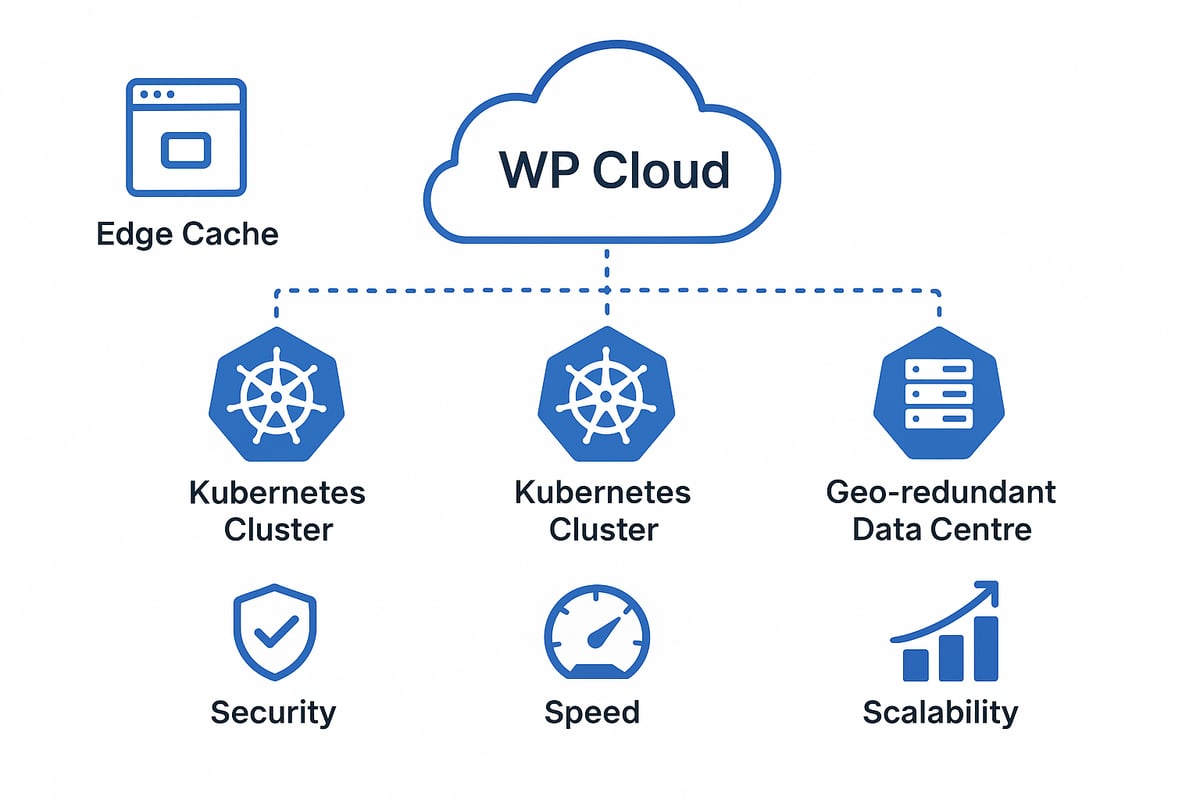
What is WP Cloud?
WP Cloud is a specialised Platform-as-a-Service (PaaS) created by Automattic, the company behind WordPress.com. Unlike general-purpose cloud services, WP Cloud is designed exclusively for WordPress hosting. Officially launched in 2021, its robust infrastructure has been operational since 2019, evolving to meet the unique needs of WordPress users.
The primary audience for WP Cloud consists of hosting providers, not direct consumers. However, end users benefit significantly when their chosen host leverages WP Cloud, enjoying optimised performance and reliability. Its WordPress-only focus sets it apart from platforms like AWS or Google Cloud, which serve many industries.
Technically, WP Cloud utilises Kubernetes for resource orchestration and deploys sites across multiple geo-redundant data centres. This architecture ensures high availability and rapid failover if an issue arises in any location. Major platforms such as WordPress.com and Pressable run on this infrastructure, offering proof of its scalability and resilience.
High-profile websites, including TechCrunch and CNN, rely on similar underlying technology, demonstrating WP Cloud’s capability to power content-rich, high-traffic sites. The platform supports thousands of concurrent users per site, making it suitable for demanding use cases. For a deeper dive into infrastructure details and advantages, visit WP Cloud’s WordPress-First Cloud Hosting Platform.
Core features of WP Cloud
WP Cloud brings together a suite of advanced features tailored for the WordPress ecosystem. Edge caching is a standout, delivering lightning-fast speeds by serving cached versions of pages from locations closest to visitors. This approach reduces server load and latency.
Scalable PHP workers ensure that sites can handle sudden traffic spikes without slowdowns. The architecture automatically allocates resources, so even during high-traffic events, performance remains stable. Flexibility is another strength, as WP Cloud can serve both small blogs and enterprise-level sites with equal efficiency.
Security is central to WP Cloud. Built-in server isolation uses Linux namespaces and cgroups to separate each site’s data, reducing the risk of cross-site breaches. Automatic failover and geo-redundancy further protect sites from downtime due to localised incidents.
Management is fully handled by the provider, removing the need for manual server configuration or updates. For example, Edge Cache can instantly return cached content, which is especially valuable during peak loads. Pressable, a leading WP Cloud host, consistently achieves 99.99% uptime, reflecting the reliability of the platform.
In summary, WP Cloud offers a purpose-built foundation for WordPress sites. Its focus on speed, scalability, and security, combined with managed operations, makes it a compelling choice for users seeking robust hosting in 2025.
Key features and advantages of WP Cloud in 2025
As WordPress sites grow in complexity and traffic, hosting requirements have never been more demanding. In 2025, WP Cloud stands out as a dedicated solution, engineered to deliver exceptional speed, reliability, and security for WordPress websites. Understanding the key features and advantages of WP Cloud helps site owners and agencies make the right hosting decisions for the future.
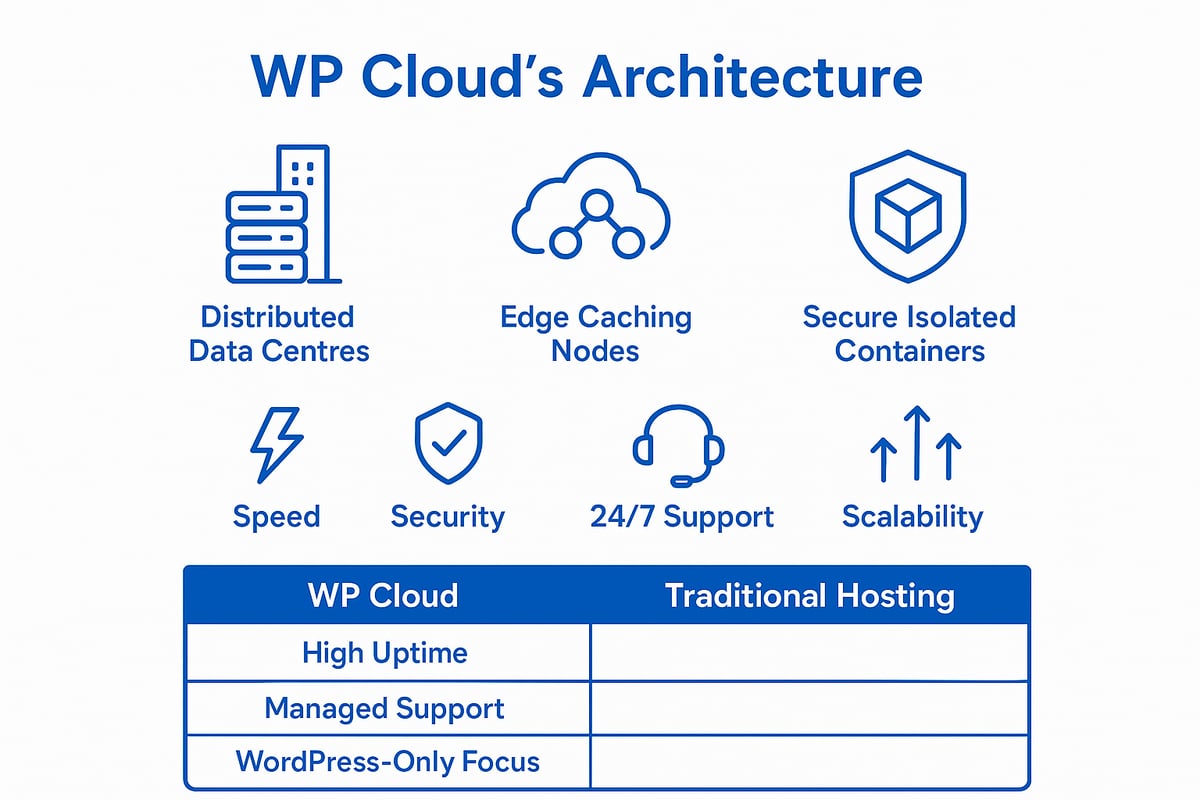
Performance and scalability
WP Cloud takes WordPress performance to new heights through its purpose-built infrastructure. The platform is designed with multiple caching layers, including page, database, OPCache, and edge caching, which work in tandem to deliver content at lightning-fast speeds. Sites benefit from geo-redundant failover, meaning resources are distributed across several data centres, so even if one location faces issues, uptime is preserved.
Handling large bursts of traffic is a core strength of WP Cloud. For example, ecommerce and news websites can experience sudden spikes in visitors during sales or breaking news events. WP Cloud ensures these sites remain operational and responsive, thanks to scalable PHP workers and automated resource allocation.
A recent statistic shows WP Cloud infrastructure supports thousands of active users per site without performance drops. In direct comparison, many public cloud providers struggle to match these WordPress-specific results, especially under heavy load. This makes WP Cloud a leading choice for businesses expecting rapid growth or unpredictable traffic patterns.
Security and reliability
Security and reliability are at the heart of WP Cloud’s offering. Each website is isolated using Linux namespaces and cgroups, which keeps data and processes separate, reducing the risk of cross-site contamination. Dedicated DDoS protection is built into the platform, with a custom scheduler ensuring that attacks do not impact overall performance.
TLS encryption is automatically enabled at the edge servers, ensuring all site traffic remains confidential and secure. This is particularly crucial for membership sites and online courses, where sensitive user data must be protected at all times.
Since its launch, there have been zero major breaches reported on WP Cloud-powered hosts. This impressive record highlights the platform’s commitment to robust security and consistent uptime, providing peace of mind for site owners who demand the highest standards.
Managed hosting and support
One of the defining advantages of WP Cloud is its fully managed hosting environment. The core infrastructure is maintained in-house by the WP Cloud team, with no reliance on third-party clouds like AWS or Google. This approach ensures that every aspect of the platform is optimised for WordPress, from server configuration to daily operations.
Hosting providers such as Pressable build their services on WP Cloud, offering 24/7 expert support tailored specifically for WordPress users. This collaboration between WP Cloud engineers and hosting support teams means issues are resolved quickly and with deep technical insight.
Customer satisfaction rates consistently exceed 90 percent for WP Cloud-enabled hosts, reflecting the quality of service and support. For those seeking a seamless transition to managed WordPress hosting, the WordPress hosting and maintenance guide offers further insights into what to expect from modern cloud solutions like WP Cloud.
Limitations and considerations
While WP Cloud brings many benefits, it is important to understand its limitations. The platform is exclusive to WordPress sites, so those running other content management systems will need alternative hosting. Users do not have access to direct server configuration, as is typical with Platform-as-a-Service models, which may not suit developers needing granular control.
Subdomain multisite installations are not supported, only subdirectory multisites. Agencies or developers managing mixed CMS portfolios or requiring custom server setups should carefully assess their needs. However, for users who prioritise simplicity, security, and reliability over advanced server control, WP Cloud remains an ideal choice.
In summary, WP Cloud’s features set a new benchmark for managed WordPress hosting in 2025. Its combination of performance, security, and expert support caters to a broad range of site owners, from growing businesses to established enterprises.
WP Cloud vs traditional WordPress hosting: What’s changed?
The evolution of WordPress hosting has accelerated, with wp cloud setting a new benchmark for managed solutions in 2025. Understanding how wp cloud compares to traditional hosting models is essential for any site owner considering an upgrade. Let us examine the key differences that define this new era.
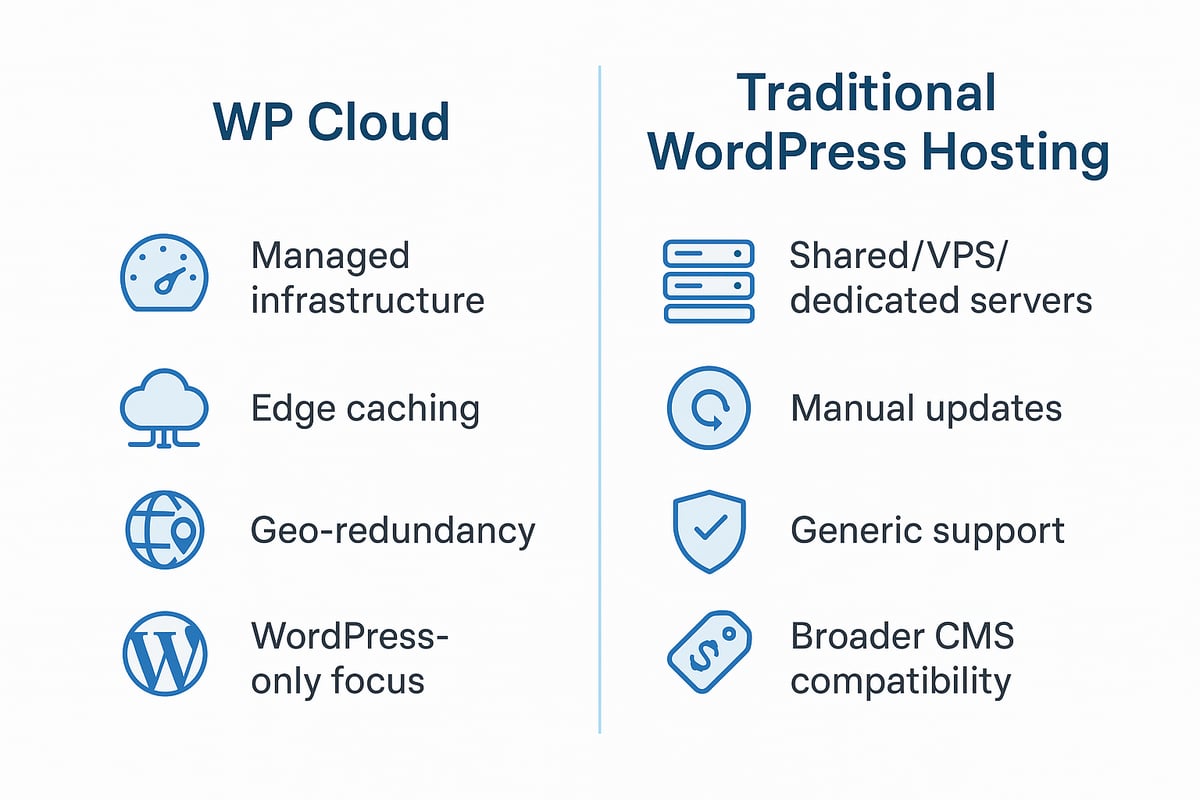
Technical differences
Traditional WordPress hosting typically relies on shared, VPS, or dedicated servers that are often not purpose-built for WordPress. In contrast, wp cloud is engineered exclusively for WordPress, using a modern Platform-as-a-Service (PaaS) model. The infrastructure is managed entirely by WordPress experts, not by large public cloud providers focused on multiple industries.
Whereas public cloud platforms like AWS or Google Cloud split resources across a variety of applications, wp cloud is optimised for WordPress performance and reliability. This means the architecture, including Kubernetes orchestration and geo-redundant data centres, is tailored to the specific needs of WordPress sites.
The difference is further highlighted by the management interface. Providers such as Pressable deliver a streamlined experience built on wp cloud, making complex server tasks invisible to the end user. For a deeper dive into how hosting models differ, see Shared vs own WordPress hosting.
Comparison Table
| Feature | WP Cloud | Traditional Hosting |
|---|---|---|
| Platform focus | WordPress only | Multiple CMS |
| Infrastructure | Managed PaaS | Shared/VPS/Dedicated |
| Data centre redundancy | Geo-redundant | Variable |
| Server management | Fully automated | Manual or semi-automated |
The technical foundation of wp cloud provides a robust, WordPress-centric alternative to legacy setups.
User experience and performance
With wp cloud, users benefit from a system designed for maximum speed and stability. Multiple layers of caching, including page, database, and OPCache, work together with scalable PHP workers to keep load times consistently low. This is particularly valuable during traffic spikes, such as viral news events or product launches.
Traditional hosting environments often require manual tuning to handle surges in visitors. In contrast, wp cloud automatically scales to meet demand, reducing the risk of slowdowns or outages. Edge caching further reduces server load by serving content from the closest available location.
Sites running on wp cloud, such as news portals or e-commerce shops, consistently report faster page loads and improved user engagement. The platform’s seamless management approach means less time spent on technical maintenance and more on content creation.
Security and support enhancements
Security is a cornerstone of wp cloud’s offering. Each site is isolated using advanced Linux namespaces and cgroups, ensuring that a breach in one account does not affect others. Built-in DDoS protection and TLS encryption at the edge keep data safe from common threats.
Traditional hosts may offer security add-ons, but these are often reactive rather than proactive. In contrast, wp cloud integrates security at every layer, with automated updates and real-time monitoring as standard.
Support is another area where wp cloud excels. Providers offer 24/7 expert assistance, with teams trained specifically on WordPress. This collaboration between wp cloud engineers and hosting support leads to rapid resolution of any issues.
- Server isolation for each WordPress site
- Proactive DDoS mitigation
- Automatic failover and monitoring
- Dedicated, WordPress-savvy support
Since its launch, wp cloud-powered hosts have reported zero major security breaches, highlighting the reliability of this model.
Cost and flexibility
One of the most compelling shifts with wp cloud is the balance between enterprise-grade features and accessible pricing. By running its own infrastructure, wp cloud avoids the markup associated with third-party public clouds. This translates into competitive plans for agencies, small businesses, and large enterprises alike.
Traditional hosting can sometimes offer more flexibility for advanced customisation, especially at the server level. However, this often comes at the cost of increased management overhead and potential security risks. With wp cloud, the trade-off is clear: ease of use and robust security in exchange for less direct server control.
For organisations seeking a managed, high-performance environment tailored to WordPress, wp cloud is a forward-thinking solution that reduces complexity and operational costs.
Who should use WP Cloud? Use cases and ideal scenarios
Choosing the right hosting for your WordPress site is critical for performance, security and long-term success. WP Cloud stands out as a specialised solution, but is it the right choice for everyone? This section explores who benefits the most from wp cloud, when it delivers the greatest value and which scenarios may require alternative options.
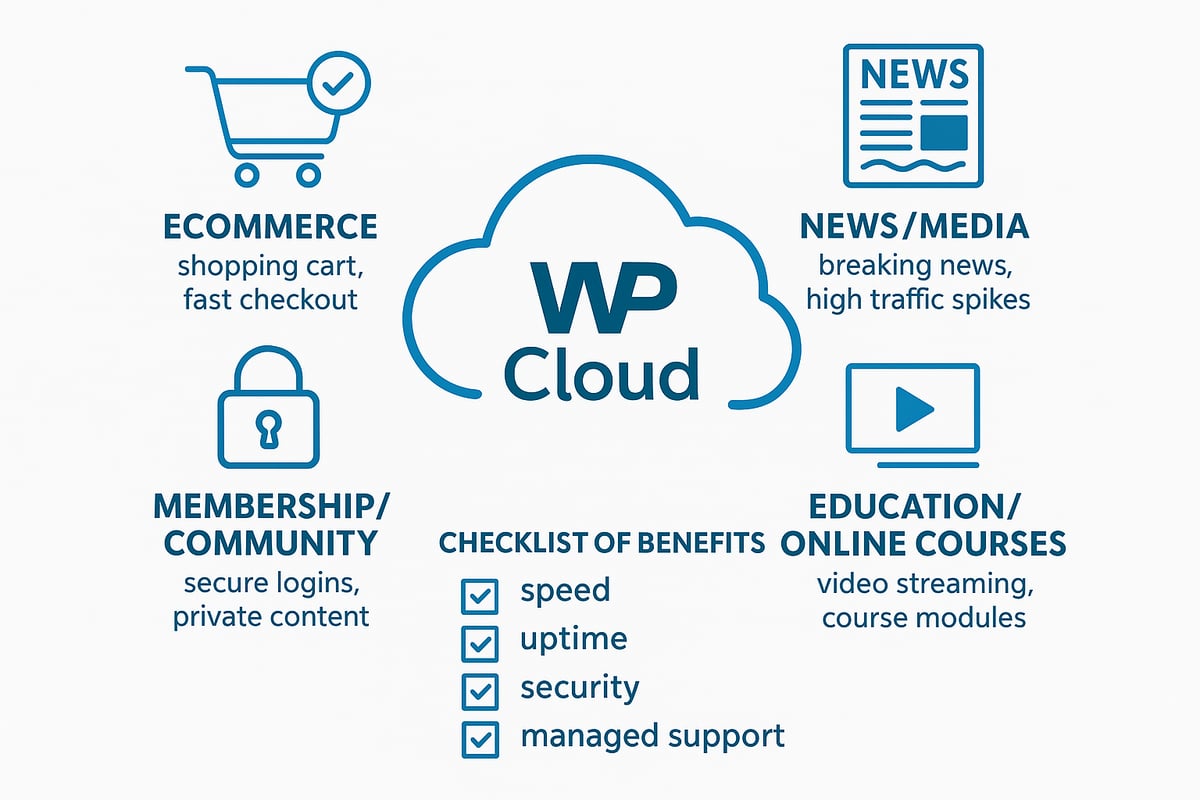
Types of websites that benefit
WP Cloud is purpose-built for WordPress, making it a natural fit for websites where speed, uptime and reliability are essential. Its architecture is designed to handle demanding workloads, ensuring sites remain fast and secure no matter the number of visitors.
The following types of sites are especially suited to wp cloud:
- Ecommerce shops: Fast page loads reduce cart abandonment and boost sales, especially during seasonal spikes or flash sales.
- News and media platforms: Real-time publishing, heavy multimedia and viral traffic are managed effortlessly with scalable infrastructure.
- Membership and community sites: Secure logins, private content and member interactions run smoothly, even with thousands of concurrent users.
- Education and online courses: Video hosting, resource downloads and interactive content are delivered without interruption, creating a seamless learning experience.
For example, Pressable clients using wp cloud in these sectors consistently report fewer outages and higher engagement rates. The platform’s edge caching and automatic failover protect against downtime, which is vital for businesses and educational providers who cannot afford disruptions.
Not suitable for every user
While wp cloud delivers impressive performance and security for many WordPress websites, it is not the right choice for every scenario. Its focus on managed, WordPress-only hosting means there are some limitations to consider.
Developers who require direct server access or want to run custom server configurations may find wp cloud restrictive. Advanced setups that involve non-standard software, server-level tweaks or the need for root access are not supported within this environment.
Additionally, wp cloud cannot host non-WordPress sites. Agencies or businesses with mixed CMS portfolios, such as those using Drupal or Joomla alongside WordPress, will need to look at other hosting options to meet their broader needs. For these users, a VPS or dedicated server may offer the flexibility required.
It is important to evaluate your technical requirements before committing to wp cloud. If your project demands extensive server customisation or supports multiple platforms, consider alternative solutions that provide greater control.
How to choose a WP Cloud-powered provider
Selecting the right provider is essential to unlocking the full benefits of wp cloud. Start by evaluating the provider’s reputation and track record in managed WordPress hosting. Look for established names like Pressable or WordPress.com, which are known for leveraging wp cloud infrastructure.
Key factors to assess include support quality, uptime guarantees, and the availability of managed migration services. For a smooth transition, prioritise providers offering comprehensive migration assistance. For example, services such as Hosting, rehosting, and migration services can simplify the move to wp cloud, reducing the risk of downtime or data loss.
Also consider pricing, included features, and customer satisfaction ratings. Many wp cloud providers offer free SSL, automated backups and 24/7 expert support as standard, which adds significant value for site owners.
Ultimately, choosing a wp cloud-powered provider means balancing performance, support and cost to match your unique needs. Take the time to compare options, ask questions and ensure your chosen host aligns with your business goals.
How to migrate your WordPress site to WP Cloud: Step-by-step guide
Migrating your WordPress site to wp cloud can seem daunting, but a structured approach makes the process efficient and secure. Whether you are moving from shared hosting or another cloud platform, following these steps will ensure a smooth transition. Let us explore each stage in detail, so you can unlock the full potential of wp cloud for your website.
Step 1: Prepare your current site
Start your wp cloud migration by securing a complete backup of your site. Use tools like cPanel, PHPMyAdmin, or trusted backup plugins to save both your files and database.
- Download all website files to your local machine.
- Export your database, ensuring you have the latest version.
- Document any custom configurations or plugins, such as those for ecommerce or membership functions.
Careful preparation at this stage reduces downtime and prevents data loss when transitioning to wp cloud.
Step 2: Select a WP Cloud-powered provider
Choosing the right wp cloud-powered provider is crucial. Compare hosts on reliability, support, performance, and the quality of migration services. Providers like Pressable and WordPress.com build on wp cloud infrastructure to deliver optimised experiences.
- Review independent comparisons, such as the Best WordPress Hosting Providers in 2025, to evaluate your options.
- Look for hosts offering free migrations and 24/7 support.
- Consider providers recognised for excellence, such as those featured in WP Cloud’s Ninth Consecutive Forbes Cloud 100 Recognition.
A reputable wp cloud provider simplifies your migration and ensures ongoing site stability.
Step 3: Initiate migration
With your provider selected, begin the wp cloud migration process. Many hosts offer automated migration plugins, making the move seamless.
- Use the host’s migration plugin, if available, for a guided transfer.
- For manual migrations, upload your files and import the database into the wp cloud environment.
- If your site is complex, request managed migration assistance from your provider’s support team.
Automated tools can save time, but manual checks are vital when migrating to wp cloud, especially for larger or custom sites.
Step 4: Configure and test your new site
Once your site is on wp cloud, thorough testing and configuration are essential. This step ensures your website functions correctly and takes full advantage of cloud hosting features.
- Confirm all files and the database have transferred successfully.
- Verify SSL/TLS is active; wp cloud providers typically enable this by default.
- Test site speed, check for broken links, and ensure plugins are working as expected.
Addressing issues early helps you benefit from the performance and security of wp cloud right away.
Step 5: Go live and monitor
After configuration, it is time to point your domain to your wp cloud site. This involves updating your DNS records to the new host’s details.
- Change DNS settings at your domain registrar to direct traffic to wp cloud.
- Monitor site uptime and responsiveness using the provider’s dashboard or third-party tools.
- Watch for increased performance and reduced downtime as your site leverages wp cloud capabilities.
Continuous monitoring is key to maintaining a high-performing, secure site on wp cloud.
Troubleshooting and support
While most wp cloud migrations proceed smoothly, occasional issues may arise. Common problems include missing files, database errors, or plugin incompatibilities.
- Double-check file paths and database credentials if your site does not load.
- Update or replace outdated plugins causing conflicts.
- Reach out to your wp cloud provider’s support team for expert help with technical issues.
Prompt support and proactive troubleshooting make wp cloud migration a safe and effective upgrade for your WordPress site.
Expert perspectives and future trends for WP Cloud
As wp cloud continues to gain traction, insights from industry leaders offer a glimpse into its strategic direction. Automattic’s Jesse Friedman highlights the importance of focusing solely on WordPress performance and security, positioning wp cloud as a solution built by experts for experts. Pressable’s leadership echoes this sentiment, emphasising collaboration between hosting providers and the wp cloud core team. This synergy ensures that platform updates and innovations are always aligned with the evolving needs of the WordPress community.
Insights from industry leaders
Industry leaders have played a pivotal role in shaping the vision for wp cloud. Jesse Friedman of Automattic often discusses the WordPress-centric approach, stating that wp cloud is purpose-built for reliability and performance. Pressable’s team reinforces this, sharing that their partnership with wp cloud allows them to deliver tailored solutions for demanding WordPress sites.
This collaborative model means that updates, feature rollouts, and security enhancements are driven by those who understand the WordPress landscape best. The result is a platform that evolves in tandem with user needs, staying ahead of industry challenges.
WP Cloud’s roadmap for 2025 and beyond
Looking ahead, wp cloud’s development roadmap is ambitious. Plans include expanding the global network of geo-redundant data centres, further improving site speed and uptime. Enhanced server isolation and automated failover are set to strengthen platform security, with continuous investment in DDoS protection.
Automattic aims to introduce more advanced migration tools and deeper integration with popular plugins, making transitions to wp cloud even smoother. For users keen on robust security, regular updates and enhancements are prioritised, as highlighted in resources like WordPress security updates and enhancements.
The evolving WordPress hosting landscape
The WordPress hosting industry is shifting rapidly towards managed, cloud-based platforms such as wp cloud. Traditional shared or VPS environments often struggle to meet the demands of high-traffic or mission-critical sites. In contrast, wp cloud delivers enterprise-grade reliability and scalability, previously out of reach for many smaller organisations.
Market analysts project that managed WordPress hosting will grow by 15 percent annually through 2025. This trend reflects increasing demand for simplified management, robust security, and consistent performance, all hallmarks of wp cloud-powered solutions. For decision-makers, understanding these shifts is vital.
What WordPress users should watch for
WordPress users should keep an eye on new wp cloud-powered offerings from additional hosting providers, which will broaden their options for high-performance, secure hosting. Enhanced migration tools and tighter integration with leading plugins are on the horizon, promising a smoother onboarding experience.
Community feedback continues to shape wp cloud’s evolution, ensuring real-world challenges are addressed promptly. For those evaluating hosting options, the WordPress Hosting Selection Guide 2025 provides expert advice to make informed decisions in this changing landscape.
After exploring how WP Cloud is reshaping WordPress hosting in 2025—from seamless scalability and robust security to hands-off management and expert support—you might be wondering how these benefits could elevate your own website. Whether you’re aiming for peak performance, stronger protection, or simply want more time to focus on your business instead of technical hurdles, the next step is straightforward. If you’re ready to see what tailored WordPress solutions can do for your online presence, Ready to transform your WordPress website? Let’s take your site to the next level together.