

WooCommerce site speed matters because every extra delay between a click and a response gives a shopper a reason to leave, and the delay hurts most at the moments closest to payment. It also feeds into how Google judges the page experience, and it shapes how much a customer trusts the store. For an agency that built the store, a slow shop is rarely just a technical problem: it is a client conversation about falling revenue that lands on your desk, usually unbilled.
This article sets out what the research says about speed and sales, which measures show whether a store is fast enough, where WooCommerce stores typically lose time, and how agencies can stop absorbing that work.
TL;DR
- Academic research found that website slowdowns have sizable adverse effects on online sales, and that shoppers are most sensitive to delays at checkout.
- Speed is a page-experience signal for Google, but relevance and content quality still matter more, so treat speed as a conversion and trust issue first and an SEO bonus second.
- Track TTFB, LCP, CLS and INP rather than guessing, and test product, cart and checkout pages separately.
- Extensions, hosting, caching and PHP versions are the usual causes of a slow store, and all of them need ongoing care, not a one-off fix.
- Our WordPress Profit Calculator shows in under 90 seconds how much uncaptured revenue sits in your existing WordPress client base.
Table of Contents
- What a slow store costs in sales
- How speed changes shopper behaviour and trust
- Does site speed affect SEO?
- How to tell whether a WooCommerce store is fast enough
- Product pages, cart and checkout need separate attention
- The usual causes of a slow WooCommerce store
- Why this lands on agencies
- Our perspective: speed is a maintenance problem, not a launch problem
- How we can take this off your plate
- FAQ
- Sources
What a slow store costs in sales
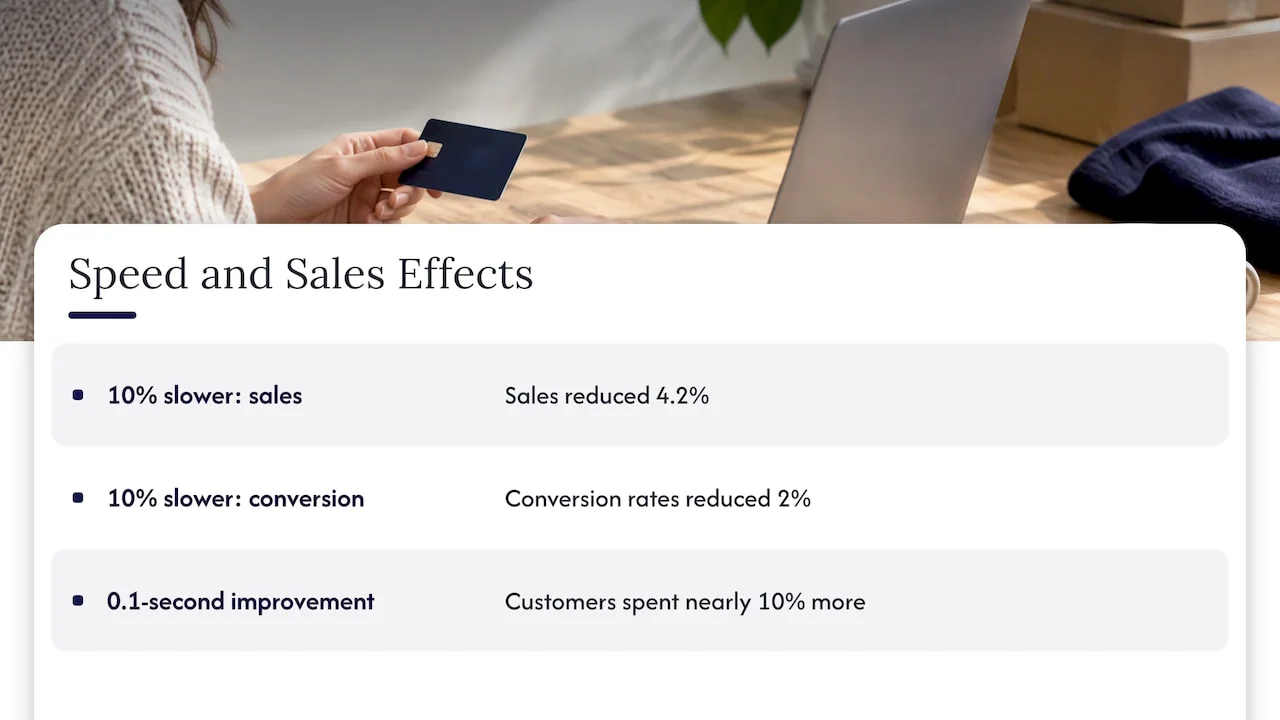
Most people accept that slow sites sell less. What is harder to know is how much less. A Wharton Magazine article on research into online retail speed reported that a 10% decrease in website speed can reduce sales by 4.2% and conversion rates by 2%, according to Wharton’s 2022 coverage of the study. The researcher quoted there, Santiago Gallino, makes the point that even small fractions of a second matter, and that customers lose patience differently depending on where they are in the purchase journey.
The underlying paper, published in Operations Research by Gallino, Karacaoglu and Moreno, reached the same conclusion: website slowdowns have sizable adverse effects on online sales, and customers are especially sensitive to delays during checkout. That detail matters for WooCommerce, because the cart and checkout are the heaviest, least cacheable pages in the store.
The percentages are worth translating into a client’s own numbers. A store taking £20,000 a month does not need a dramatic slowdown to feel this. If a degraded page cost it a few per cent of sales, the loss would be hundreds of pounds every month, and it would never appear as a line item. It would simply look like a quiet month.
There is a positive version of the same finding. Jetpack’s WooCommerce guide cites a case where a 0.1-second improvement increased page views, conversions and average order value, with customers spending nearly 10% more. Treat vendor-quoted case studies as indicative rather than a promise for any one store, but the direction is consistent with the academic work.
How speed changes shopper behaviour and trust
Speed is not only a mechanical barrier. It changes what shoppers think of the brand.
A 2024 Retail Dive report found that just over half of consumers say a website’s speed reflects the quality of the brand behind it, and that half permanently lost trust in a brand after between one and five poor website experiences. The figures come from US consumers, so read them as a signal rather than a UK benchmark, but the behaviour will be familiar to anyone who has abandoned a basket because a page hung.
Older research points the same way. A 2006 JupiterResearch survey of US shoppers found that 75% of online shoppers who met a site that froze, crashed, rendered slowly or had a convoluted checkout would no longer buy from it. The same survey found that 55% of shoppers spending more than $1,500 a year insisted on quick page loading. The technology has changed since 2006, but the finding that your best customers are the least patient has not.
More recent figures from Jetpack’s guide say that over 70% of consumers report page speed affects their willingness to buy, and that 57% will leave after a three-second wait, with most of those not returning. These are survey-based claims from a company that sells performance tools, so use them to frame the conversation rather than as precise forecasts.
What this means in practice:
- First-time visitors have no loyalty to protect them. A slow product page loses them silently.
- Returning customers remember. Repeated poor experiences are what erode trust, and repeat purchase is the profit centre of most stores.
- Mobile shoppers are the least forgiving, and in most UK stores they are the majority of traffic.
Does site speed affect SEO?
Yes, but it needs to be described carefully, because it is often oversold.
Shopify’s guide on site speed says that Google uses speed as a ranking factor and added Core Web Vitals signals to its algorithm, so faster stores are easier to discover. Cloudflare’s learning centre makes the broader case that speed influences user experience, conversion rates, rankings and revenue.
The caveat comes from Search Engine Journal’s review of Google’s own documentation: page speed is a page-experience signal, but relevance and content quality matter more. A faster page will not automatically outrank a more relevant slower one.
So the honest position for a client conversation is this:
- Speed will not rescue a store with thin category pages or poor product content.
- Among stores with similar relevance, a poor experience is a disadvantage you do not need to carry.
- The conversion effect is the bigger prize. Even if speed moved nobody up the rankings, the sales research above would still justify the work.
If SEO is part of what you sell, our guide to using Yoast SEO in a client build covers the on-page side, and our piece on how site migration improves SEO, and when it does not is worth reading before any hosting move.
How to tell whether a WooCommerce store is fast enough
“It feels slow” is not a brief. WooCommerce’s own developer team lists the measures a store can monitor: TTFB, FCP, LCP, CLS and INP, with TTFB indicating server response time. They also note that Google’s Web Vitals are a common framework for rating frontend performance across the web.
In plain terms:
| Measure | What it tells you | Where WooCommerce stores usually struggle |
|---|---|---|
| TTFB (time to first byte) | How quickly the server starts responding | Weak hosting, uncached pages, heavy database queries |
| FCP (first contentful paint) | When something first appears | Render-blocking scripts and styles |
| LCP (largest contentful paint) | When the main content is visible | Oversized product and hero images |
| CLS (cumulative layout shift) | Whether the page jumps around while loading | Late-loading banners, fonts and embedded widgets |
| INP (interaction to next paint) | How quickly the page responds to taps and clicks | Script-heavy themes, add-to-cart and filter scripts |
WooCommerce’s guidance on extensions recommends benchmarking with Core Web Vitals and Lighthouse. Do this before and after any change, so you can show a client what the work achieved.
Two practical habits make the numbers meaningful:
- Test the pages that earn money. A fast homepage says little. Test a product page, a category page with filters, the cart and the checkout, on a mid-range mobile connection.
- Test search separately. Generic page-speed scores do not show how quickly on-site live search responds, so if a store depends on search, check that latency on its own.
Product pages, cart and checkout need separate attention
This is where WooCommerce differs from a brochure site. Most of a store can be cached. The cart and checkout cannot be cached in the same way, because they are personal to each shopper.
WooCommerce’s performance documentation recommends caching static pages while making sure the dynamic cart and checkout pages are handled correctly, because caching reduces server load and speeds delivery. Misconfigured caching is one of the quickest ways to break a store: baskets that show another session’s contents, or checkouts that fail silently. A speed fix that breaks checkout is worse than no fix.
Since shoppers are most sensitive to delay at checkout, that is where effort pays back soonest. We cover specific, delegable improvements in seven checkout quick wins for agencies, and the layout choices that affect weight and clarity in what to build and what to skip in an ecommerce layout.
On the product and category pages, the usual gains come from:
- compressing and correctly sizing product images, especially the first image above the fold
- removing scripts that load on every page but are only needed on a few
- limiting the number of variations and filters that fire database queries on load
- avoiding page builders that output heavy markup for simple product templates
The usual causes of a slow WooCommerce store
In our experience, slow stores rarely have one dramatic problem. They have several modest ones that accumulated.
Extensions and plugins
WooCommerce’s own guidance warns that inefficient extensions can add load time and resource usage, affecting store performance, SEO and conversion rates. Every extra plugin for reviews, popups, wishlists or tracking adds requests and queries. The question for each one is whether it earns its weight. Our note on checking which plugins a site uses explains how to audit this without needing a login.
Front-end weight
The same WooCommerce documentation says that minifying HTML, CSS and JavaScript, reducing requests and deferring non-critical JavaScript can improve page-load times. These are well-understood changes, but they need testing against the theme and checkout, since deferring the wrong script can stop a payment button working.
Caching
Good caching is the biggest single lever on TTFB for catalogue pages, provided the exclusions for cart, checkout and account pages are right. If you are comparing options, this overview of caching plugins for WooCommerce is a reasonable starting point. Whatever you pick, test a full purchase after every configuration change.
Hosting and PHP
A cheap shared server will hold back a well-built store. Hosting and PHP version both affect response times, and an out-of-date PHP version is a common hidden drag. We explain the effect in how PHP updates affect WordPress performance, and the broader context in our plain guide to WordPress core updates. If the hosting is the problem, moving it is a project in its own right, which is what our hosting, re-hosting and migration service is for.
Neglect over time
A store that was fast at launch can be slow a year later. New plugins, bigger image libraries, a growing database and untouched updates all add weight. Speed is not a launch deliverable. It is a maintenance outcome.
Why this lands on agencies
When a store slows down, the client does not call a hosting company or a plugin developer. They call the agency that built it. That is a compliment to the relationship and a problem for the margin.
The pattern is familiar: a client mentions the checkout feels sluggish, someone on your team spends an afternoon investigating, a plugin gets disabled, and none of it is billed because there is no retainer covering it. Multiply that across a client base and you have absorbed hours that cost more than they look, and which pull designers and strategists away from the work you were hired for.
There are three ways to deal with it:
- Absorb it. Simple, but it quietly erodes profit and morale.
- Staff for it. Hiring a WordPress engineer is a real cost for an agency of 2 to 50 people, and the work is uneven.
- Put a specialist behind you. The client relationship stays with you, and the technical work goes to people who do it daily.
If you are not sure how large the problem is, run your numbers first. The WordPress Profit Calculator takes under 90 seconds and shows how much uncaptured revenue sits in the WordPress clients you already have. It is a useful next step before deciding which of the three routes makes sense, and our list of site management checks agencies can bill for shows where that revenue usually hides.
Our perspective: speed is a maintenance problem, not a launch problem
We look after WordPress sites for agencies, and the same pattern turns up again and again. Agencies build a good store, test it, launch it and move on. Six months later the client has added plugins, the PHP version has aged, the images are twice the size they used to be, and nobody owns the performance. The agency only finds out when the client complains about sales.
The research on speed and conversion is clear enough that waiting for a complaint is the expensive option. Our view is that performance should be a standing, scheduled part of care for any WooCommerce store: regular updates, a look at the heaviest extensions, caching that has been tested against the checkout, and a Core Web Vitals check you can show the client. That is dull work, which is exactly why it should be handled by a team set up to do it, quietly, under your brand.
We would also say plainly that not every slow store needs a big rebuild. Most need a careful audit and a handful of fixes. Agencies who know that can offer clients a modest, repeatable service rather than an emergency.
— Marcel
How we can take this off your plate
WPCTO works behind design, brand and digital agencies in the UK, handling WordPress delivery so you keep the client relationship and the recurring revenue. For WooCommerce speed, that means maintenance, plugin and theme management, hosting management and migration, and emergency support when something breaks.
If you want the work covered on a predictable basis, our service level agreements are published at £450 a year for Bronze, £750 a year for Silver and £1,850 a year for Gold, with details on the WordPress service level agreements page. For a one-off job, such as a slow checkout, you can look at our quick fixes and other services, or buy time as you need it.
Not sure where to start? Use the WordPress Profit Calculator to see what your existing WordPress clients could be worth, then talk to us about taking the technical work off your team.
FAQ
How fast should a WooCommerce site be?
There is no single magic number, but the measures to hold yourself to are Google’s Web Vitals: LCP, CLS and INP, along with TTFB for server response. WooCommerce’s developer team lists these as the ones a store can monitor. Aim to pass them on mobile for product, cart and checkout pages, not only the homepage.
Does page speed directly improve Google rankings?
Speed is a page-experience signal, but Google’s documentation, as reviewed by Search Engine Journal, indicates relevance and content quality matter more. Faster stores are not guaranteed higher rankings. The stronger and more reliable benefit is better conversion, because shoppers leave slow pages.
Why is my WooCommerce checkout slower than the rest of the site?
Cart and checkout pages are personal to each shopper, so they cannot be cached like ordinary pages. They also tend to load payment scripts, address lookups and tracking. WooCommerce recommends handling these dynamic pages carefully in any caching setup, and testing them separately.
Can a plugin slow down my store?
Yes. WooCommerce’s own guidance says inefficient extensions can add load time and resource usage. Audit what each plugin does, remove the ones that no longer earn their place and benchmark before and after any change.
Who should look after WooCommerce performance for a client?
Someone with a standing responsibility for it, not whoever happens to be free when a complaint arrives. For many agencies that is a specialist partner working under the agency’s brand, so the client relationship and recurring revenue stay with you.
Sources
- Why Online Retailers Have a ‘Need for Speed’, Wharton Magazine
- Need for Speed: The Impact of In-Process Delays on Customer Behavior in Online Retail, Operations Research
- Slow website? It’ll cost you, Retail Dive
- Retail Web Site Performance: Consumer Reaction to a Poor Online Shopping Experience, JupiterResearch
- WooCommerce Performance Optimization guide, Jetpack
- Why Site Speed Is So Important For CRO, SEO and Loyalty, Shopify
- Why does site speed matter?, Cloudflare Learning Center
- Page Speed As A Google Ranking Factor, Search Engine Journal
- Improving WooCommerce Performance at Scale, WooCommerce developer blog
- Performance best practices for WooCommerce extensions
- How to optimize performance for WooCommerce stores
- Top 4 caching plugins for WooCommerce