

A WordPress core update is a new version of the main WordPress software that runs your site. It is separate from your theme and your plugins. It replaces the old core code with new code to fix security holes, correct bugs and add features. If you build sites for clients, core updates are the ones that arrive on a schedule you do not control, and they are the ones clients ring about when something looks different on Monday morning.
This guide explains what core updates are, how the version numbers work, what the updates change, what WordPress does automatically, and how to handle them without losing a Sunday evening. It is written for agency owners, directors and account managers who sell WordPress sites but do not want to be the help desk for them.
TL;DR
- A core update replaces the WordPress software itself. Themes and plugins are updated separately and need their own management.
- Major releases bring new features. Minor releases carry security fixes, maintenance and translation updates, and WordPress applies them automatically by default.
- Always back up first. Any manual edits to core files are overwritten by an update.
- Apply security releases promptly, but test major releases on a staging copy before they reach a live client site.
- If you would rather not carry this work, our WordPress Profit Calculator shows in under 90 seconds what your existing client base could be worth as a managed service.
Table of Contents
- What a WordPress core update actually is
- Major, minor and security updates explained
- Why core updates matter for client sites
- Does WordPress update core automatically?
- A safe routine for updating core
- What to do when a core update goes wrong
- The real cost of core updates for an agency
- Our perspective: treat core updates as a service, not a favour
- Where the free calculator fits in
- How WPCTO takes core updates off your plate
- Practical checklist for each client site
- FAQ
- Sources
What a WordPress core update actually is
A WordPress site is made of three layers that update independently: the core software, the theme that controls design and templates, and the plugins that add functionality. A core update touches only the first. The official Learn WordPress guide to managing updates describes it as replacing old code with new code to improve security, fix bugs and add features, and notes that themes and plugins are separate components that need their own attention.
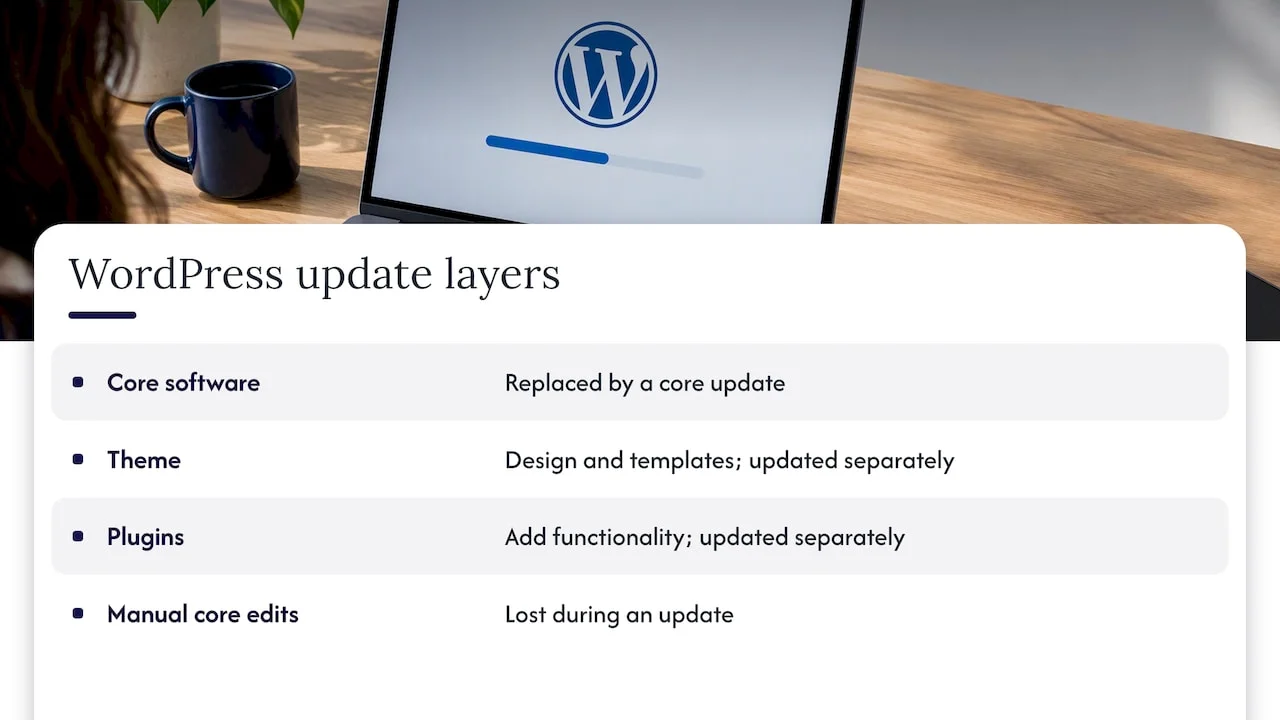
That separation matters in practice. When a client says “WordPress updated and now the site is broken”, the cause is often not core at all. It is a plugin or theme that has not caught up with a change in core, or the reverse. Knowing which layer moved is the first step of any diagnosis.
A core update changes everything in the main installation: the files and folders that make up WordPress itself. The official WordPress documentation on updating is explicit that any manual modifications made to core files will be lost. Your content, uploads, theme and plugins live in separate places and are not replaced, but a developer who once “just tweaked a core file” on a client site has left a trap that an update will spring.
What core updates are not
A few things are commonly confused with core updates:
- Plugin updates: new versions of individual plugins, released by their own developers on their own timetable.
- Theme updates: new versions of the theme, which may overwrite customisations made directly in the theme files rather than in a child theme.
- PHP updates: a change to the server language WordPress runs on. This is a hosting matter, though it interacts with core and plugin compatibility. We cover it in how PHP updates affect WordPress performance.
Major, minor and security updates explained
WordPress releases come in two broad kinds, and the version number tells you which.
| Type | Version pattern | What it usually contains | How it is applied by default |
|---|---|---|---|
| Major | 4.0, 4.1, 4.2 style | New features, editor and interface changes | Depends on the site’s configuration (see below) |
| Minor | 4.1.1 style | Maintenance, security fixes, translation updates | Automatically in the background |
These patterns come from the Learn WordPress update lesson. One detail worth telling clients: WordPress does not treat the first digit as special. A jump from one major number to the next is a normal feature release, not a rebuild of the platform. The risk is in what changed, not the size of the number.
Security releases
Security releases are usually minor releases, and they are the ones you should not sit on. WordPress’s own release notes advise updating sites immediately when a security release is available, as in the version 7.0.3 announcement.
A recent example shows why “it has been fine so far” is a weak strategy. In March 2026, WordPress 6.9.4 was released specifically to address security vulnerabilities that had not been fully applied in the earlier 6.9.2 and 6.9.3 releases. Even a fix can need a second pass, and a site that skipped the first release is still exposed after the second.
For the wider picture of how sites actually get compromised, see our breakdown of WordPress malware risks and the entry points agencies can close. Outdated core is one of several, alongside neglected plugins and weak access control.
Why core updates matter for client sites
The official guidance gives three reasons to keep a site current: security from known hacks, stability through bug fixes, and better administration through new features (Learn WordPress). For an agency, each has a commercial edge.
Security. Once a vulnerability is fixed and published, the fix itself tells attackers where the weakness was. Sites that stay behind become the easy targets. When a client site is hacked, the client does not blame WordPress. They blame the agency that built it.
Stability. Bug fixes in core remove the odd, hard-to-reproduce faults that eat support hours. These are the issues that generate a vague email saying “the editor is acting strangely”.
Features and compatibility. Plugin and theme developers build against current core. Falling several versions behind eventually means a plugin you need stops supporting your version, and you are forced into a larger, riskier jump later.
WooCommerce and business-critical sites
A brochure site that breaks for an hour is an embarrassment. A WooCommerce store that breaks at checkout is lost revenue, minute by minute. The reasoning does not change, but the care does: test on a copy, update outside trading peaks, and check the basket, checkout and payment flow afterwards, not just the home page. Our guide to WooCommerce checkout efficiency covers what is worth checking on a store.
Does WordPress update core automatically?
Partly, yes. Automatic background updates were introduced in WordPress 3.7 to streamline updating and improve security, as the Learn WordPress lesson records. The official guidance on configuring background updates states that minor core updates are enabled by default and that administrators can change this behaviour with constants or filters.
Major releases have a newer rule. According to the WordPress developer documentation on upgrading, since WordPress 5.6 new installations have automatic updates enabled for both minor and major core releases by default, unless version control is detected. In other words, what a given client site does depends on how and when it was installed, who configured it, and whether the host overrides the setting.
Should you leave automatic updates on?
Our view depends on the release type:
- Minor and security releases: leave automatic updates on. The risk of a patch release breaking something is low, and the risk of a known vulnerability sitting open is higher.
- Major releases on important sites: consider turning automatic major updates off and applying them yourself after testing. This keeps you in control of timing, particularly for e-commerce and sites with heavy custom code.
- Sites with no one watching: if nobody is responsible for checking the site after an update, automatic updates are better than no updates. The worst outcome is a site that is neither updated nor monitored.
Whichever you pick, decide it deliberately per client and write it down. “We assumed WordPress handled it” is not a maintenance policy.
A safe routine for updating core
WordPress’s one-click update, the “Update Now” button under Dashboard > Updates, works on most servers. The button is easy. The surrounding routine is what protects you. Here is the order we recommend.
- Check the release. Read the release notes. Is it a security release, a maintenance release or a major release? That decides how fast you move.
- Back up the files and the database. Both the WordPress documentation and Learn WordPress strongly recommend a backup before updating, so the site can be restored if something goes wrong. A copy stored in a second, separate location is safer than one sitting on the same server; the 3-2-1 backup rule is a sensible standard to follow.
- Update on staging first for major releases, or for any site with custom code, a page builder or WooCommerce.
- Update plugins and themes in the right order. Core first, then plugins, then theme, checking after each, so that if something breaks you know which step caused it.
- Test what matters. Home page, key templates, forms, search, login, and for stores the full checkout. Check the front end logged out, as clients and customers see it.
- Monitor afterwards. Watch error logs and uptime for a day or two. Faults sometimes appear only when a scheduled task runs.
How often you back up before this matters too. Our pieces on how often to back up WordPress and on matching backup frequency to recovery targets explain what to promise a client and how to hand it over.
A note on beta versions
WordPress publishes beta and release-candidate versions ahead of each major release. The project’s releases page is clear that betas are for testing and development in non-production environments. They never belong on a client’s live site, however tempting a new feature sounds.
What to do when a core update goes wrong
Most failed updates are recoverable. The commonest symptom is a site stuck showing a maintenance message after an interrupted update. The official documentation says to delete the .maintenance file from the WordPress directory using FTP, and, if the one-click update does not work, to try a manual update (WordPress documentation).
If the site is up but something is broken, work through it in this order:
- Restore from the backup you took, if the fault affects trading or visitors. Diagnosis can wait until the site is back.
- Disable plugins one at a time, or all at once, to see whether a plugin is conflicting with the new core.
- Switch temporarily to a default theme to rule out the theme.
- Check the PHP version and error logs. A mismatch between PHP and a plugin is a frequent hidden cause.
- Look for modified core files. Anything edited by hand will have been overwritten.
This is the point where an agency’s time disappears. A fault that takes an experienced WordPress engineer thirty minutes can consume an afternoon of a designer’s time, and it is rarely billable because the client sees it as “the website not working”.
The real cost of core updates for an agency
None of this is difficult. It is just constant. Every client site needs the routine above, every few weeks, with backups, staging, testing and follow-up. Multiply by thirty client sites and it becomes a part-time job, one that sits uncomfortably between creative work and technical work.
The usual outcomes are familiar:
- Updates are done in gaps between projects, so they are done late.
- Fixes are absorbed as goodwill, so the time is never charged.
- Nobody owns the process, so when something breaks, everyone does.
- Clients on old versions accumulate, until one is hacked or an upgrade becomes a rebuild.
We look at how to turn this into a proper service in our list of site management checks agencies can bill for and in our overview of WordPress support services.
Our perspective: treat core updates as a service, not a favour
We work behind agencies, so we see the same pattern again and again. The technical side of core updates is well documented and, for a competent team, routine. The trouble is organisational. Updates are nobody’s job, so they happen when someone remembers, and the cost lands on the people hired to do design and strategy.
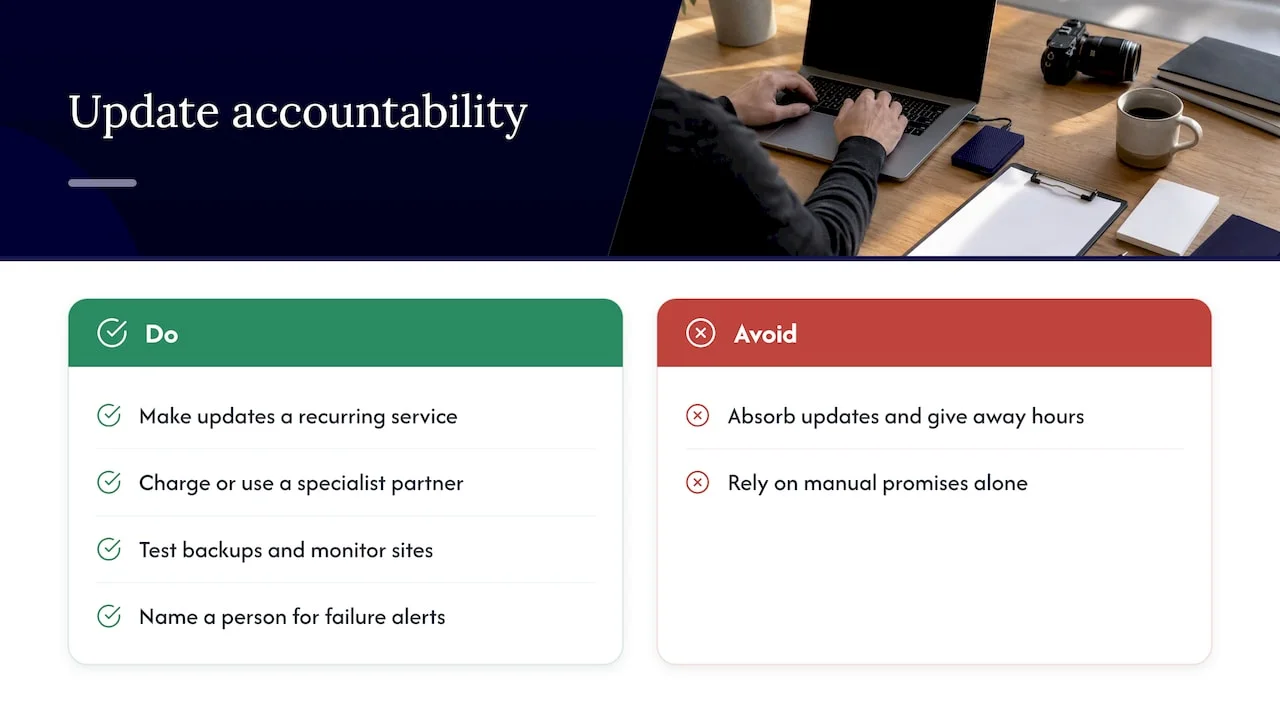
Our advice is to stop thinking of updates as maintenance you tolerate and start thinking of them as a recurring service your clients already need. Every client site has to be updated whether or not anyone is paid to do it. The only question is who does it, how reliably, and who earns from it. Agencies that charge for it, or hand it to a specialist partner, protect their time and keep the client relationship. Agencies that absorb it give away hours every month, and take the blame when it goes wrong.
We also think the debate over automatic versus manual updates is less important than the debate over accountability. A site with automatic minor updates, tested backups, monitoring and a named person who is alerted when something fails is in better shape than a site where a developer promises to “do updates manually” and never gets round to it.
— Marcel
Where the free calculator fits in
If you have never worked out what your WordPress client base is worth as a managed service, start with numbers rather than guesses. Our WordPress Profit Calculator for agencies takes under 90 seconds and shows how much uncaptured revenue sits in the sites you already look after. Many agencies are surprised by the figure, especially once absorbed update and fix hours are counted.
How WPCTO takes core updates off your plate
We handle WordPress delivery for agencies and stay invisible to your clients, so you keep the relationship and any recurring revenue. For core updates, that means our Service Level Agreements, published at three levels:
| Plan | Price |
|---|---|
| Bronze SLA | £450 per year |
| Silver SLA | £750 per year |
| Gold SLA | £1,850 per year |
The SLA page sets out what each level includes, so you can match a plan to a client’s risk. Around the plans, we also offer security updates and enhancements, hosting, re-hosting and migration, quick fixes, and fractional CTO and consultancy support for agencies that want senior technical direction without a full-time hire. If you only need occasional help, you can buy time as you need it.
Practical checklist for each client site
Use this as a standing policy rather than a one-off.
- Record the current WordPress version, PHP version, theme and plugin list for each site.
- Decide and document the automatic update setting for minor and major releases.
- Confirm backups exist, are stored off the server, and have been test-restored.
- Keep a staging copy for any site with WooCommerce, a page builder or custom code.
- Make sure no custom code lives in core files. Use a child theme or a plugin instead. Our guide to plugin management best practices helps here.
- Name who is alerted when an update fails, and who fixes it.
- Tell the client what you do and when, so the work is visible and chargeable.
FAQ
What is the difference between a major and a minor WordPress update?
A major update brings new features and follows a pattern such as 4.0 or 4.1. A minor update carries maintenance, security fixes and translation updates and follows a pattern such as 4.1.1. Minor updates are applied automatically by default; major updates need more care and testing.
Do WordPress core updates delete my content or customisations?
A core update replaces the files and folders of the main WordPress installation, so manual changes to core files are lost. Your posts, pages, media, theme and plugins are held elsewhere and are not replaced by it. Keep customisations in a child theme or plugin and take a backup before every update.
Does WordPress update itself?
Minor core updates are applied automatically by default, and administrators can change that with constants or filters. Since WordPress 5.6, new installations also have automatic major updates switched on unless version control is detected. Check each site’s actual setting rather than assuming.
What should I do if a core update fails?
If the site shows a failed update or maintenance message, delete the .maintenance file from the WordPress directory using FTP. If the one-click update does not work, try a manual update. If the site is broken in any other way, restore your backup first and investigate on a staging copy.
Should I update WordPress the moment a release appears?
For security releases, yes: WordPress recommends updating immediately. For major releases on live business or WooCommerce sites, test on staging first, then update at a quiet time with a fresh backup in place.
If core updates are eating hours your agency never bills for, run the numbers with the WordPress Profit Calculator, then talk to us about an SLA that handles them for you.
Sources
- Managing Updates, Learn WordPress
- Updating WordPress, WordPress documentation
- WordPress 6.9.4 release announcement
- WordPress version 7.0.3
- Configuring automatic background updates
- Upgrading WordPress, developer resources
- WordPress releases news