

Uptime is the share of a period during which a website is available and working as expected. Downtime is the rest: the minutes or hours when visitors get an error, a blank page or a checkout that won’t complete. Uptime is usually written as a percentage, and the gap between 99% and 99.9% is far bigger than it looks. If you build WordPress sites for clients, both numbers eventually land on your desk, usually on a Sunday evening.
This guide explains how to read uptime figures, what causes downtime on WordPress, what it costs your clients, and how to stop absorbing the work when it happens.
TL;DR
- Uptime and downtime are two sides of one measurement: uptime % = (total time minus downtime) ÷ total time × 100.
- 99.9% uptime still allows roughly 8 hours 45 minutes of downtime a year. 99% allows more than three and a half days.
- Most outages are short, but they hit most sites and rarely happen in office hours, so monitoring and out-of-hours cover matter more than a headline percentage.
- For agencies, unmanaged downtime is unbilled time and a risk to the client relationship. A defined support agreement turns it into recurring revenue.
Table of Contents
- Uptime and downtime: the plain definitions
- What each uptime percentage actually allows
- How common is downtime, really?
- What causes downtime on a WordPress site
- Planned versus unplanned downtime
- What downtime costs your clients (and you)
- Why a headline percentage is the wrong thing to chase
- How to reduce downtime on client sites
- Our view: uptime is a service, not a statistic
- Turning uptime into a service you can sell
- Talking to clients about uptime without overpromising
- FAQ
- Sources
Uptime and downtime: the plain definitions
Uptime is the time your website is reachable and doing its job. Downtime is the time it isn’t. The two always add up to the full period you are measuring, whether that is a day, a month or a year.
The formula is simple:
Uptime % = (total time − downtime) ÷ total time × 100
If a site is down for one whole day in a 30-day month, uptime for that month is 96.67%. That sounds respectable until you notice it is a full day of lost trade.
Two details trip people up:
- “Up” must mean working, not just responding. A server can return a page while the checkout is broken, the database connection has failed or a plugin conflict is showing a fatal error. A good definition of uptime checks the thing the visitor came to do.
- The measurement window matters. Providers often quote monthly figures, which hide the effect of one bad day in an otherwise clean year. Ask what the period is before you compare two numbers.
What each uptime percentage actually allows
The table below applies the formula to a 365-day year (8,760 hours). The figures are our own arithmetic, rounded.
| Uptime | Downtime per year | Downtime per month (30 days) |
|---|---|---|
| 99% | about 3 days 15 hours | about 7 hours 12 minutes |
| 99.5% | about 1 day 19 hours | about 3 hours 36 minutes |
| 99.9% | about 8 hours 46 minutes | about 43 minutes |
| 99.95% | about 4 hours 23 minutes | about 22 minutes |
| 99.99% | about 53 minutes | about 4 minutes 19 seconds |
Each extra nine cuts the allowance by roughly a factor of ten, and each one costs more to deliver. For a brochure site for a local business, 99.9% is a sensible, realistic target. For a busy WooCommerce store, a few minutes at the wrong moment can matter more than the annual total.
How common is downtime, really?
More common than most clients assume. Oh Dear’s report, covered by IT Brief in June 2026, analysed 1.8 million confirmed outages across 38,544 monitored sites. It found that downtime touched a majority of those sites, yet most individual outages were brief.
That combination is worth sitting with. It means:
- Almost every site you manage will have an outage at some point.
- Most will fix themselves or be fixed quickly, if someone is watching.
- The damage comes from the few that run long, and from the ones nobody noticed until a client rang.
The problem is rarely the five-minute blip. It is the outage that starts at 7pm on a Friday with nobody monitoring, nobody on call, and no agreed process for who does what.
What causes downtime on a WordPress site
Hosting failures get the blame, but on WordPress sites the causes are usually closer to home:
- Plugin and theme updates. An update that conflicts with another plugin or with the PHP version can take a site down instantly. Updating on a live site without a staging check is the classic cause.
- Expired or misconfigured certificates and domains. An expired SSL certificate or lapsed domain renewal makes a perfectly healthy site look broken.
- Resource limits. A traffic spike, a heavy plugin or a bad query exhausts memory or database connections on under-specified hosting.
- Security incidents. Compromised sites can be taken offline by the attacker, or by the host once malware is found. Our guide to preventing website hacking covers the weekly checks that reduce the risk.
- Failed migrations and DNS changes. Moving a site without a tested plan and a low DNS time-to-live is a common way to create avoidable downtime.
- Third-party dependencies. Payment gateways, CDNs and API services can fail while your own site is fine. UK research reported by Ecommerce News found most large UK merchants had suffered payment outages or disruptions in the previous two years.
Notice that most of these are preventable with routine maintenance, which is exactly the work agencies find hardest to prioritise.
Planned versus unplanned downtime
Not all downtime is a failure. Separating the two keeps reporting honest and client conversations calm.
- Planned downtime is scheduled, communicated and short: a major version upgrade, a hosting move, a database change. It happens at a quiet hour, with a backup taken first.
- Unplanned downtime is everything else. It is the kind that costs money and trust.
Most SLAs exclude planned maintenance from uptime calculations, so check the wording. It also helps to design for partial failure. The GOV.UK Service Manual describes building in read-only or minimal-function modes so users can still see critical information when a backend system has problems. On WordPress, that can mean serving cached pages when the database is struggling, rather than showing an error.
What downtime costs your clients (and you)
The direct cost depends on the business. A shop loses orders. A professional services firm loses enquiries and credibility. A charity loses donations at its busiest campaign moment.
There are also hidden costs. A 2024 study reported by Business Manchester found 91% of UK small businesses had experienced internet outages, with an estimated three hours of lost productivity per month per SME. That concerns connectivity rather than websites specifically, but it shows how quickly small interruptions add up for small firms.
For your agency the cost is different and often invisible:
- Absorbed hours. Someone senior drops what they are doing to diagnose a client’s site. Nobody raises an invoice because it “only took an hour”.
- Context switching. The creative team loses an afternoon of momentum.
- Relationship risk. The client doesn’t distinguish between “your site” and “your agency”. When the site fails, you are the one they call.
If you want to see how much of this sits unbilled across your client base, the WPCTO WordPress Profit Calculator gives you an estimate in under 90 seconds. It is free, and it is a useful way to put a figure on the hours you currently give away.
Why a headline percentage is the wrong thing to chase
Clients like a single number, and hosts like to advertise one. But a percentage on its own tells you very little:
- It says nothing about response. A 99.9% host that takes six hours to answer a ticket is worse for your client than a 99.5% setup with a fast, accountable engineer behind it.
- It usually excludes your real causes. A host’s uptime guarantee covers its own infrastructure. It won’t cover a plugin conflict, an expired domain or a hacked site.
- Compensation is small. Service credits rarely approach the cost of a lost sales day.
What clients actually need is a short list of commitments: how fast problems are detected, how fast someone responds, and who does the work. That is a support agreement, not a hosting claim. Our own WordPress Backups guidance on RPO and RTO explains how recovery targets turn a vague promise into something measurable.
How to reduce downtime on client sites
A practical routine, whether you do it in-house or hand it over:
- Monitor from outside. Use external uptime checks that test the homepage and one business-critical path, such as a contact form or checkout. The GOV.UK guidance on monitoring the status of your service distinguishes internal monitoring inside your infrastructure from external checks, and you need both ideas in mind.
- Stage before you update. Test plugin, theme and core updates on a copy, then deploy.
- Back up on a schedule that matches the site. A brochure site and a busy shop need different frequencies. See how often to back up WordPress.
- Track renewals. Put domains, certificates and hosting renewals in one place with reminders well ahead.
- Right-size hosting. Review resource use and caching before a campaign, not after the site falls over.
- Write down the incident process. Who is alerted, who decides, who talks to the client, and what gets logged.
- Review after every incident. Find the cause, fix it, and record it so the same thing doesn’t return.
Many of these tasks are billable, and most clients will pay for them once they are named and priced. We list more in 12 site management checks WordPress agencies can bill for.
Visibility also matters beyond uptime itself. If a site is repeatedly unreachable, it can lose the findability that took months to build, which is one reason website visibility and reliability belong in the same conversation.
Our view: uptime is a service, not a statistic
We work behind design, brand and digital agencies, and the pattern is consistent. The outage itself is rarely the hard part. The hard part is that nobody owns it.
The agency built the site, so the client calls the agency. The agency’s developers are mid-project, or the agency has no developer at all. A director ends up on a call at the weekend, nobody invoices for it, and the next month it happens again.
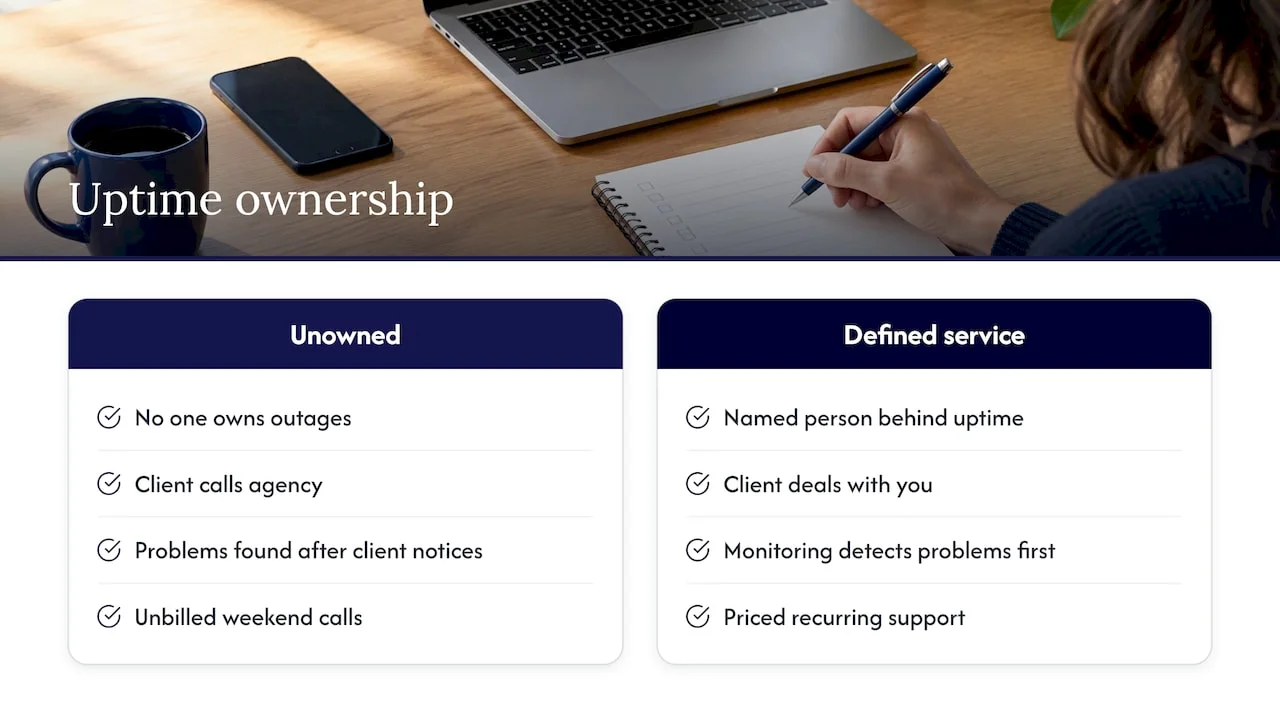
Our position is that uptime should be a defined, priced service with a named person behind it. That means monitoring that detects problems before the client does, updates tested before they go live, and a documented response when something fails. It should also be invisible to the client: they deal with you, and we do the work behind you.
There is a reasonable commercial argument too. If you already carry the risk of client sites being down, you may as well be paid for managing it. Recurring support revenue is steadier than project work, and it keeps the client relationship warm between builds.
— Marcel
Turning uptime into a service you can sell
If you want the work handled and the revenue kept, we offer service level agreements for WordPress sites, published at three levels:
| Plan | Price |
|---|---|
| Bronze SLA | £450 per year |
| Silver SLA | £750 per year |
| Gold SLA | £1,850 per year |
Details of each tier are on our WordPress service level agreements page, and the full SLA terms are available as a PDF, so you can read exactly what is and isn’t covered before you commit.
We also handle the pieces that most often cause downtime: security updates and enhancements, and hosting, re-hosting and migration. If you only need help occasionally, you can buy time as and when a client needs it.
A quick way to size the opportunity
Before you decide what to offer, find out what you are already giving away. Our WordPress Profit Calculator for agencies shows how much uncaptured revenue sits in your current WordPress client base. It takes under 90 seconds, costs nothing, and gives you a figure to take into your next partner or pricing conversation.
Talking to clients about uptime without overpromising
Agencies get into trouble when they promise a percentage they don’t control. A better approach:
- Promise process, not perfection. “We monitor the site, respond within an agreed time and report monthly” is honest and deliverable.
- Show the history. A simple monthly note with incidents, causes and fixes builds more trust than silence.
- Separate hosting from care. Explain that the host looks after the server, while the care plan looks after the WordPress layer on top.
- Agree what’s out of scope. Third-party outages, client-made changes and planned maintenance should be named in writing.
- Set expectations on hours. If cover is business hours only, say so. Outages start at all times of day, so clients with a trading site may want wider cover.
When the conversation is framed this way, a support plan stops being a cost the client resents and becomes insurance they understand.
FAQ
What is the difference between uptime and availability?
Uptime is the time a system is running. Availability is whether users can actually use it for its purpose. A WordPress site can be “up” while its checkout is failing, so availability is the stricter and more useful test for client sites.
What is a good uptime percentage for a WordPress site?
For most business sites, 99.9% is a realistic target, equal to about 8 hours 46 minutes of downtime a year. Trading sites and stores may want more, but higher figures need redundant infrastructure and cost more. What the percentage covers matters as much as the number.
Does planned maintenance count as downtime?
It depends on the agreement. Many SLAs exclude scheduled maintenance from uptime calculations, provided notice is given. Check the wording, and schedule any work at quiet hours with a fresh backup.
How do I know my client’s site is down before they do?
Use external uptime monitoring that checks the site at regular intervals and alerts a named person. Test a key action as well as the homepage. Alerts are only useful if someone is assigned to respond.
Who is responsible when a client site goes down?
That should be agreed in writing. The host covers the server, while WordPress, plugins and themes usually fall to whoever maintains the site. Without a support agreement, the agency tends to end up doing it unpaid.
Sources
- Oh Dear report says most website outages are brief (IT Brief)
- Uptime and availability: keeping your service online (GOV.UK Service Manual)
- Monitoring the status of your service (GOV.UK Service Manual)
- 9 in 10 SMEs report poor internet connectivity and frequent outages (Business Manchester)
- UK payment outages cost merchants millions and stall expansion (Ecommerce News)