

Patch promptly, require multi-factor authentication for every admin account, run HTTPS on every page, keep an offline backup, and add basic monitoring. These actions, drawn from guidance set by the NCSC, OWASP and the ICO, can help address common security gaps on WordPress sites.
TL;DR:
- Critical vulnerabilities require immediate patching, while lower risk fixes should land within 14 days; test updates on staging and keep versioned backups for rollback.
- Use an app based authenticator or FIDO2 passkey instead of SMS, and keep management interfaces off the public internet behind an allow list or VPN.
- Validate untrusted input before database queries or page rendering, use parameterized queries, and add a Content Security Policy to limit scripts that bypass other defenses.
- Test a full backup restore quarterly, protect backup storage with separate multi factor authentication, and document recovery time and acceptable data loss.
- After a compromise, preserve logs and assess whether personal data was exposed; UK GDPR requires qualifying breaches to be reported to the ICO without undue delay.
Table of Contents
- What attackers want and which attacks you need to defend against
- A prioritised checklist you can start this week
- Patch management: cadence, triage and safe deployment
- Protect accounts: multi-factor, hygiene and admin separation
- Harden the server and network: firewalls and no exposed admin panels
- Prevent injection and application-level flaws
- TLS everywhere: why HTTPS belongs on every page
- Backup design that survives ransomware
- Set up simple monitoring: what to log and what to watch
- Detect and fix: scans, disclosure and scheduled testing
- First actions after a breach, and the 72-hour reporting rule
- Security headers: Content Security Policy and the rest
- Database security and safe configuration
- Why agencies should stop doing this themselves
- How WPCTO keeps your agency’s sites secure without the Sunday evening calls
- FAQ
- Sources
What attackers want and which attacks you need to defend against
Most website attacks are not personal. Attackers want data to sell, server resources for cryptomining, a platform to send spam, or leverage for a ransom demand, and they automate the search for easy targets rather than hand-picking victims.
That automation is why certain vectors show up again and again. Injection attacks, including SQL injection and cross-site scripting, let an attacker manipulate a database or inject malicious scripts through poorly validated input, and OWASP lists this among the most serious web application risks. Credential attacks, where bots try leaked or guessed passwords against login forms, remain one of the simplest ways in. Exposed management interfaces, an admin login left open to the public internet, give attackers a direct route to the control panel. Outdated plugins and themes round out the list, since a known vulnerability in widely used software is far easier to exploit than finding a new one.
Each of these vectors maps to a specific defence, which is exactly what the checklist below is built around.
A prioritised checklist you can start this week
Security work only sticks when it is ordered by urgency rather than tackled all at once. Split it into three horizons: this week, every week, and every quarter.
Immediate (this week):
- Patch any critical vulnerability straight away rather than waiting for a scheduled update window.
- Enable HTTPS site-wide, not just on login and checkout pages.
- Enforce multi-factor authentication on every account with administrative access.
- Take a fresh backup and store a copy somewhere disconnected from your live environment.
Ongoing (every week):
- Update plugins and themes as new versions release.
- Run an automated vulnerability scan and review the results.
- Check access logs and admin account lists for anything unfamiliar.
Periodic (every quarter):
- Commission a vulnerability assessment or penetration test for anything handling sensitive data.
- Test a full backup restore rather than assuming the backup file works.
- Review what your maintenance SLA actually covers against what you are doing in practice.
Pro Tip: Put a date on your calendar for the quarterly restore test. A backup nobody has tried to restore is a backup you cannot trust.
If you manage WordPress sites for clients, this is also where recurring revenue sits. Every item on that list is billable maintenance work, and our WordPress Profit Calculator shows how much of it is currently going uncharged across your client base.
Patch management: cadence, triage and safe deployment
Not every update deserves the same urgency. NCSC Cyber Essentials guidance treats 14 days as the maximum window for applying patches to lower-risk vulnerabilities, while critical vulnerabilities call for immediate action.
Build this into a pipeline rather than a manual chore: subscribe to vendor advisories and CVE feeds for your core plugins and themes, test updates on a staging copy first, and keep versioned backups so a bad update can be rolled back quickly. Where the hosting platform supports it, signed updates from a trusted source reduce the risk of a compromised package slipping through.
Protect accounts: multi-factor, hygiene and admin separation
Credential theft is one of the most common routes into a site, which makes account controls worth getting right first. Require multi-factor authentication on every administrative account, and favour an app-based authenticator or a FIDO2 passkey over SMS codes, which are easier to intercept.
Separate day-to-day editing accounts from full administrator accounts, and use a dedicated, locked-down device for privileged access where the stakes justify it, a practice NCSC secure design principles recommend for protecting management environments. Remove or disable any account nobody has used in the last few months, and document provisioning and deprovisioning so leavers lose access the day they leave, not whenever someone remembers.
Harden the server and network: firewalls and no exposed admin panels
Never leave an admin login or management console open to the public internet. Cyber Essentials requirements specifically call for keeping administrative interfaces away from internet exposure, using IP allow-listing, a VPN or a bastion host instead of a direct public login. Enable a correctly configured host firewall, turn off any service you are not using, and change every default credential the hosting platform ships with. Keep anti-malware active and updated, and use application allow-listing where your hosting setup supports it.
Prevent injection and application-level flaws
SQL injection and cross-site scripting remain two of the most exploited application flaws, and OWASP recommends validating and transforming untrusted input before it ever reaches a database query or gets rendered on a page. Use parameterised queries and safe framework APIs rather than concatenating raw input into SQL statements.
Where you run custom code, add static and dynamic application security testing to your build pipeline, and bring in source code review for anything handling sensitive data. GENTY recruitment’s guide to code review processes sets out a practical structure for peer review that catches these issues before deployment rather than after.
TLS everywhere: why HTTPS belongs on every page
HTTPS should run across every page of a site, not only the login form or checkout flow. Automated certificate services such as Let’s Encrypt make renewal effectively maintenance-free, and enabling HTTP Strict Transport Security prevents a browser from ever falling back to an unencrypted connection. As the ICO notes, there is no longer a valid technical argument for leaving any page unencrypted.
Backup design that survives ransomware
A backup that lives on the same server it protects is not a backup, it is a second copy of whatever a ransomware attack has already encrypted. Keep at least one offline or air-gapped copy, and protect access to backup storage with its own multi-factor authentication rather than relying on the same credentials as the live site.
Test restores regularly rather than assuming the file works, and write down your actual recovery time and recovery point objectives so everyone knows how long a restore takes and how much data could be lost. Never store recovery credentials on the same admin machine used for daily site work.
Set up simple monitoring: what to log and what to watch
You cannot react to an incident you never noticed. Centralise logs for authentication events, file changes and application errors in one place, and keep them long enough to support a forensic review if one becomes necessary.
Watch specifically for admin logins from unfamiliar locations or times, unexpected changes to core files, sudden spikes in outbound traffic, and repeated failed login attempts against the same account. Where in-house capacity is limited, a managed monitoring service or participation in schemes such as NCSC’s Active Cyber Defence reduces the overhead of watching logs manually.
Detect and fix: scans, disclosure and scheduled testing
A vulnerability management programme does not need to be elaborate to work. Run automated scans on a schedule, using tools such as OpenVAS, and monitor CVE feeds for anything affecting your software stack. Prioritise fixes by how easily a flaw could be exploited and how much damage it could do, not simply by severity score alone.
For anything public-facing, NCSC guidance on digital services recommends professional penetration testing once internal review has caught the obvious issues, and a published route for responsible disclosure means an outside researcher can tell you about a flaw before it becomes a headline. Be ready to push an out-of-band fix the moment a critical vulnerability surfaces, rather than waiting for the next scheduled release.
First actions after a breach, and the 72-hour reporting rule
Acting promptly after discovering a compromise matters more than almost anything that follows. Stabilise affected systems, preserve logs rather than wiping them, and bring in an NCSC-assured incident response provider where the scale of the incident justifies it. Weigh disconnecting a compromised system against the value of the forensic evidence it still holds, and work from a tested playbook rather than improvising under pressure.
Where personal data is involved, UK GDPR requires reporting a qualifying breach to the ICO without undue delay. Check the ICO’s guidance for the applicable reporting requirements. Build the reporting decision into your incident playbook rather than leaving it until the investigation is finished.
Security headers: Content Security Policy and the rest
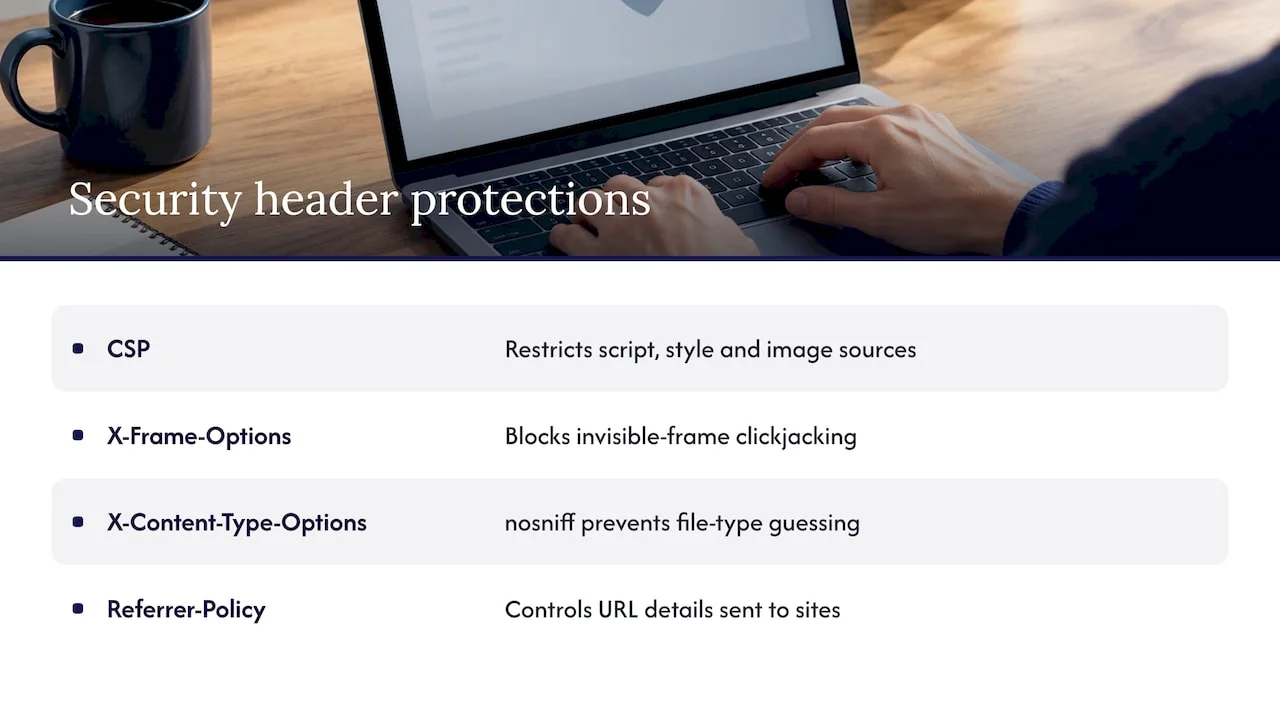
Security headers tell the browser how to treat your site, and a handful of them close off entire categories of attack with a single configuration change. A Content Security Policy restricts which sources a page can load scripts, styles and images from, which blunts cross-site scripting even when a flaw slips through other defences. MDN’s documentation on CSP sets out the directive syntax in detail.
X-Frame-Options, or the frame-ancestors directive in a Content Security Policy, stops another site from loading your pages inside an invisible frame to trick visitors into clicking something they did not intend to, a technique known as clickjacking. X-Content-Type-Options set to “nosniff” stops a browser guessing a file’s type in a way that could let a malicious upload execute as a script. A Referrer-Policy header controls how much of your URL structure leaks to other sites when a visitor clicks an outbound link, which matters more than it sounds for sites handling sensitive query parameters.
None of these headers require custom development. Most hosting platforms and content delivery networks let you set them at the server or CDN layer, so adding them is a configuration task rather than a code change. Review them whenever you add a new third-party script or widget, since a tightly configured CSP will quietly block anything it has not been told to trust, which is the point.
Database security and safe configuration
The database behind a WordPress site is often the single most valuable target on the server, since it holds every password hash, every post, and every piece of customer data the site has ever collected. A handful of configuration choices make it a much harder target.
Change the default WordPress table prefix away from “wp_” during installation, which does little against a determined attacker but removes an entire class of automated, prefix-guessing attack scripts from the equation. Limit database user privileges to exactly what the application needs: a web application account rarely needs permission to drop tables or manage other users, and restricting it reduces what an attacker can do even after a successful injection attack, the exact scenario OWASP’s injection guidance warns against.
Store database credentials outside the web root and outside version control, never in a file a misconfigured server could serve up as plain text. Where the hosting platform allows it, restrict database access to the application server itself rather than leaving it reachable from any IP address, and keep the database software patched on the same cadence as the rest of the stack. These are configuration tasks, not development projects, and they belong on the same maintenance checklist as plugin updates rather than treated as a one-off setup step.
Why agencies should stop doing this themselves
Most agencies know this checklist. The problem is never knowledge, it is time: patching, monitoring and incident response pull skilled people away from the client work they were hired to do. A specialist partner should offer clear SLAs, genuine emergency support, documented handover, and the discipline to run this checklist every week without being asked. Our Profit Calculator shows what that unbilled time is actually worth.
— Marcel
How WPCTO keeps your agency’s sites secure without the Sunday evening calls
We built our service around the exact tasks this article has walked through: patch management, security monitoring, backups, and emergency support when something does go wrong. Our Security Updates and Enhancements service covers the ongoing patching and monitoring work, while our Hosting, Re-hosting and Migration Services handle the server-level hardening that sits underneath it.

We work white-label, which means your agency keeps the client relationship and the recurring revenue, while we handle the technical delivery behind the scenes. Our Bronze, Silver and Gold SLAs start at £450 per year, giving you a structured way to formalise security work that might currently be sitting as unbilled fixes. For anything bigger than routine maintenance:
- Our Fractional CTO and Consultancy services give you senior technical input without a full-time hire.
- Our Buy Time service covers one-off fixes and quick wins outside a retainer.
- Our Security Updates and Enhancements service keeps patching and monitoring running continuously.
FAQ
How do most website data breaches actually happen?
Most breaches start with a known, unpatched vulnerability, a stolen or guessed credential, or an injection flaw in input handling, according to OWASP’s injection guidance. Attackers automate the search for these weaknesses rather than targeting specific sites, so unpatched software and weak logins are found quickly.
Can hackers see what is on your screen?
Not without additional malware already running on your device, since a website compromise alone does not give an attacker screen access. Remote access tools, spyware or a compromised remote desktop session are what actually enable screen viewing, which is a separate risk from the server-side attacks this article covers.
How can you prevent web-based attacks like injection and cross-site scripting?
Validate and safely transform any untrusted input before it reaches a database query or gets rendered on a page, and use parameterised queries rather than building SQL statements from raw input, as OWASP recommends. Security headers such as a Content Security Policy add a further layer of protection against scripts that slip through.
What should you check before choosing a WordPress maintenance partner?
Confirm the partner offers a clear SLA covering patch cadence, monitoring and emergency response, since these are the tasks that most reduce hacking risk. Our SLA tiers set out exactly what each level covers, from Bronze through to Gold.
Do you have to report a hacked website to a regulator?
Where personal data is affected, UK GDPR requires reporting a qualifying breach to the ICO without undue delay. Check the ICO’s guidance for the applicable reporting requirements. Not every security incident involves personal data, so the reporting obligation depends on what was actually exposed.