

The ecommerce security measures that matter most are strong authentication, encrypted connections, a patched and monitored platform, PCI DSS-aligned payment handling, tested backups and a written plan for when something goes wrong. None of them is exotic. The difficulty is that someone has to do them every week, on every store, and for most agencies that someone is a designer or developer who would rather be doing something else.
This guide sets out the measures in the order we would apply them to a WooCommerce store, what UK rules apply, and how to make the work a managed, billable service instead of an unpaid drain on your team.
TL;DR
- Layer your defences: MFA, HTTPS, a firewall, file-integrity checks and security testing all work together, so one failure does not expose the store.
- If a store takes card payments, PCI DSS 4.0.1 applies, and outsourcing payments to a third party does not remove the merchant’s responsibility.
- Under UK GDPR, a personal data breach must be reported to the ICO without undue delay and, where feasible, within 72 hours.
- Most compromises come through routine gaps: weak credentials, outdated plugins and unmonitored third-party scripts. These are maintenance tasks, not mysteries.
- Agencies can turn this work into recurring revenue rather than absorbed hours.
Table of Contents
- What ecommerce security actually covers
- The threats worth planning for
- Measure 1: Lock down authentication
- Measure 2: Encrypt everything in transit and at rest
- Measure 3: Keep the platform patched and the plugin list short
- Measure 4: Handle payments the PCI DSS way
- Measure 5: Add layers: firewall, monitoring and testing
- Measure 6: Backups you have actually planned
- Check how much of this you are giving away
- Measure 7: Train people and write the incident plan
- Perspective
- How to turn security into a service your clients buy
- How we can help
- FAQ
- Sources
What ecommerce security actually covers
It helps to think in terms of what you are protecting. The European Commission’s guidance for businesses frames it as confidentiality, integrity and availability: keeping card and personal data private with multi-factor authentication and HTTPS, checking daily for altered files and running security testing, and keeping the shop online.
The ITU’s e-commerce security recommendation takes the same idea further, adding authentication, authorisation and accountability as dimensions, with mechanisms such as encryption, access control, DDoS protection, two-factor authentication and logging.
In plain terms, a secure store can answer yes to five questions:
- Can only the right people log in?
- Is data encrypted where it is stored and where it travels?
- Would we notice if a file or script changed unexpectedly?
- Could we restore the store quickly?
- Do we know exactly what to do, and who to call, in a breach?
The sections below follow those questions.
The threats worth planning for
You do not need to defend against every attack in a glossary. For small and mid-sized WooCommerce stores, a handful of patterns account for most of the risk:
- Phishing and stolen credentials. One compilation of retail breach data puts phishing and credential theft at 45% of retail breaches, the largest single vector. Treat that figure as indicative, but the direction is consistent across sources.
- Bots. Radware’s 2025 report found that during the 2024 holiday season overall bot traffic exceeded human traffic, with 71% of bot activity classed as bad. Credential stuffing, fake account sign-ups and card testing all come from this traffic.
- E-skimming. Malicious JavaScript injected into a checkout page quietly copies card details as customers type them.
- Vulnerable plugins and themes. On WordPress, third-party code is the most common way in. Our guide to WordPress malware entry points covers the five that agencies can close.
- DDoS. Floods of false requests overload a site so that legitimate customers cannot be served.
Notice that only one of those is about clever hacking. The rest are about hygiene, which is good news: hygiene can be scheduled, scoped and sold.
Measure 1: Lock down authentication
Start here, because it is cheap and it closes the door most attackers try first.
- Enforce multi-factor authentication for every administrator, shop manager and developer account. The Commission’s guidance lists MFA among its core recommendations for protecting card and personal data.
- Give each person their own named account. Shared logins make it impossible to tell who did what.
- Apply least privilege. A content editor does not need access to orders, and a freelancer who finished a project last year should not still have an account.
- Change default credentials on day one, and remove any account you do not recognise.
- Limit login attempts and rate-limit the login and checkout endpoints to blunt credential stuffing.
When a developer leaves a project, offboarding should be a checklist item. It is one of the most common gaps we see on sites that have passed through several hands.
Measure 2: Encrypt everything in transit and at rest
HTTPS across the whole site, not just the checkout, is the baseline. Beyond the certificate, check that:
- Mixed content warnings are cleared, so no page loads insecure resources.
- Stored personal data is protected, and you only keep what you need.
- Admin areas and databases are not reachable from the open internet unnecessarily.
- Backups are stored away from the server they protect, and are encrypted.
If you are weighing the broader case for investing in these controls, this overview of why cybersecurity matters for ecommerce success is a useful companion to the technical steps here.
Measure 3: Keep the platform patched and the plugin list short
On WooCommerce, patching is the single most valuable recurring task. That covers WordPress core, WooCommerce itself, every plugin and theme, and the PHP version underneath. Each of those is a potential entry point, and each ships updates on its own schedule.
A workable routine looks like this:
- Audit the plugin list quarterly and remove anything unused or abandoned. Our plugin management best practices walk through the process.
- Apply security updates promptly, but test on a staging copy first for stores with custom checkout logic.
- Keep PHP supported. We explain the performance and security side in how PHP updates affect WordPress.
- Understand what core releases do. Our plain guide to WordPress core updates helps you explain them to clients.
This is exactly the work that lands on agency teams on a Friday afternoon. It rarely gets charged for, and it is easy to forget until something breaks.
Measure 4: Handle payments the PCI DSS way
Any business that accepts card payments online has PCI DSS obligations. As of 1 April 2025, merchants and service providers must fully adhere to PCI DSS 4.0.1, which applies regardless of where the business is based.
Two points agencies often miss:
Outsourcing does not remove responsibility. The PCI Security Standards Council states that no ecommerce implementation option completely removes a merchant’s PCI DSS responsibilities. Even with a hosted payment page or redirect, the merchant should monitor connections and redirections for unexpected changes.
Payment-page scripts are now in scope. Under the 4.0.1 requirements, requirement 6.4.3 calls for authorising, integrity-checking and documenting scripts on payment pages, and 11.6.1 for tamper detection at least every seven days, or at a frequency set by a targeted risk analysis. A tag manager full of marketing pixels on a checkout page is precisely the sort of thing this addresses.
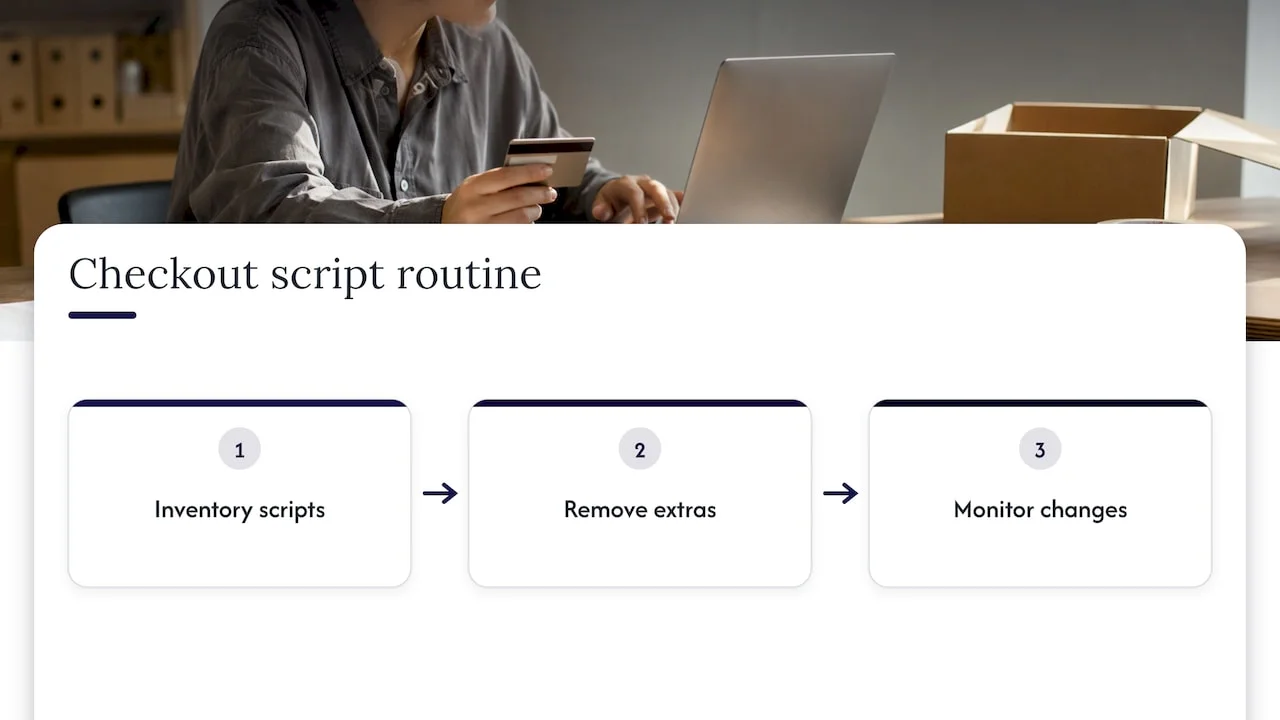
Practically, that means keeping an inventory of every script on the checkout, removing what is not needed, and monitoring for changes. Our notes on WooCommerce checkout best practices and checkout efficiency quick wins cover the front-end side of the same page.
Measure 5: Add layers: firewall, monitoring and testing
No single control is enough. Multilayer security means that if one layer fails, an attacker still has to get through another. For a WooCommerce store, a sensible stack includes:
- A web application firewall and bot protection in front of the site.
- File-integrity monitoring, so altered files are flagged. The Commission’s guidance recommends daily checks for altered files.
- Uptime and performance monitoring, since sudden slowdowns are often the first sign of an attack. See why WooCommerce speed matters.
- Periodic security testing, and a named person who reads and acts on alerts.
- Secure, well-managed hosting. Hosting choices decide how much of the server hardening you inherit and how much you have to build yourself.
For a longer list of what to check each month, see 12 site management checks agencies can bill for and this week’s hacking-prevention tasks.
Measure 6: Backups you have actually planned
Backups are your availability measure. They are what turns a ransomware attempt or a bad update from a crisis into an inconvenience. For a shop, the database matters most, because orders arrive constantly.
Decide two numbers per store: how much data you can afford to lose (recovery point) and how long you can be offline (recovery time). A brochure site and a store taking orders all day need very different answers. Our guides on backup frequency for agencies and matching RPO and RTO to your backups show how to set them, and the handoff checklist covers what to document.
Check how much of this you are giving away
If you manage several WooCommerce stores, add up the hours that go into patching, monitoring, restoring and answering “is my site safe?” emails. Most agencies find the figure is larger than expected, and little of it appears on an invoice. Our WordPress Profit Calculator shows in under 90 seconds how much uncaptured revenue sits in your existing WordPress client base. It is free, and it makes a useful starting point before you decide how to package security work.
Measure 7: Train people and write the incident plan
Technology fails when people are the weak point. The PCI DSS e-commerce guidelines expect that all staff are trained to use systems securely, that technical staff know how to manage firewalls, certificates and encryption, and that a specific team member monitors security alerts.
In a small team, that means:
- Brief everyone on phishing, password hygiene and how to report something suspicious without fear of blame.
- Name one person responsible for security alerts, and a deputy.
- Keep a one-page incident plan: who to call first, how to isolate the site, who speaks to the client, and how to preserve evidence.
What the law expects after a breach
For UK stores, the timing matters. Under UK GDPR Article 33, the controller must notify the regulator without undue delay and, where feasible, within 72 hours of becoming aware of a personal data breach, unless it is unlikely to risk individuals’ rights and freedoms. If card data is involved, the acquiring bank and card schemes also need to be told promptly. The Commission’s guidance adds that you should inform affected customers, determine the cause with documented evidence, and appoint a permanent IT contact.
The store owner is usually the controller, but they will look to you first. Having the plan agreed in advance is what makes a calm response possible.
Perspective
We have taken enough Sunday evening calls from agencies to know how this usually goes. A client’s store is slow or showing a strange pop-up, nobody owns security on the contract, and a senior designer ends up reading server logs.
Our view is that ecommerce security is not a one-off project. It is a rhythm of updates, monitoring, backups and review, and it belongs with a specialist who does it every day. When an agency tries to absorb it, the work is either skipped or done for free, and both outcomes are expensive.
That is why we work invisibly behind agencies. You keep the client relationship and the recurring revenue, and we handle the WordPress delivery, from security updates and monitoring to emergency support when something does go wrong. The best security measure for a busy agency is a reliable partner who treats the store as their own.
Marcel
How to turn security into a service your clients buy
Clients rarely ask for “file-integrity monitoring”. They ask for confidence that their shop will be up on Black Friday. The simplest way to package the work is as a clear, scoped care plan with a defined response time.
A structure that works for most agencies:
- Baseline: patching, backups and uptime monitoring on every store.
- Protected: adds security monitoring, performance checks and a monthly report the client can read.
- Priority: adds faster response times and ongoing technical advice.
Then price it on value. A store taking daily orders is worth far more to its owner than the hours involved, and that is your margin. Our write-up on how agencies can bill for site management gives a starting list.
How we can help
WPCTO provides white-label WordPress management for UK design, brand and digital agencies. For security work, our Security Updates and Enhancements service handles the routine hardening and patching, and our hosting, re-hosting and migration service covers moving stores to a better-managed environment.
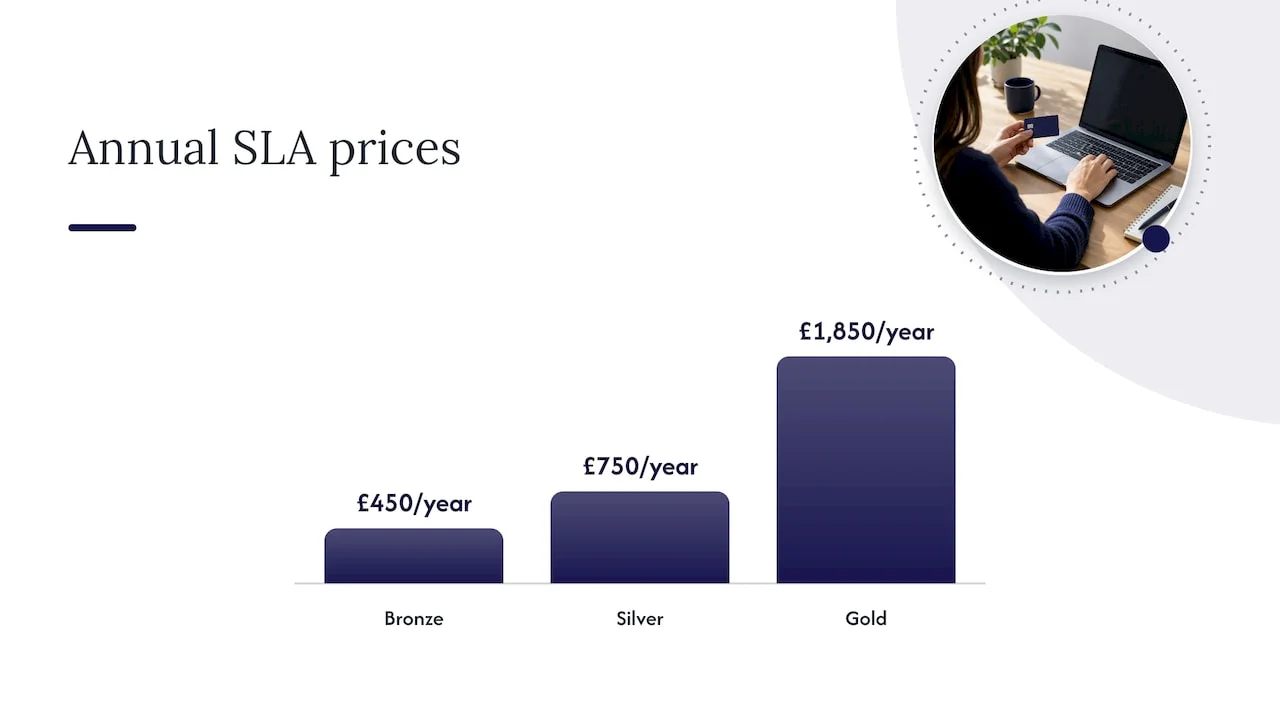
If you want defined response commitments, our service level agreements are published at £450 per year for Bronze, £750 per year for Silver and £1,850 per year for Gold. For one-off help, you can buy time when you need it, and our fractional CTO and advice services are there when you want senior technical input on a client’s store.

Not sure where to start? Run your client list through the WordPress Profit Calculator and see what security and care plans could be worth to your agency.
FAQ
What are the key elements of ecommerce security?
The classic model covers privacy, integrity, authentication and non-repudiation. In practice, that means encrypting data, detecting unauthorised changes, verifying who is logging in, and keeping records of who did what. The European Commission groups these as confidentiality, integrity and availability.
Does PCI DSS apply if we use a hosted payment page?
Yes. The PCI Security Standards Council says no ecommerce implementation option fully removes a merchant’s responsibilities. A hosted page or redirect reduces the scope of what you handle, but you should still monitor the connections and any scripts on the payment page, and complete the right self-assessment for your setup.
How quickly must a data breach be reported in the UK?
Where feasible, within 72 hours of becoming aware of it, if the breach is likely to risk people’s rights and freedoms. The notification goes to the ICO. If card data is involved, tell the acquiring bank too. Have a written plan in place so the clock is not spent working out who to call.
Which security measure should an agency do first?
Enforce multi-factor authentication and remove accounts that are no longer needed, then put a regular patching and backup routine in place. Those steps cost little and close the most common routes in. After that, add monitoring and payment-page script checks.
Can we charge clients for security work?
Yes, and you should. Patching, monitoring and incident readiness are ongoing tasks with clear value to a store owner. Use the WordPress Profit Calculator to see how much revenue your current client base could be generating from care plans, then speak to us about delivering it behind your brand.
Sources
- Securing a website with privacy in mind, Your Europe
- Recommendation ITU-T X.1040
- Retail Data Breach Statistics For 2025 to 2026
- 2025 E-Commerce Bot Threat Report
- Top Ecommerce Security Threats and Common Issues, Fortinet
- Check PCI DSS compliance, McDermott Will & Emery
- Securing eCommerce, PCI Security Standards Council
- PCI DSS 4.0.1 Future-Dated Requirements Now in Force
- PCI DSS E-commerce Guidelines
- UK GDPR Article 33
- Why cybersecurity matters for ecommerce success